

Análisis de la app Android System Widgets para 23 de diciembre

Android System Widgets
- Benjamin Laws
- Google Play Store
- Gratis
- Productividad
System Widgets Collection – Monitor & Customize Your Phone
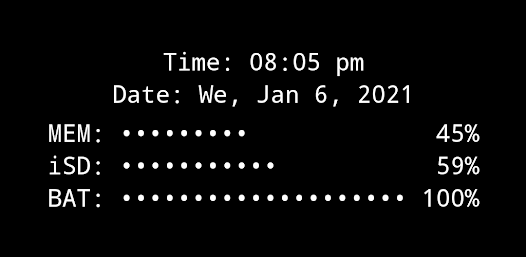
All essential info right on your home screen: Clock, Date, Uptime, RAM, Storage, Battery, Net Speed & Flashlight.
Included Widgets:
🕒 Clock / Uptime
📈 Memory (RAM) Usage – monitor free & used RAM
💾 Storage / SD-Card Usage – available & used space
🔋 Battery – level + NEW: 🌡️ temperature (°C / °F)
🌐 Net Speed – current upload/download speed (NEW: switch Bytes/s ↔ Bits/s)
✨ Multi Widget – combine several of the above in one widget (configurable)
🔦 Flashlight Widget – auto-off after 2 minutes, with 4 icon sets to choose from
(Permission for camera & flashlight is required only to control the LED. The app cannot take pictures!)
Free Version Limitations (compared to "+" version):
• Multi Widget: some elements disabled
• No custom font & background colors
• Battery, SD and RAM update interval fixed at 60s
• Flashlight auto-off always after 2 minutes
How To (Setup & Troubleshooting):
1. Open the app and adjust widget settings to your needs
2. Add the desired widgets to your home screen
👉 If widgets don’t load right after installation: restart your device or re-install the app.
👉 If widgets show "null" or don’t update: open the app once to initialize and make sure the Keep-Alive Service is enabled in General Settings.
Tapping Actions:
Tapping most widgets shows detailed info as a toast/notification.
Example:
Internal SD:
753.22MB / 7.89GB
Global Settings:
🎨 Widget Font Color – + Feature!
🖼️ Widget Background Color – + Feature!
▓ Custom Characters – for percentage bar display
Widget Configuration Options:
- Background opacity
- Font size
- Percentage bar length & accuracy (or compact mode)
- Alignment of widget content (precise positioning on screen)
Why Choose System Widgets Free?
✔️ All-in-one widget collection (RAM, Storage, Battery, Network/Internet Speed, Clock, Flashlight)
✔️ Lightweight, fast & ad-free
✔️ Upgrade anytime to the full "+"-version for more customization
📲 Download System Widgets Free now – monitor your phone and customize your home screen!
Clasificación del uso de Android System Widgets
El rango de uso se basa en el algoritmo de Similarweb que calcula las instalaciones actuales y los usuarios activos durante un periodo de 28 días.
Todas las categorías en
Brasil--
Productividad en
Brasil--
Intereses de los usuarios & Top categorias
Principales categorías y aplicaciones utilizadas por los usuarios de Android System Widgets.
Categorías principales
Afinidad
Principales aplicaciones de la categoría
Más aplicaciones
56%


16%



13%





6%

Principales competidores & aplicaciones alternativas
Aplicaciones con una alta probabilidad de ser utilizadas por los mismos usuarios, desde la misma tienda.

AppDash: App Manager & Backup

Meludia Melody - Ear training

Moto Widget

BOLT Icon Pack
Android System Widgets VS. 23iciembre d, 2025