

You’ve hit your search limit
Start your free trial to keep exploring full traffic and performance insights.
Get StartedAnálisis de la app Control Center OS para 4 de febrero

Control Center OS
- Launcher Pro Max
- Google Play Store
- Gratis
- Personalización
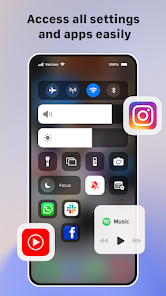
Control Center gives you instant access to Camera, Clock, Flashlight and more settings
To Open Control Center
- Swipe up, swipe right or swipe left from the edge of screen.
To Close Control Center
- Swipe down, tap the top of the screen, or press the Back, Home, Recent button.
If you want to customize Control Center on your device, open Control Center application and you can change everything.
Quickly change settings and open apps:
With Control Center, you can quickly access multiple settings and apps:
- Airplane Mode: Use Airplane Mode to instantly turn off Bluetooth, Wi-Fi, and cellular connections on your android device.
- Wi-Fi: use control panel to turn on Wi-Fi to browse the web, stream music, download movies, and more.
- Bluetooth: Connect to headphones, car kits, wireless keyboards, and other Bluetooth-enabled devices.
- Do Not Disturb: Silence calls, alerts, and notifications that you receive while your device is locked.
- Portrait Orientation Lock: Keep your screen from rotating when you move your device.
- Adjust brightness: Adjust the brightness of your display from any screen.
- Flashlight: The LED flash on your camera doubles as a flashlight, so you can get extra light when you need it.
- Alarms and Timer: Set an alarm, timer, or stopwatch, or check the time in another country or region.
- Calculator: Tap numbers and functions in Calculator, just like a standard calculator.
- Camera: Never miss a moment to take a picture with quickly access camera.
- Control audio: From here, you can quickly play, pause, and control volume of your favorite song, podcast, and instant access more.
With Control Center app, you can customize more style, such as size, color, position, vibration.
And if you have any problems with Control Center application, please contact to me with email: sportdev@outlook.com
Thank you so much for using my app.
Clasificación del uso de Control Center OS
El rango de uso se basa en el algoritmo de Similarweb que calcula las instalaciones actuales y los usuarios activos durante un periodo de 28 días.
Todas las categorías en
Estados Unidos--
Personalización en
Estados Unidos#517
Intereses de los usuarios & Top categorias
Principales categorías y aplicaciones utilizadas por los usuarios de Control Center OS.
Categorías principales
Afinidad
Principales aplicaciones de la categoría
98%

2%

<1%

Principales competidores & aplicaciones alternativas
Aplicaciones con una alta probabilidad de ser utilizadas por los mismos usuarios, desde la misma tienda.

Launcher OS™ Pro

Magazine Lockscreen XOS

Super S9 Launcher for Galaxy S
Action Launcher: Pixel Edition
 Control Center OS VS.
 febrero 4, 2026