

Análisis de la app Navigation Bar for Android para 2 de diciembre
Navigation Bar for Android
- Wormhole Space
- Google Play Store
- Gratis
- Herramientas
“Navigation Bar for Android” application can replace a failed and broken button for those people who has
trouble using buttons or navigation bar panel is not working properly.
This application can also replace on-screen navigation bar and add more function such as long press the button to do some action.
This app provides several features and colors to make awesome navigation bar.
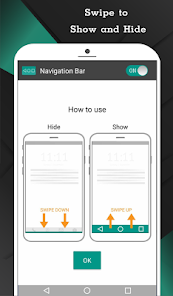
It is easy to swipe up and down navigation bar as assistive touch.
Key Features:
- Auto hide navigation bar with user-selected duration.
- Easy to swipe up/down to show/hide navigation bar.
- Swap button position between back button and recent button
- Single press action : Home, Back, Recent.
- Long press action for back, home, recent buttons. (See below for list of actions)
- Ability to change navigation bar with background and button color.
- Ability to set navigation bar size with height.
- Ability to Set vibrate on touch.
- Options to adjust "Swipe up sensitivity".
- Options to hide navigation bar when keyboard appear.
- Options to lock navigation bar.
- Options to adjust position of navigation bar in landscape mode.
- 15 Themes Available.
- Switch on/off via notification. (Pro)
- Limit area of minimized navigation bar to prevent accidentally click.(Pro)
- Switch on/off via quick settings tile. (Android 7.0+) (Pro)
Support command for long press action
- Lock screen (for Android O and below require Device Administrator activation, If you already activate Device Administrator and you want to uninstall this application, it need to deactivate Device Administrator first. There will be an uninstall menu in 'Help' section to help you easily uninstall this application.)
- Toggle Wi-Fi on/off
- Power menu
- Split screen
- Launch camera
- Open volume control
- Voice command
- Web search
- Toggle notification panel
- Toggle quick setting panel
- Launch dialer
- Launch web browser
- Launch settings
- Launch this application
- Launch any application (Pro)
- Take a screenshot (Pro)
- Switch off navigation bar for 10 seconds (Pro)
*Unlocking pro version available inside an application
Accessibility Service Usage
Navigation Bar for Android requires accessibility service permission in order to enable core functionality.
The application will not read the sensitive data and any content on your screen. In addition, the application will not collect and share the data from accessibility service with any third-party.
By enabling the service, the application will support commands for press and long press actions with the following features:
- Back action
- Home action
- Recent actions
- Lock Screen
- Popup notification
- Popup Quick settings
- Popup Power dialogs
- Toggle split screen
- Take a screenshot
If you disable the accessibility service, the main features cannot work properly.
Permissions Explain
CALL_PHONE
- for long press action of shortcut for Direct dial to someone in contact list
ACCESS_NOTIFICATION_POLICY
- for long press action to toggle DND mode on/off.
ACCESS_WIFI_STATE, CHANGE_WIFI_STATE
- for long press action to toggle Wi-Fi on/off.
BLUETOOTH, BLUETOOTH_ADMIN, BLUETOOTH_CONNECT
- for long press action to toggle Bluetooth on/off.
QUERY_ALL_PACKAGES
- for long press action to open installed application.
READ_EXTERNAL_STORAGE, WRITE_EXTERNAL_STORAGE
- for long press action to save screenshot.
REQUEST_DELETE_PACKAGES
- for menu uninstall this app. (this menu will show if user activate device admin for lock screen action for Android O and below)
SYSTEM_ALERT_WINDOW
- for show navigation bar on the screen.
VIBRATE
- for option to vibrate when touch the navigation button.
WRITE_SETTINGS
- for long press action to toggle auto rotate screen, lock portrait or landscape, toggle auto brightness, increase/decrease brightness.
Clasificación del uso de Navigation Bar for Android
El rango de uso se basa en el algoritmo de Similarweb que calcula las instalaciones actuales y los usuarios activos durante un periodo de 28 días.
Todas las categorías en
Estados Unidos--
Herramientas en
Estados Unidos#5,274
Intereses de los usuarios & Top categorias
Principales categorías y aplicaciones utilizadas por los usuarios de Navigation Bar for Android.
Categorías principales
Afinidad
Principales aplicaciones de la categoría
Más aplicaciones
23%




18%





10%





6%

Principales competidores & aplicaciones alternativas
Aplicaciones con una alta probabilidad de ser utilizadas por los mismos usuarios, desde la misma tienda.

Spatial Touch™

HiOS Launcher - Fast

Magazine Lockscreen XOS
NetSpeed Indicator
Navigation Bar for Android VS. 2iciembre d, 2025