

You’ve hit your search limit
Start your free trial to keep exploring full traffic and performance insights.
Get StartedAnálisis de la app World Weather Clock Widget para 9 de febrero

World Weather Clock Widget
- satok
- Google Play Store
- Gratis
- Meteorología
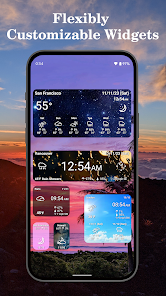
Explore the world with "World Weather Clock Widget"! Stay on top of weather and time in your favorite global locations. Our precise weather data covers over 200 countries, offering forecasts, rain chances, humidity, wind, and alarms - tailor-made for your desired locations.
Maximize your weather insights:
Get up-to-date details via a status bar icon.
Follow three-hour forecasts with temperature graphs.
Study rainfall patterns with our historical radar over satellite maps.
Power up with robust world clock features:
Our timezone-aware alarm clock and weather forecast provides a seamless experience.
Offline, GPS-based timezone updates make time tracking effortless.
Prevent timezone errors by scheduling events on your calendar.
Elevate your World Weather Clock Widget experience with:
Personalized photo backgrounds.
Weather-triggered background changes.
Customizable font styles.
Customizable clock face styles.
A range of widget sizes.
*The app uses location info in the background to update widget time zones and weather. To disable this feature, set location permissions to "Allow only while using the app."
*We welcome all questions and suggestions via e-mail to improve our app.
*If you use task killer or security apps, please add our app to their exclusion lists for stability, otherwise our app can’t update information in a timely manner.
*If our app isn't in your widget list, it may have moved to your SD card. Move it back to internal storage to restore it.
*We apologize for frequent updates, but we're committed to speedy app development for your benefit.
Special thanks to NASA, JAXA.
Privacy Policy: https://sites.google.com/view/world-weather-clock-widget/privacy_policy_en
Version 9.002
- Costomizable clock face styles
- Android Version 12 Support
Ver 8.024:
- Android Version 11 Support
- New Maps UI
- Improve clock update reliability
Ver 7.002:
- Drastic design update
- Android Version 9 support (Android Pie 🥧)
- 5 x 2 resizable Widget
- Crystal 3D icon
※Beyond Android version 8.x, now rule mandates apps' service to show a notification icon. Check Q&A to hide it.
Ver 6.000:
- Premium icon: Mono white
- Opened the weather icon store
- World Alarm Clock
- Photo background
Ver 5.000:
- Show three hour forecast for all countries
- Doubled the density of the rain radar map
- Language supports for 45 languages
- Launched rain radar history
- Added new icon theme "Glass"
- Show weather forecast of major cities in maps page of widgets
- Added new fonts
- Added "wood pattern" in the background list
- Added 4x2 size
- Added high-resolution icons
- Added weather map
- Added the functionality to customize the text color
- Added the list of weather clock widgets which can be launched from the application icon
- All tutorials in French are now ready
- Map view now available
-- Rain radar, satellite view and maps
- Added 4x1 widget
- Added translations (20+ languages)
- Added an option to select the background
Features:
* GPS-based forecasts
* Weather forecasts all over the world (more than 197 countries).
* 3rh forecasts
* Weekly weather forecasts
* Current condition in the status bar.
* Rich options for icons backgrounds and fonts
* Compact display mode for small screen devices
* Detailed settings (e.g. refresh rate and time adjustment)
* Supports 20+ languages
Remarks:
* GPS location and forecast information are updated every hour. If you want to update them manually, please tap the "Update now" button.
* If there are some errors, please reinstall the application and then reboot the device.
* If the time zone displayed is incorrect, please let us know by e-mail.
* Rain radar is cached for 1 hour.
How to reconfigure the widget:
1. Tap a widget to open the weekly forecasts page
2. Click the menu button of the device or tap the gear button on the left of the page
3. Tap the "Settings" button
Produced by SYMROP, Satoshi Kataoka
Clasificación del uso de World Weather Clock Widget
El rango de uso se basa en el algoritmo de Similarweb que calcula las instalaciones actuales y los usuarios activos durante un periodo de 28 días.
Todas las categorías en
Estados Unidos--
Meteorología en
Estados Unidos--
Principales competidores & aplicaciones alternativas
Aplicaciones con una alta probabilidad de ser utilizadas por los mismos usuarios, desde la misma tienda.

Today Weather:Data by NOAA/NWS

Weather Forecast & Widget

Yahoo Weather: Forecast & Maps

Weather App - Weather Forecast
 World Weather Clock Widget VS.
 febrero 9, 2026