

Análisis de la app PDF Utils: Merge, Split & Edit para 2 de diciembre
PDF Utils: Merge, Split & Edit
- shash9989
- Google Play Store
- Gratis
- Productividad
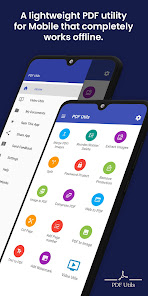
Looking for a reliable PDF editor? Look no further than our app! With our lightweight and completely free PDF utility, you can edit any PDF file, from office documents to receipts, bills, certificates, and ID cards. Designed specifically for mobile, our app works offline and is easy to use.
Our PDF editor comes with a range of features to help you modify and create PDFs, including:
• PDF Reader: Open and view PDFs with our free PDF viewer. Customize your reading experience to suit your preferences.
• PDF Merger: Merge PDFs or images (JPG/PNG/BMP/TIFF) into a single PDF file. Our PDF merger can even merge documents from cloud storage.
• Image to PDF converter: Convert JPEG/JPG/PNG/TIFF and other image formats to PDF.
• PDF Reorder: Reorder PDF pages using an interactive interface.
• PDF Rotate: Rotate PDF pages by 90/180/270 degrees.
• PDF Page Removal: Remove any PDF page with a single swipe.
• PDF Splitter: Split PDFs into smaller files to reduce their size. Our PDF splitter also lets you extract specific pages.
• Image Extractor: Extract images from PDFs and save them as PNG or JPG files.
• PDF Watermark: Add text or image watermarks to your PDFs.
• PDF Security: Encrypt or password-protect your PDFs with both owner and user passwords. You can also remove password protection from PDFs.
• PDF Compressor: Compress your PDFs to reduce their file size.
• Web to PDF converter: Convert web pages to PDFs by sharing the web page with our app and printing to PDF.
• PDF Cutter: Cut PDF pages into multiple pages to align your content.
• Add Page Numbers: Add page numbers to your PDFs.
• Text to PDF converter: Convert custom text, including emojis, to PDF.
• PDF to Image converter: Convert PDF pages to images, or convert images to PDFs.
• Share files: Share your converted PDF files with friends and family via social media, Bluetooth, email, and more.
We also offer tutorial videos on how to use our PDF editor, including how to merge PDFs, reorder, delete, and rotate PDF pages, cut PDFs, extract images, split PDFs, and add watermarks. Check out our tutorial videos on our YouTube channel!
Merge PDF : https://youtu.be/Ws_-xr3VYhs
Reorder, Delete and Rotate PDF : https://youtu.be/bpbS0XBDyyU
Cut PDF: https://youtu.be/kYbcGzNokqI
Extract Image: https://youtu.be/4v0ixO7co7A
Split PDF: https://youtu.be/puJZyPdT6eQ
Watermark: https://youtu.be/uHfH5wjBg_g
Our app also supports reading from Google Drive and Microsoft OneDrive. Simply share your files with our app and start editing your PDFs.
Got feedback or suggestions? Reach out to us at pdfutils.shash9989@gmail.com. And if you love our app, consider purchasing the ad-free version to support our developer.
Clasificación del uso de PDF Utils: Merge, Split & Edit
El rango de uso se basa en el algoritmo de Similarweb que calcula las instalaciones actuales y los usuarios activos durante un periodo de 28 días.
Todas las categorías en
Estados Unidos--
Productividad en
Estados Unidos#1,336
Intereses de los usuarios & Top categorias
Principales categorías y aplicaciones utilizadas por los usuarios de PDF Utils: Merge, Split & Edit.
Categorías principales
Afinidad
Principales aplicaciones de la categoría
Más aplicaciones
52%





12%





7%



5%




Principales competidores & aplicaciones alternativas
Aplicaciones con una alta probabilidad de ser utilizadas por los mismos usuarios, desde la misma tienda.

PDF viewer lite

Foxit PDF Editor

PDFelement-PDF Editor & Reader

PDF Editor & Reader | Xodo
PDF Utils: Merge, Split & Edit VS. 2iciembre d, 2025