

You’ve hit your search limit
Start your free trial to keep exploring full traffic and performance insights.
Get StartedAnalyse de l'application BOSS Small Business Accounting pour le 14 janvier

BOSS Small Business Accounting
- 1C-RARUS TAS, MAS ULIYATI CHEKLANGAN JAMIYATI XORIJIY KORXONASI
- App Store Apple
- Gratuit
- Entreprises
Don’t waste your time on things that don’t bring you revenue. Boss was created to give you an opportunity to do business whenever and wherever you want. Our tutorial will help you harness the power of the app, even if you have never worked with accounting software before. With Boss, your business, big or small, can fit on your smartphone.
You will be able to use your mobile device to:
- Sell or buy goods and services (retail, wholesale, store credit, Debt, Cash).
- Maintain inventory records and generate price lists.
- Create and distribute pricing tables to your wholesale customers.
- Receive and spend money in any currency.
- Conduct mutual settlements with customers, suppliers, and other partners.
- Record inventory counts and revaluation of stock.
- Scan barcodes with your device’s camera.
- Keep accounts in multiple currencies at the same time.
- Estimate your expenses and profitability.
- Print documents directly from the app.
A penny saved is a penny earned, and with Boss, you will save a lot of money. No need to buy a barcode scanner, an extra PC, or business software. With Boss, all you need is your smartphone. Start saving money now!
Features included with Boss:
- Multi-currency option allows you to run transactions with your customers in multiple currencies at the same time.
- Add a barcode and a photo to any product. This feature makes inventory bookkeeping so much easier.
- Make out an invoice directly from the app, and send it by email or share with any other messaging app.
- Generate any kind of report in just a few seconds: sales report, debt report, balance report, cost-of-sales, profit and loss report, and so on.
- Ability to calculate and itemize your expenses.
- Inventory is maintained in real time.
- Choose the best possible ROS (Return on Sales) calculation for your business.
- Two user modes: The Cashier and The Owner. The Owner can choose the number of functions available for the Cashiers.
How it works in practice:
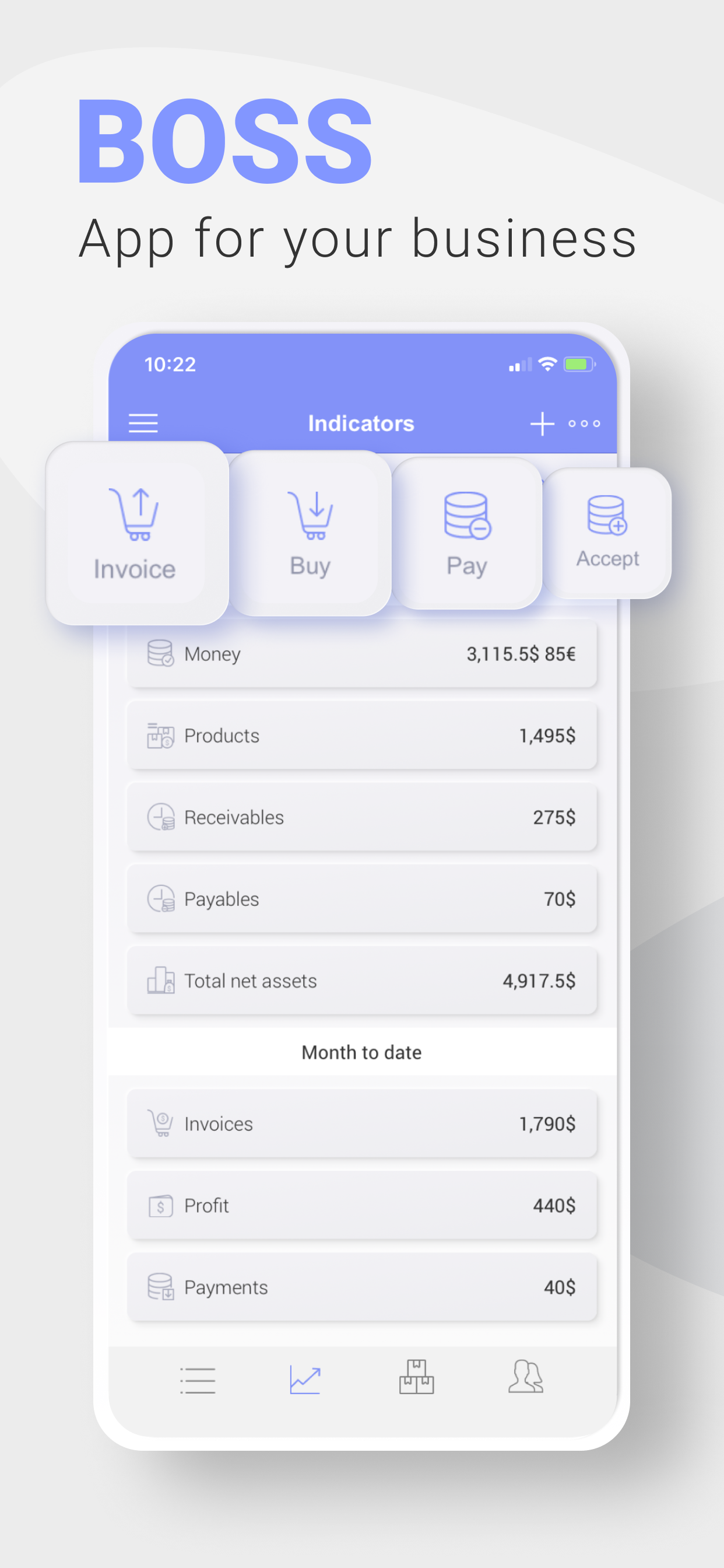
On the main screen, you can see key business indicators such sales, leftover stock, income, debt, accounts receivable, and costs. You can add any additional indicator you need.
Quick action buttons are located at the top of the main menu. They are “Sell,” “Pay,” “Receive Payment,” and “Rates of Exchange.”
The following actions are below:
- Sales: Goods Issues and Drop Off.
- Money: Inflow (cash receipt voucher), Outflow (cash payment voucher), Transfers, and Rates of Exchange.
- Purchases and Stock: Transfers, Capitalization, Deactivation, Inventory, and Input of Leftover Stock.
- Catalogs - Goods and Services (Assortment), Clients (Customers), Suppliers, Employees, Currencies, Cash Desks, and Stocks.
The above are followed by Reports. Reports are presented as adjustable tables and graphics. Different filters are available. Types of reports are:
- Sales Report: This report describes sales from customers, goods, stocks, and documents. It can take into account earning capacity and extra charges.
- Goods: This is a report of a leftover stock. Here you can find prime costs, quantity, and sum at any price.
- Money report: Four types are available: Leftover stock, Money turnover, Dynamics, and Cash Flow.
- Debt Report: May be analyzed. Includes Accounts Receivable, Dynamics, and Money Turnover.
- Incomes and costs are available taking into account articles that may be added.
- Price list: It is important to be able to change the prices just in the price list. Revaluation will be made by upgraded price lists.
- Financial Result.
Paid subscription options:
- Auto-renewable subscription - $6.99 per month or $66.99 per year.
- Payment will be charged to iTunes Account at confirmation of purchase
- You can Cancel subscription by going to the user's Account Settings after purchase (do it at least 24-hours before the end of period to avoid the next period charge)
Privacy Policy - https://boss-app.online/en/privacy-policy/
Terms of Service - https://boss-app.online/en/terms-of-use/
Classement dans le store
Le classement des stores est basé sur plusieurs paramètres définis par Google et Apple.
Toutes les catégories dans
États-Unis--
Entreprises dans
États-Unis--
Principaux concurrents & apps alternatives
Applications ayant une forte probabilité d'être utilisées par les mêmes utilisateurs, à partir du même store.

My Business Control
Inventory Control with Scanner

Daily Sales Record - POS, CRM

Controle de Vendas: Minha Loja
 BOSS Small Business Accounting VS.
 janvier 14, 2026