

You’ve hit your search limit
Start your free trial to keep exploring full traffic and performance insights.
Get StartedAnalyse de l'application Pen and Paper pour le 15 janvier

Pen and Paper
- Jens Egeblad
- App Store Apple
- Gratuit
- Productivité
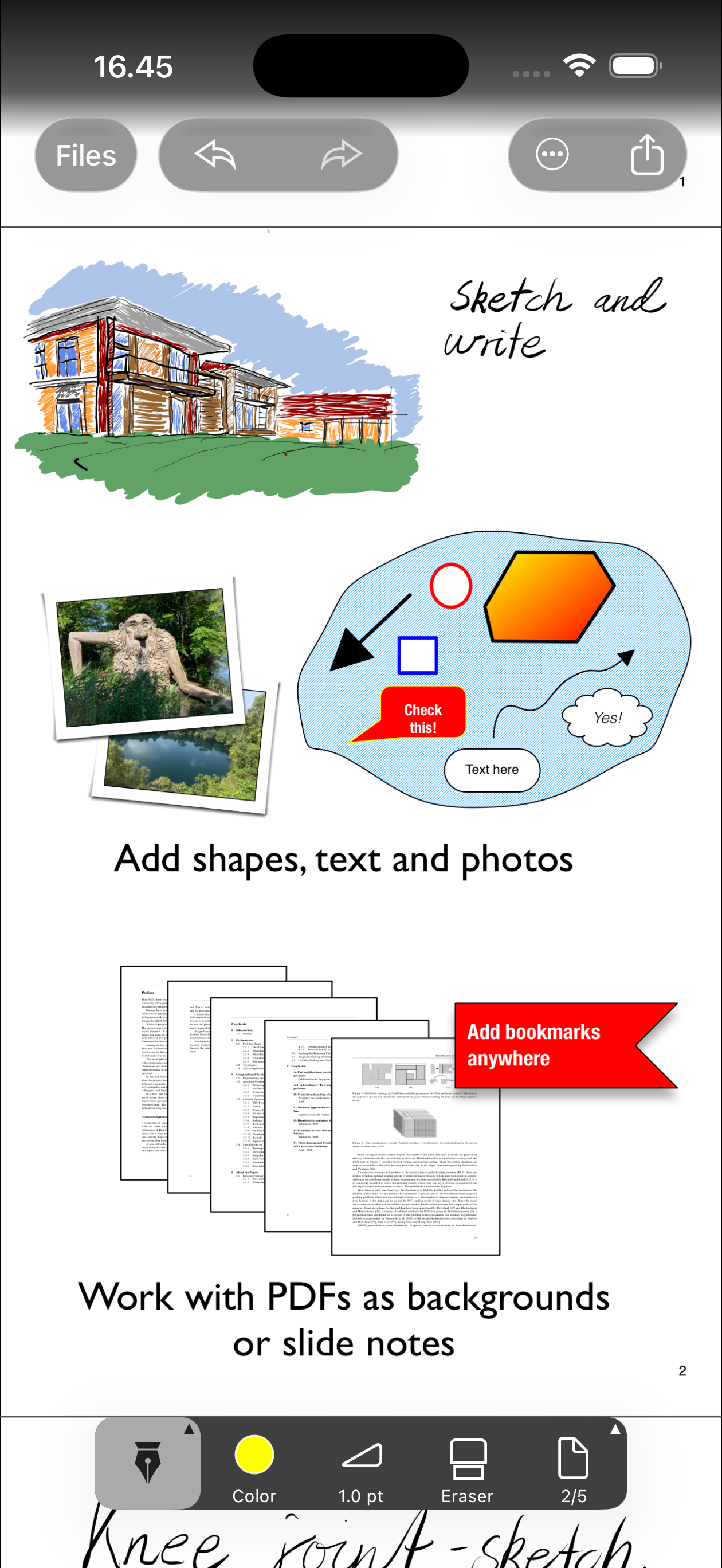
Pen and Paper is perfect for hand-written notes on your iPad or iPhone. You can even import and write on PDFs.
INK
Draw ink with your finger. Resize, recolor, and move your doodles.
TEXT
Add text and text boxes. Change alignment, fonts, color, and install additional fonts. Perfect for adding comments to PDF.
SHAPES
Add geometric primitives, arrows, curves, and polygons Use the built in diagram elements and arrows to create diagrams. Create clip art of portions that you wish to reuse. shapes can be colored using gradients and fill with patterns. Use "rough" outline to make it look more like a drawing.
ZOOM AND SPLIT VIEW
Zoom more than 10 times to edit and draw even tiny details. Use split view (iPad only) to see full page view or look at another page
PHOTOS
Include photos. You can crop and rotate photos.
BOOKMARKS
Add bookmarks to navigate in your documents
PDF SUPPORT AND SLIDE NOTES
Import and annotate PDFs from other apps or Files. Use any of the built-in "Slide Note" templates to annotate presentations. When you are done export as PDF again. Use the "clone" tool to copy a portion a PDF and marker to mark text in the PDF for easy search.
SHARING
To share your notes with the world, simply email them as PDF. You can also extract individual pages as JPEG images.
LAYERS
Use the layer list to organize order of shapes and ink on the page
PAGE STYLES
Pen and paper comes with a variety of page styles, but you can also create your own. Import a PDF of your favourite page style and store it as a "page style" in the app.
ICLOUD SUPPORT
Documents, clipart and page styles, can be stored in iCloud.
FONTS
Are the built-in fonts not interesting enough? Install extra Truetype fonts from sites like FontSquirrel and Blambot within the app.
Features:
• Layers
• Pen tool with color and thickness
• Marker tool for marking text in PDFs
• Smooth pan and zoom
• Split-view to see two parts of your documents at the same time
• Bookmarks and search
• Insert text, arrows, photos, rectangles, circles and polygons easily
• Fill shapes with gradients and patterns
• Area selection, for moving and resizing large areas of your note
• Built-in icon library
• PDF import and export (email or other accounts)
• Install additional fonts (Truetype)
• Various page styles and add your own.
• Fullscreen mode
• iCloud support
SUBSCRIPTION
Subscription removes watermark (on export) and enables lasso tool. All other features are part of free version.
TERMS OF USE (EULA)
Uses Apple's standard terms of use:
https://www.apple.com/legal/internet-services/itunes/dev/stdeula/
Classement dans le store
Le classement des stores est basé sur plusieurs paramètres définis par Google et Apple.
Toutes les catégories dans
États-Unis--
Productivité dans
États-Unis--
Principaux concurrents & apps alternatives
Applications ayant une forte probabilité d'être utilisées par les mêmes utilisateurs, à partir du même store.
Calculator Advanced

Inventory Tracker Itemlist

Penned: Private Notes

Translator+ Plus
 Pen and Paper VS.
 janvier 15, 2026