

You’ve hit your search limit
Start your free trial to keep exploring full traffic and performance insights.
Get StartedAnalyse de l'application TSD Rally Split pour le 10 janvier

TSD Rally Split
- Michael YOUNG
- App Store Apple
- Payant
- Sports
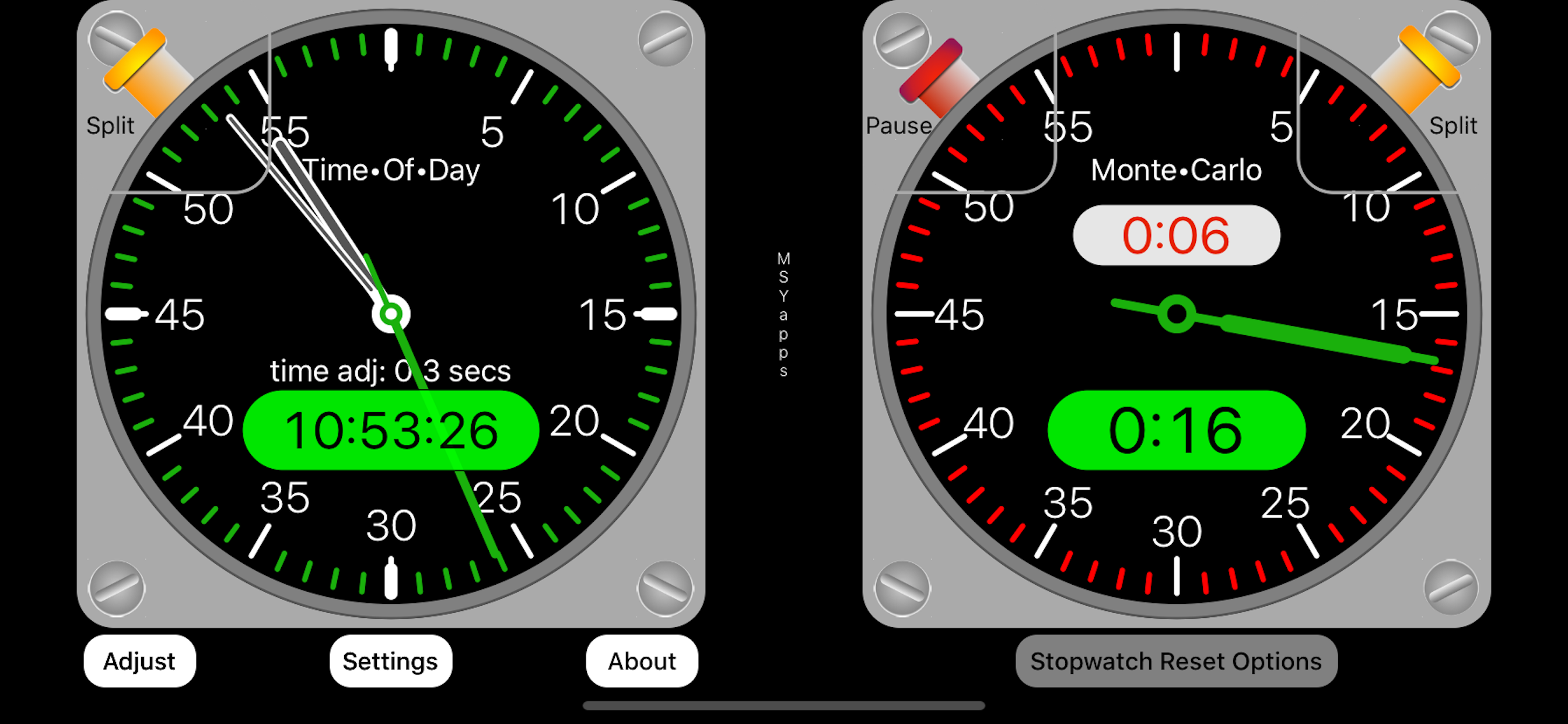
The TSD Rally Split consists of two clocks with different purposes. Master•Time on the left is the rally time-of-day clock. This clock can be adjusted to synchronize with the Official Rally Time clock. Also, the Master•Time clock can be split/stopped by touching the button on the left side. Retouching the button will cause the split time display to disappear.
Monte•Carlo on the right is a stopwatch with two buttons: one starts and resumes the stopwatch and the other records each lap.
When the stopwatch has been stopped, there are three options for resetting it to zero for another start available when you click the Stopwatch Reset Options button below the stopwatch. One option (To Zero Now) is to reset to zero and await pressing the Start button. A second option (Next Minute) is to have the stopwatch reset when the time-of-day clock reaches the next full minute. A third option (Preset Time) allows you to select any time in either minutes:seconds or minutes:cents using the four sets of green or red buttons to increment to the time desired.
In order for any of these three options to take affect, you must touch the Apply button on the Stopwatch Reset Options popup.
Touching the "Adjust" button opens a popup that allows you to synchronize the Master•Time to the Official Rally Time by making adjustments in increments of +/– 0.1 seconds to account for total errors of as much as + or – 10 seconds.
Touch the Lock button to make clock adjustments. Adjust time ahead or behind as needed and, when finished, touch the Unlock button to prevent unintended adjustments. Touch the double Arrows singly or continuously to make adjustments in +/– 0.1 second increments.
When unlocked, a chime will sound at 0 seconds and 30 seconds. This audible cue is helpful when synching with an Official Clock.
When the Official Rally Clock’s second hand reaches zero, the start of a new minute, estimate the error by which your clock is behind or ahead of the Official time and add or subtract 0.1 second increments.
On the clockface displays, time can be measured in either seconds or decimal minutes. Additionally, there are two levels of time precision. One displays two digits for seconds or two digits for hundredths of a minute. For more precision, the other measures and displays seconds as two digits plus tenths of a second or three digits for thousandths of a minute.
There are three watch face styles: black, yellow, and white.
Classement dans le store
Le classement des stores est basé sur plusieurs paramètres définis par Google et Apple.
Toutes les catégories dans
États-Unis--
Sports dans
États-Unis--
Principaux concurrents & apps alternatives
Applications ayant une forte probabilité d'être utilisées par les mêmes utilisateurs, à partir du même store.

Le Sueur Country Club

Richta Transponder

Rabbit Connect

Blackboard-Stopwatch
 TSD Rally Split VS.
 janvier 10, 2026