

You’ve hit your search limit
Start your free trial to keep exploring full traffic and performance insights.
Get StartedAnalyse de l'application Filerev for Google Drive™ pour le 13 janvier

Filerev for Google Drive™
- Brett Batie
- Google Play Store
- Gratuit
- Productivité
Clean up and organize your Google Drive™ files with Filerev and reduce storage usage. This software will not only help you find and remove duplicate files in Google Drive, but it will also show your large files, large folders, hidden files, empty folders, and so much more. It displays your files in an organized way so you can quickly see the files cluttering your Google Drive account.
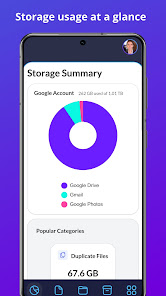
When you first log in to the Filerev app with your Google account the software will scan your files and then present you with a summary of how your storage is used. It will show what is taking the most space between Google Drive, Gmail, Google Photos and other categories. It will also show a summary of how much space your duplicate files are consuming in Google Drive and the number of hidden files, empty files and empty folders. The summary page shows a chart of the largest folders in your Google Drive account and a chart of the file groups (documents, images, audio, video, archive, other) that consume the most space.
Filerev shows your Google Drive files in different categories, such as:
✔️ Duplicate Files
✔️ Hidden Files
✔️ Empty Files
✔️ Files Larger than X MB
✔️ Files Older than X years
✔️ Files not owned by me
✔️ Temporary Files
✔️ Files by Extension
✔️ Custom Files, where you can view files by custom criteria.
✔️ Google Drive Trash
In each category, you will see the total storage space that your files are consuming and the number of files in the category. You can use filters to further drill down to specific files and folders. Then, you can delete the files you no longer want or move them to another location. The bulk delete tool is also available in every category, making it a breeze to delete everything in a specific category quickly.
Below the files, there is another category for your folders where you will see:
✔️ Empty Folders
✔️ Custom Folders where you can filter folders by custom criteria.
You can also use the Storage Usage Analyzer (aka Storage Usage Explorer) to browse your Google Drive folders by size.
You also can browse your files by specific file types. The file types are first broken down into high-level types such as:
✔️ Documents
✔️ Photos & Images**
✔️ Audio
✔️ Video
✔️ Archive (zip)
✔️ Other
When you view any of these categories, you will see your files further broken down into categories for specific file types. For example, the documents category might show your files in categories such as Microsoft Word, PDF, JPG, Excel, Google Sheets, PowerPoint, etc.
💰 PRICING
With the free plan, you can scan up to 1 million files in your Google Drive account and view how your storage is being used. You can see the number of duplicate files, empty folders, large folders and more that are taking up space in your Google Drive account. You can also delete or move up to 500 files or folders each month.
Upgrade to a paid plan that starts for as little as 4 per month (paid annually) to unlock more features. The paid plans have additional features, and you can scan more files, delete more files and browse large folders and empty folders.
Install the app above to start using the free plan or you can view the plan comparison by visiting https://filerev.com/pricing
🏦 SECURE & PRIVATE
We care about the privacy of your data and are committed to protecting it. Our motivation is to help you organize your Google Drive account, and we will not use your information for anything other than that. Everything is transferred over a secure SSL connection, and we encrypt any account information we store.
We also regularly submit Filerev for security reviews and audits to ensure your data stays safe. You can read more about this here: https://filerev.com/help/faq/is-filerev-safe/
** Please note that you can find and organize photos in Google Drive, but Filerev does not currently show files in Google Photos.
Google Drive is a trademark of Google Inc. Use of this trademark is subject to Google Permissions.
Rang d'utilisation de Filerev for Google Drive™
Le classement d'utilisation est basé sur l'algorithme de Similarweb qui calcule les installations actuelles et les utilisateurs actifs sur une période de 28 jours.
Toutes les catégories dans
États-Unis--
Productivité dans
États-Unis--
Intérêts des utilisateurs & catégories principales
Principales catégories et applications utilisées par les utilisateurs de Filerev for Google Drive™
Top des catégories
Affinité
Top des applications pour cette catégorie
35%



29%



11%



10%


Principaux concurrents & apps alternatives
Applications ayant une forte probabilité d'être utilisées par les mêmes utilisateurs, à partir du même store.

AppDash: App Manager & Backup

ASTRO File Manager & Cleaner

CSV File Viewer - Smart CSV

File Manager - File Explorer
 Filerev for Google Drive™ VS.
 janvier 13, 2026