

Analyse de l'application Secure Camera pour le 3 décembre

Secure Camera
- GrapheneOS
- Google Play Store
- Gratuit
- Photographie
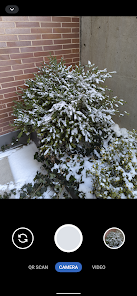
This is a modern camera app focused on privacy and security. It includes modes for capturing images, videos and QR / barcode scanning along with additional modes based on CameraX vendor extensions (Portrait, HDR, Night, Face Retouch and Auto) on devices where they're available.
Modes are displayed as tabs at the bottom of the screen. You can switch between modes using the tab interface or by swiping left/right anywhere on the screen. The arrow button at the top opens the settings panel and you can close it by pressing anywhere outside the settings panel. You can also swipe down to open the settings and swipe up to close it. Outside of the QR scanning mode, there's a row of large buttons above the tab bar for switching between the cameras (left), capturing images and starting/stopping video recording (middle) and opening the gallery (right). The volume keys can also be used as an equivalent to pressing the capture button. While recording a video, the gallery button becomes an image capture button for capturing images.
The app has an in-app gallery and video player for images/videos taken with it. It currently opens an external editor activity for the edit action.
Zooming via pinch to zoom or the zoom slider will automatically make use of the wide angle and telephoto cameras on Pixels and other devices supporting it. It will become more broadly supported over time.
By default, continuous auto focus, auto exposure and auto white balance are used across the whole scene. Tapping to focus will switch to auto focus, auto exposure and auto white balance based on that location. The focus timeout setting determines the timeout before it switches back the default mode. The exposure compensation slider on the left allows manually tuning exposure and will automatically adjust shutter speed, aperture and ISO. Further configuration / tuning will be provided in the future.
The QR scanning mode only scans within the scanning square marked on the screen. The QR code should be aligned with the edges of the square but can have any 90 degree orientation. Non-standard inverted QR codes are fully supported. It's a very quick and high quality QR scanner able to easily scan very high density QR codes from Pixels. Every 2 seconds, it will refresh auto focus, auto exposure and auto white balance on the scanning square. It has full support for zooming in and out. The torch can be toggled with the button at the bottom center. The auto toggle at the bottom left can be used to toggle scanning for all supported barcode types. Alternatively, you can select which barcode types it should scan via the menu at the top. It only scans QR codes by default since that provides quick and reliable scanning. Most other types of barcodes can result in false positives. Each enabled type will slow down the scanning and will make it more prone to false positives especially with difficult to scan barcodes such as a dense QR code.
Camera permission is the only one that's required. Images and videos are stored via the Media Store API so media/storage permissions aren't required. The Microphone permission is needed for video recording by default but not when including audio is disabled. Location permission is only needed if you explicitly enabling location tagging, which is an experimental feature.
By default, EXIF metadata is stripped for captured images and only includes the orientation. Stripping metadata for videos is planned but not supported yet. Orientation metadata isn't stripped since it's fully visible from how the image is displayed so it doesn't count as hidden metadata and is needed for proper display. You can toggle off stripping EXIF metadata in the More Settings menu opened from the settings dialog. Disabling metadata stripping will leave timestamp, phone model, exposure configuration and other metadata. Location tagging is disabled by default and won't be stripped if you enable it.
Rang d'utilisation de Secure Camera
Le classement d'utilisation est basé sur l'algorithme de Similarweb qui calcule les installations actuelles et les utilisateurs actifs sur une période de 28 jours.
Toutes les catégories dans
États-Unis#7,813
Photographie dans
États-Unis#130
Intérêts des utilisateurs & catégories principales
Principales catégories et applications utilisées par les utilisateurs de Secure Camera
Top des catégories
Affinité
Top des applications pour cette catégorie
Plus d'applis
15%





15%





12%




10%



Principaux concurrents & apps alternatives
Applications ayant une forte probabilité d'être utilisées par les mêmes utilisateurs, à partir du même store.

Stop Motion Studio

Kidjo Games: Kids Play & Learn

Vlad and Niki – games & videos

Peppa Pig by PlayShifu
Secure Camera VS. 3écembre d, 2025