

You’ve hit your search limit
Start your free trial to keep exploring full traffic and performance insights.
Get StartedAnalyse de l'application Remote for Kodi / XBMC pour le 13 janvier
Remote for Kodi / XBMC
- Music Pump
- Google Play Store
- Gratuit
- Lecteurs vidéo & Éditeurs
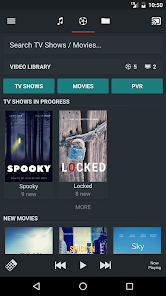
Music Pump is a beautiful and feature rich Kodi Remote which has been optimized for phones and tablets. You can fully control your Kodi Media Center and stream media from / to Kodi.
XBMC / Kodi versions Eden, Frodo, Gotham, Helix, Isengard, Jarvis and Krypton are supported
Main features:
* Browse your Kodi library from your phone
* Browse playlists / file sources
* Browse addons on your android device (due to limitations in Kodi this does not work for all addons)
* Stream Music from Kodi to your device or to bluetooth speakers or to a chromecast dongle
* Stream Movies and TV Shows from Kodi to your device (requires unlocker)
* Internal audio player to play files locally and stream them to Kodi and Chromecast (requires unlocker)
* Themes: light, dark (requires unlocker)
* Synchronize Music from Kodi to your android device (requires unlocker)
* PVR support (requires unlocker)
* Send Youtube videos from android to Kodi
* Send local videos and pictures to Kodi (using android share feature)
Other features:
* Select subtitles and audio tracks
* Download subtitles
* Caching of music database for faster access
* Resume video files
* Show / Hide watched videos
* Mark movies / TV shows as watched / unwatched
* Lock screen support
* Headset remote support (play / pause / next / previous)
* Music rating support
* Virtual keyboard
* Support for Raspberry Pi
* Customizable remote buttons
* And much more...
Some advanced features are only available after purchasing the unlocker.
Setup Instructions:
In Kodi go to System -> Settings -> Services and enable the following settings:
- Webserver -> Allow control of Kodi via HTTP
- Remote control ->Allow programs of this system to control Kodi
- Remote control -> Allow programs on other systems to control Kodi
FAQ:
- Yellow server icon: Usually the option “Allow programs on other systems to control Kodi” has not been enabled in Kodi. For more info see http://goo.gl/0EiYzN
- How to force Refresh Music Library: Long-press on the server name and select refresh music
- Music or Video library is empty: In order to see your music and video files you need to enable the library function within Kodi and scan your music and video files to the library.
- By default the application uses a “local” queue for music playback: This has the big advantage of having a very flexible queuing system. However this has some limitations you may not like: You cannot control music playback from more than one remote at a time (which may be good since other family members can't clear your play queue by mistake), skipping songs using a hardware remote control won't work since only one song is in the Kodi queue. The unlocked version has a feature to use the Kodi queue to bypass these limitations.
- Playlists are not visible: In Kodi playlists must be in a special folder. See http://wiki.XBMC.org/index.php?title=Playlists
- Streaming music / video is not working: The reason may be that no source is created in Kodi (sources.xml). Some Kodi versions (e.g. raspberry pi) allow scraping of media files without adding a source. Kodi will only allow downloading/streaming media which is defined inside a source. In case of doupt ask in the Kodi forum
If you have a problem / request please use the thread in the Kodi forum at http://forum.XBMC.org/showthread.php?tid=131303 or send an email
Remark:
All thumbnails (movie posters, tv shows, albums etc...) used in the screenshots are purely fictional. Images used to create the screenshots have been downloaded from pixabay.com which provides images free of copyrights under Creative Commons CC0.
Rang d'utilisation de Remote for Kodi / XBMC
Le classement d'utilisation est basé sur l'algorithme de Similarweb qui calcule les installations actuelles et les utilisateurs actifs sur une période de 28 jours.
Toutes les catégories dans
Brésil--
Lecteurs vidéo & Éditeurs dans
Brésil--
Intérêts des utilisateurs & catégories principales
Principales catégories et applications utilisées par les utilisateurs de Remote for Kodi / XBMC
Top des catégories
Affinité
Top des applications pour cette catégorie
28%



11%


10%

10%

Principaux concurrents & apps alternatives
Applications ayant une forte probabilité d'être utilisées par les mêmes utilisateurs, à partir du même store.
Yatse: Kodi remote and cast

ItsIPTV!

Yubii Home
 Remote for Kodi / XBMC VS.
 janvier 13, 2026