

You’ve hit your search limit
Start your free trial to keep exploring full traffic and performance insights.
Get StartedAnalyse de l'application Desmos Test Mode pour le 12 février

Desmos Test Mode
- Desmos Inc
- Google Play Store
- Gratuit
- Éducation
**BETA** Not intended for use in a high-stakes environment yet.
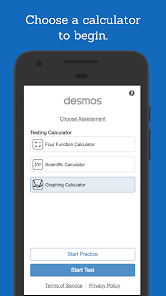
** These are restricted versions of the Desmos Calculators that comply with exam requirements. To prepare for specific state or national assessments, select the corresponding test from the menu in the app. Find out whether Desmos is used for your test at www.desmos.com/testing.
If you’d like to use full, unrestricted versions of the calculators, download the Scientific or Graphing Calculator apps or visit www.desmos.com. **
At Desmos, we imagine a world of universal math literacy where math is accessible and enjoyable for all students. To that end, we’ve built simple yet powerful calculators. They’re intuitive, beautiful, and completely free.
- - -
Graphing Calculator Features:
Graphing: Plot polar, Cartesian, and parametric graphs. There’s no limit to how many expressions you can graph at one time—and you don’t even need to enter expressions in y= form!
Sliders: Adjust values interactively to build intuition, or animate any parameter to visualize its effect on the graph.
Tables: Input and plot data, or create an input-output table for any function.
Statistics: Use regressions to find the lines (or other curves!) that best fit your data.
Zooming: Scale the axes independently or at the same time with the pinch of two fingers, or edit the window size manually to get the perfect view of your graph.
Points of Interest: Touch a curve to show its maximum and minimum values, intercepts, and points of intersection with other curves. Tap any of these points of interest to see their coordinates. Hold and drag along a curve to see the coordinates change under your finger as you trace.
- - -
Scientific Calculator Features:
Variables: Assign values to variables that you can use in other expressions. Since all of your work is held in the expressions list, you can compute a value once and use it in many places simultaneously. Take advantage of the “ans” key, which always stores the value of the previous expression.
Arithmetic: Beyond the four basic operations, the scientific calculator also supports exponentiation, radicals, absolute value, logarithms, rounding, and percentages.
Trigonometry: Evaluate the fundamental trigonometric functions and their inverses using either radians or degrees for angle measure.
Statistics: Compute the mean and standard deviation (sample or population) of a list of data.
Combinatorics: Count combinations and permutations and calculate factorials.
- - -
Four-Function Calculator Features:
Simple and Beautiful: Just the basics done right. Add, subtract, multiply, divide, and take square roots.
Multiple Expressions: Unlike many four-function calculators, all of your previous work remains visible on the screen. The special “ans” key always holds the value of the previous computation (and updates automatically!), so you never have to remember or copy a result.
Rang d'utilisation de Desmos Test Mode
Le classement d'utilisation est basé sur l'algorithme de Similarweb qui calcule les installations actuelles et les utilisateurs actifs sur une période de 28 jours.
Toutes les catégories dans
États-Unis--
Éducation dans
États-Unis#627
Intérêts des utilisateurs & catégories principales
Principales catégories et applications utilisées par les utilisateurs de Desmos Test Mode
Top des catégories
Affinité
Top des applications pour cette catégorie
Plus d'applis
21%






17%


12%


12%





Principaux concurrents & apps alternatives
Applications ayant une forte probabilité d'être utilisées par les mêmes utilisateurs, à partir du même store.

Scientific Calculator Pro

MEL Science: a science lab app

NerdSnap: AI Homework Helper

Mathway: Scan & Solve Problems
Desmos Test Mode VS. février 12, 2026