

Analyse de l'application ECOVACS HOME pour le 2 décembre

ECOVACS HOME
- ECOVACS ROBOTICS
- Google Play Store
- Gratuit
- Style de vie
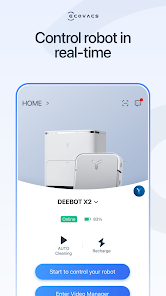
ECOVACS HOME debuts! With awesome connected features, our latest App allows you to control your DEEBOT anytime, anywhere, and takes your cleaning experience to a new level.
By connecting to your DEEBOT, you can:
• Start, pause, or stop cleaning
• Set a regular cleaning schedule
• Set voice report, suction power, and Do-Not-Disturb time*
• Receive notifications from your Wi-Fi enabled robot*
• Share DEEBOT with your friends through multiple accounts*
• Receive software and firmware updates*
• Access instruction manuals, video tutorials and FAQs, and contact customer service
And you can do much more with your advanced mapping DEEBOT (powered by Smart Navi™ Technology):
• Set up Virtual Boundary™ to create no-go zones*
• Use Custom Cleaning to customize any cleaning area you want*
• View real-time stats from the visual map of your home, areas cleaned, and cleaning time*
• Adjust water flow level when DEEBOT is mopping (Robots with mopping function only)*
*Features vary with models. Go to ecovacs.com to see detailed features of your model.
*** App permissions***
The application service requires the following permissions on your phone. For optional permissions, if they are not accessed, the related features will not be available, but it will not affect the basic using of the App.
[Required Permissions]
/
[Optional Permissions]
-Location: Used for device networking, discovering nearby devices, and obtaining WiFi information currently connected to the mobile device.
-Camera: Scan the QR code on the Robot for networking, and scan the sharing code for device sharing.
-Photos and Videos(Storage): Used for changing profile pictures, posting image comments, and online customer service providing feedback via images.
-Microphone: Audio and video call feature for customer service and Robot Video Manager.
-Bluetooth: Used for connecting devices via Bluetooth, enabling network configuration and robot controlling.
-Nearby Devices: Used for scanning and discovering nearby Bluetooth devices during network configuration.
-WLAN: Used for connecting to the Wi-Fi hotspot emitted by the device for network configuration.
-Notifications: Used for sending device and system notification messages to users.
-Local Network: Used to enable local network access on iOS devices, allowing connection to the Wi-Fi hotspot released by the device during network configuration.
-Music and audio: Audio and video call feature for customer service and Robot Video Manager.
Plus, you can control your DEEBOT with simple commands through Amazon Alexa and Google Home**.
**Smart Home commands are available only in some countries/regions.
Requirements:
Wi-Fi with 2.4 GHz or 2.4/5 GHz mixed band support only
Mobile device with Android 4.4 or later
Need help? Visit ecovacs.com for more information or to contact our customer service team.
Rang d'utilisation de ECOVACS HOME
Le classement d'utilisation est basé sur l'algorithme de Similarweb qui calcule les installations actuelles et les utilisateurs actifs sur une période de 28 jours.
Toutes les catégories dans
États-Unis#2,198
Style de vie dans
États-Unis#168
Intérêts des utilisateurs & catégories principales
Principales catégories et applications utilisées par les utilisateurs de ECOVACS HOME
Top des catégories
Affinité
Top des applications pour cette catégorie
Plus d'applis
14%




11%





9%





8%





Principaux concurrents & apps alternatives
Applications ayant une forte probabilité d'être utilisées par les mêmes utilisateurs, à partir du même store.

Roborock
TP-Link Tapo
eufy Clean(EufyHome)

iRobot Home (Classic)
ECOVACS HOME VS. 2écembre d, 2025