

Analyse de l'application Real Pi Benchmark pour le 4 décembre

Real Pi Benchmark
- GeorgieLabs
- Google Play Store
- Gratuit
- Outils
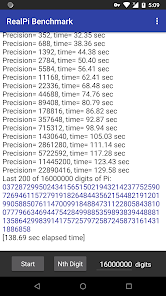
RealPi provides some of the best and most interesting Pi calculation algorithms out there. This app is a benchmark which tests your Android device's CPU and memory performance. It calculates the value of Pi to the number of decimal places you specify. You can view and search for patterns in the resulting digits to find your birthday in Pi or find famous digit sequences like the "Feynman Point" (six 9's in a row at the 762nd digit position). There are no hard limits on the number of digits, if you experience a freeze or crash please see "Warnings" below.
Leave comments with your Pi calculation time on the AGM+FFT formula for 1 million digits. Also the most digits you can calculate, which tests your phone's memory. The author's Nexus 6p takes 5.7 sec for 1 million digits. Note that the AGM+FFT algorithm works in powers of 2, so calculating 10 million digits takes just as much time and memory as 16 million digits (the internal precision is shown in the output). On multi-core processors RealPi tests the performance of a single core. For accurate benchmark timing ensure that no other applications are running and your phone is not hot enough to throttle the CPU.
Search function:
Use this to find patterns in Pi like your birthday. For best results calculate at least one million digits using the AGM + FFT formula, then select the "Search for Patterns" menu option.
Here's a summary of the available algorithms:
-AGM + FFT formula (Arithmetic Geometric Mean): This is one of the fastest available methods to calculate Pi, and is the default formula used by RealPi when you press "Start". It runs as native C++ code and is based on Takuya Ooura's pi_fftc6 program. For many millions of digits it can require a lot of memory, which often becomes the limiting factor in how many digits you can calculate.
-Machin's formula: This formula was discovered by John Machin in 1706. It's not as fast as AGM + FFT, but shows you all the digits of Pi accumulating in real time as the calculation proceeds. Choose this formula in the settings menu and then press "Start". It's written in Java using the BigDecimal class. Calculation times may start to get long around 200,000 digits, but on modern phones you can calculate and view 1 million digits using Machin if you're patient.
-Nth digit of Pi formula by Gourdon: This formula shows that it's possible (surprisingly) to calculate decimal digits of Pi "in the middle" without calculating the preceding digits, and needs very little memory. When you press the "Nth Digit" button RealPi determines 9 digits of Pi ending with the digit position you specify. It runs as native C++ code and is based on Xavier Gourdon's pidec program. Although it's faster than Machin's formula it can't beat the AGM + FFT formula in speed.
-Nth digit of Pi formula by Bellard: Gourdon's algorithm for the Nth digit of Pi can't be used for the first 50 digits, so this formula by Fabrice Bellard is used instead if digits < 50.
Other Options:
If you enable the "Calculate when in sleep" option RealPi will keep calculating while your screen is off, useful when calculating many digits of Pi. While not calculating or after the calculation finishes your device will go into deep sleep as usual.
Warnings:
This app can drain your battery quickly when doing a long calculation, especially if the "Calculate when in sleep" option is on.
Calculation speed depends on your device's CPU speed and memory. At very large numbers of digits RealPi may terminate unexpectedly or not produce an answer. It could also take a very long time to run (years). This is due to the large amount of memory and/or CPU time needed. The upper limit on the number of digits you can calculate depends on your Android device.
Changes to the "Calculate when in sleep" option take effect for the next Pi calculation, not in the middle of a calculation.
Rang d'utilisation de Real Pi Benchmark
Le classement d'utilisation est basé sur l'algorithme de Similarweb qui calcule les installations actuelles et les utilisateurs actifs sur une période de 28 jours.
Toutes les catégories dans
États-Unis--
Outils dans
États-Unis--
Principaux concurrents & apps alternatives
Applications ayant une forte probabilité d'être utilisées par les mêmes utilisateurs, à partir du même store.

3DMark — The Gamer's Benchmark

Quikshort: Shortcut Creator

Orbitrack

CPU Monitor - temperature
 Real Pi Benchmark VS.
 4écembre d, 2025