

You’ve hit your search limit
Start your free trial to keep exploring full traffic and performance insights.
Get StartedAnalyse de l'application Snap Markup: Photo Markup tool pour le 13 janvier

Snap Markup: Photo Markup tool
- Photo & Video Editors - Instant Solution
- Google Play Store
- Gratuit
- Productivité
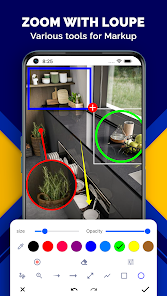
Snap Markup: Image Highlighter - One Tool to Rule them All! Snap Markup has some of the best image enhancement with editing tools, and it's called Snap Markup: Image Highlighter. This clever Pic Markup: Add Text On Photos app enables you to highlight, alter, and comment over images easily. It doesn't matter if you want to include some text, doodle, or even mark the important points - this Mark Photo Note Tool packs everything you need to stand out.
Add pictures, texts, and comments on them with Pic Markup: Add Text On Photos itching to enhance your pictures. This Draw Photo Notes tool lets you change the picture's visual content for professional and scholarly purposes along with creative projects. Get ready to augment your images with powerful Pic Marker: Write On Photos.
📄 Snap Markup: Image Highlighter Features: 📄
🖍️ Draw Photo Notes: Cropping and rotating into rectangles, stars, circles, etc;
🖍️ Embedding a spotlight so the highlighted part gets a lot of attention;
🖍️ Hide sensitive data by pixelating or blurring the images;
🖍️ Have a closer look at some details by applying a loupe effect on select sections;
🖍️ Mark Photo Note Tool: Make pictures more interesting by embedding emojis, stickers, and numbers;
🖍️ Employ Pic Marker: Write On Photos for customizable texts where you can change font color, font, size, shadow, and stroke;
🖍️ Add arrows, lines, circles, rectangles, and freehand drawings on the images through annotation;
🖍️ Get started on drawings to your liking with our blank image custom drawing option;
🖍️ Utilize the Screenshot Editor to instantly make changes and improvements to your captured images;
🖍️ Effortlessly combine several images in either a horizontal or vertical frame.
Annotate And Edit Your Images Like A Professional! With Mark Picture: Photo Drawing you are able to take, edit, and mark images with ease. No matter if you are a student, designer or a project manager, this Mark Picture: Photo Drawing app is meant for all and provides you with professional marked images quickly and easily. Highlight, add comments or creative edits and remove them effortlessly!
With Draw Photo Notes, You Can Now Improve Your Captured Screens:📝
Now experience hassle-free editing with Screenshot Editor! Whether it requires highlighting, drawing, text blurring or marking, this Screenshot Editor tool brings fantastic modifying experience. Use Mark Photo Note Tool for refining your image markup.
Great To Use For Work, Study And Deep Creativity:✍️
For technique images, demos, and detailed note marking, Pic Markup: Add Text on Photos is great to use. Add notes to projects and images, plan, and tell stories through sketches while ensuring professional looking results.
Maps And Websites Marking:🌍
Clearly mark and describe important elements on maps and webpages. Taking full-page screenshots or partial illustrations is no longer a hassle as it allows users to best capture the ideas along with core details.
Start Using Snap Markup: Image Highlighter Today! Use Snap Markup: Image Highlighter to reposition your image editing work. This Mark Picture: Photo Drawing tool enables you to cover a range of activities like typing, markup annotation, figure editing and many more. Pic Marker: Write On Photos can efficiently convert your visuals into well arranged, easy to understand, and informative images within no time!
Rang d'utilisation de Snap Markup: Photo Markup tool
Le classement d'utilisation est basé sur l'algorithme de Similarweb qui calcule les installations actuelles et les utilisateurs actifs sur une période de 28 jours.
Toutes les catégories dans
États-Unis--
Productivité dans
États-Unis--
Intérêts des utilisateurs & catégories principales
Principales catégories et applications utilisées par les utilisateurs de Snap Markup: Photo Markup tool
Top des catégories
Affinité
Top des applications pour cette catégorie
26%




23%





10%


10%





Principaux concurrents & apps alternatives
Applications ayant une forte probabilité d'être utilisées par les mêmes utilisateurs, à partir du même store.

Geulgram - Text on Photo

Image Toolbox - Edit & Convert

Photo Studio: Edit Photos App

Notes : Color Folders & Lists
 Snap Markup: Photo Markup tool VS.
 janvier 13, 2026