

Analyse de l'application Diver Classic 20 Wear OS 4+ pour le 2 décembre

Diver Classic 20 Wear OS 4+
- OQ Watchfaces
- Google Play Store
- Gratuit
- Personnalisation
=======================================================
NOTICE: READ THIS ALWAYS BEFORE AND AFTER DOWNLOADING OUR WATCH FACE TO AVOID ANY SITUATION YOU DON'T LIKE.
=======================================================
1. BEST WAY TO CUSTOMIZE THIS WATCH FACE IS BY LONG PRESSING ON WATCH FACE HOME SCREEN & ACCESS THE CUSTOMIZATION MENU.
2. Before you buy this watch face you must know this watch face has more than 9 customization menu options and Customization via Galaxy Wearable Samsung Galaxy Wearable app tends not to behave nice randomly with watch faces made in Samsung Watch Face Studio. This happens irrespective of the watch face developer if the watch face has many Customization Options. So DO NOT buy this watch face if you only are used to do customization via phone.. This bug is for last 4 years and ONLY Samsung can fix Galaxy Wearable App. Stock Watch faces on Samsung Watches are made in Android Studio & NOT Samsung Watch face Studio, so this issue does not exist on them. If you bought it by mistake just email within 24 hours of purchase & you will be refunded 100 percent .
3. Use this link if you don't know how to install or having problems in Installation. Copy it and read official Install Guide Showing 3 x methods that work 100 percent to install the watch face properly.
link
https://developer.samsung.com/sdp/blog/en-us/2022/11/15/install-watch-faces-for-galaxy-watch5-and-one-ui-watch-45
======================================================
FEATURES AND FUNCTIONS
======================================================
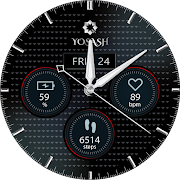
This watch face for WEAR OS 4+ has following features:-
1. Tap on 11 o clock hour index bar to open watch Google Maps app.
2. Tap on 1 o clock hour index bar to open watch Google Play Store App.
3. Tap on 5 o clock hour Index Bar to open watch Battery app.
4. Tap on Date Text to open watch Calendar app.
5. Tap on Day Text to open watch Alarm app.
6. Tap on 12 o clock hour number to open watch settings app.
7. Tap on 3 o clock hour number to open watch phone app.
8. Tap on 5 o clock hour number to open watch messaging app.
9. 4 x Different Inner Index Number Styles including default are available as option in customization menu.
10. 4x Hours Index Markers Styles including default are available as option in customization menu.
11. Minutes Outer Index is turned on by default for main and is off for AoD. You can also turn it off for main from customization menu.
12. All Rotated text can be turned off from customization menu for main display . There are 2 options for it in customization menu added.
13. 1-Click Only Hands and nothing else option has been created and added separately for both Main & AoD Display in customization menu.
14. Dim Modes added as customization options for Bot Main & AoD Display as options in customization menu added.

Rang d'utilisation de Diver Classic 20 Wear OS 4+
Le classement d'utilisation est basé sur l'algorithme de Similarweb qui calcule les installations actuelles et les utilisateurs actifs sur une période de 28 jours.
Toutes les catégories dans
États-Unis--
Personnalisation dans
États-Unis--
Intérêts des utilisateurs & catégories principales
Principales catégories et applications utilisées par les utilisateurs de Diver Classic 20 Wear OS 4+
Top des catégories
Affinité
Top des applications pour cette catégorie
Plus d'applis
29%



25%



11%


10%
Principaux concurrents & apps alternatives
Applications ayant une forte probabilité d'être utilisées par les mêmes utilisateurs, à partir du même store.

EXD134: Everyday Metrics

EXD139: Night Vibes Face

CANE Watch Face

CASION Watch Face
Diver Classic 20 Wear OS 4+ VS. 2écembre d, 2025