

Analyse de l'application Aard 2 pour le 3 décembre

Aard 2
- Igor Tkach
- Google Play Store
- Gratuit
- Livres & Référence
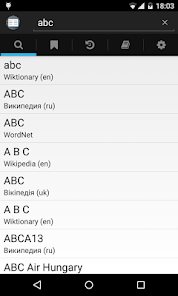
Aard 2 is a dictionary and offline Wikipedia reader.
Visit http://aarddict.org to find dictionary downloads - Wikipedia, Wiktionary, Wikiquote , Wikivoyage in many languages, FreeDict dictionaries, WordNet
Important: if updating from 0.48 or earlier version, previously opened dictionaries need to be removed (trash can icon in Dictionaries tab) and re-opened.
Features
Lookup
• Lookup queries are punctuation, diacritics and case insensitive.
Bookmarks and History
• Visited articles are automatically added to history and appear in History tab. Articles can also be bookmarked (tap Bookmark icon when viewing article). Bookmarked articles appear in Bookmarks tab. Bookmarks and history can be filtered and sorted by time or article title. Both bookmarks and history are limited to a 100 of most recently used items. To remove bookmark or history record, long tap a list item to enter selection mode, tap items to be removed, tap Trash Can icon and confirm. A bookmark can also be removed by tapping Bookmark icon when viewing article.
Dictionary Management
• Dictionaries can be added by scanning device or by manually selecting dictionary files.
Note that application itself does not download dictionary files.
• Opened dictionaries can be ordered by marking and unmarking them as "favorite" (tap dictionary title). Lookup results of equal match strength from multiple dictionaries are presented in the order of dictionary list. Dictionaries can also be deactivated. Inactive dicts do not participate in word lookup or random article lookup, but are still available when opening bookmarks, history or when following links in other articles. Unwanted dictionaries can also be completely removed from the program (but dictionary files are not deleted).
Article Appearance
• Dictionaries may include alternate style sheets. User may also add custom style sheets via Settings tab. Dictionary built-in and user styles appear in the "Style..." menu in article view.
Math
• Mathematical articles are rendered as text using MathJax (http://www.mathjax.org/) - scalable, styleable, beautiful on any screen.
Random Article
• Tapping application logo in main activity finds a random title in an active dictionary and opens corresponding articles. User may optionally limit random lookup to only use favorite dictionaries.
Volume Buttons Navigation
• When viewing articles, volume up/down buttons scroll article content or, if at the bottom (top) of the page, move to the next (previous) article. Long press scrolls all the way to the bottom (top).
• In main view volume buttons cycle through tabs.
Fullscreen Mode
• Articles can be viewed in fullscreen mode. Pull down the top edge to exit fullscreen mode.
Clipboard Auto-Paste
• Text from clipboard can be automatically pasted into lookup field (unless it contains a Web address, email or phone number). This behavior is off by default and can be enabled in settings.
External Link Sharing
• Some dictionaries (such as Mediawiki based ones - Wikipedia, Wiktionary etc.) contain external links. Long tap on the link to share it without opening in a browser first.
Requested Permissions
android.permission.INTERNET
Aard 2 uses local embedded web server to provide article content. This
permission is necessary to run the server.
Also, articles may reference remote content such as images. This
permission is necessary to load it.
android.permission.ACCESS_NETWORK_STATE
User chooses when to allow loading remote content: always,
when on Wi-Fi or never. This permission is necessary to implement
this.
Rang d'utilisation de Aard 2
Le classement d'utilisation est basé sur l'algorithme de Similarweb qui calcule les installations actuelles et les utilisateurs actifs sur une période de 28 jours.
Toutes les catégories dans
États-Unis--
Livres & Référence dans
États-Unis--
Intérêts des utilisateurs & catégories principales
Principales catégories et applications utilisées par les utilisateurs de Aard 2
Top des catégories
Affinité
Top des applications pour cette catégorie
Plus d'applis
22%



16%






11%



8%

Principaux concurrents & apps alternatives
Applications ayant une forte probabilité d'être utilisées par les mêmes utilisateurs, à partir du même store.

Equi Levare

Knack - Tutoring Simplified

West Coast Trail
Aard 2 VS. 3écembre d, 2025