

You’ve hit your search limit
Start your free trial to keep exploring full traffic and performance insights.
Get StartedAnalyse de l'application SIS Password Manager Bio-Auth. pour le 21 janvier

SIS Password Manager Bio-Auth.
- SISYOU.KUM Security JAPAN
- Google Play Store
- Gratuit
- Outils
SIS Password Manager is a highly-rated, secure, and reliable password management app developed in Japan.
We address common user frustrations—like non-existent support and data loss during migration—to offer a solution that is safer, more convenient, and completely reliable.
🔶Why Choose SIS Password Manager?
- Japanese Quality & Reliability: Benefit from the meticulous detail and robust design synonymous with Japanese engineering.
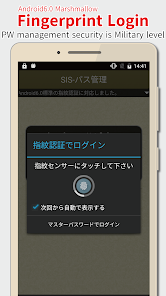
- Top-Tier Security: Your data is protected with AES256-bit encryption and Biometric Authentication (Fingerprint, Face, Iris).
- Easy Data Migration: Cloud Backup (Google Drive, Dropbox, OneDrive) allows you to instantly restore data when you switch devices or if your phone is lost.
- Seamless Login: Use the Auto-Fill feature for quick sign-ins to apps and websites with in-app web browser.
🔶Are You Facing These Problems?
If you've had any of these issues, SIS Password Manager is the solution:
- Worrying about managing passwords in a simple notes app.
- Security concerns from reusing the same passwords.
- Struggling with data loss or transfer during a device change.
- Finding other app translations awkward or difficult to use.
Our interface is designed to be intuitive for all users looking for a reliable, long-term password management solution.
🔶Key Features for Ultimate Security and Convenience
SIS Password Manager is designed to be a simple, intuitive, and feature-rich manager that balances simplicity with deep customization.
🔹Core Security & Input Features
- AES256-bit Encryption.
- Android Biometric Authentication (Official Support).
- Auto-Fill Functionality.
- Secure Password Generator.
- Automatic Log Out (Security timeout).
🔹Management & Customization:
- Create, Edit, and Delete Items.
- Sorting Options: Manual or by name.
- Category Tags for organization.
- Quick Search.
- Quick Access: Register items to the Notification Area.
- Theming/Customization.
- Multiple Fields per Item: Up to 5 sets of ID/Password/URL for one entry.
- Encrypt & Record Photos/Images securely within the app.
🔹Advanced Backup & Data Options
- Cloud Backup: Securely store data on Google Drive, Dropbox, and OneDrive for hassle-free device changes and Windows synchronization.
- Local Backup/Restore to device storage.
- Multiple Backup Lists: Save and manage named backup files.
- Windows App Linkage.
🔶Important Notes & Disclaimers
🔹Data Security & Backup
- Independent Operation: Data is not automatically transferred; use Cloud Backup for migration.
- Data Deletion: Data is stored only on your device. Uninstalling or factory resetting will permanently delete all data. Back up regularly.
- UPDATE WARNING: Please back up your data before updating.
- Master Password: If forgotten, clearing cache deletes entries, but you can restore from a backup.
🔹Biometric Authentication
- We only support Biometric Authentication officially supported by the Android OS (Android 8.0 or later).
🔹Permissions & Purchases
- Network Access: Required for Cloud Backup and ads (removable via in-app purchase).
- Storage Access: Required for local data backup/restore.
- Account Search: Required for Google Drive linkage.
- In-App Purchases: Available for ad-free (one-time) and automatic backup (subscription).
🔶Disclaimer
SISYOU.KUM is not responsible for any loss or damage caused by the use of this application. We urge users to regularly take backups as a countermeasure against device failure and the inherent risk of data loss.
Thank you for considering SIS Password Manager. We are committed to continuous updates and support.
Rang d'utilisation de SIS Password Manager Bio-Auth.
Le classement d'utilisation est basé sur l'algorithme de Similarweb qui calcule les installations actuelles et les utilisateurs actifs sur une période de 28 jours.
Toutes les catégories dans
États-Unis--
Outils dans
États-Unis--
Intérêts des utilisateurs & catégories principales
Principales catégories et applications utilisées par les utilisateurs de SIS Password Manager Bio-Auth.
Top des catégories
Affinité
Top des applications pour cette catégorie
Plus d'applis
31%



24%






22%





12%





Principaux concurrents & apps alternatives
Applications ayant une forte probabilité d'être utilisées par les mêmes utilisateurs, à partir du même store.

Aegis Authenticator - 2FA App

LockMyPix Photo Vault PREMIUM

LifeLock Identity by Norton

F-Secure: Total Security & VPN
SIS Password Manager Bio-Auth. VS. janvier 21, 2026