

Analyse de l'application Advanced Tools Pro pour le 5 décembre

Advanced Tools Pro
- SCDevs
- Google Play Store
- Payant
- Outils
A complete set of tools to manage your device, Advanced Tools Pro is: file manager, task manager, app manager, system manager and much more with the device-related tools (sensors, gps, cpu, display, flashlight).
Even more options available for root users.
Pro version is the premium choice, all the features unlocked and no ads.
**** NOTES ****
Logcat tool requires READ_LOG permission to run properly, non-root users can grant READ_LOG permission by using ADB commands, see related info inside the app.
**** BASIC HINTS ****
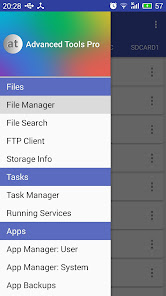
Open the main menu to access all the tools available, swipe from the left edge to the right or tap the dedicated button.
File Manager - for any of the item in the list, single tap to open, long-press to select. Open the top-right menu (three dots) for more options.
**** SOME OF THE THINGS YOU CAN DO ****
FILE MANAGER
* Operate on two different tabs
* File operations between tabs (no need to navigate back!)
* Access/modify RO folders, system, data, etc. (root)
* Copy, cut, paste, delete, rename files or folders
* Add new folders
* Add new text files
* Integrated mini text editor
* Search files or folders
* Get file or folder details
* Set file or folder permissions (root)
* Zip/unzip files or whole folders
* Browse zip file's contents
* Unzip selected contents from a zip file
* Browse APK file's contents
* Send files via bluetooth
* Share supported files
* Storage info with pie charts
* Set starting folders (shortcuts)
* FTP: download/upload files or whole folders
* FTP: browse FTP contents, add new folders
APP MANAGER
* Detailed info about each installed application
* Uninstall apps
* Freeze system apps (root)
* Uninstall system apps (root)
* Backup and restore apps
* Clear app cache/data
* Startup apps (grant/deny auto-start)
* Manage app components! (Pro only)
* View content of manifest file (Pro only)
SYSTEM MANAGER
* Plenty of info about system, memory, graphic, hw, battery
* Change LCD density (root)
* Change the heap size (root)
* Change "max events per second" value (root)
* Change the WiFi scan interval (root)
* more properties from build.prop file
* Change "min free kbytes" value (root)
* Change "vfs cache pressure" value (root)
* Change swappiness value (root)
* Change dirty ratio and dirty background ratio (root)
* more kernel's VM and sysctl parameters
* Configure Android's internal task killer
* Access special settings and info
* View filesystem
* View dmesg (Kernel Debug Messages)
* View live logcat
* Record, filter, stop, resume logcat
* Detect CarrierIQ
* Floating RAM meter (Pro only)
TASK MANAGER
* Kill selected applications
* Filter system processes (security options)
* Info about running services
SENSOR ANALYZER
* Scan and analyze all the sensors installed
* Compass tool
* Compass calibration tool
* Magnetic field detector
GPS STATUS AND FIX
* Get all the info passed by GPS device
* Fast fix tool to get signal fixed in less time
* Scan satellites and get dedicated info
* Get your current location's address
CPU MONITOR
* CPU Time in State monitor
* Real-time CPU meter
* Floating CPU meter (Pro only)
* Set CPU scaling frequencies and governor (root)
DISPLAY
* Detailed info about screen device
* Blue light filter for eyes comfort
* Dim filter for smart brightness control
ATOOLS TERMINAL (Pro only)
* Pseudo terminal emulator
* Execute linux commands
* Quick buttons for mount and set permissions
OTHERS
* Quick launch from notification bar
* Use the camera flashlight as a torch
* Light and dark themes
* Customizable font style and text size
Enjoy Advanced Tools Pro!
Rang d'utilisation de Advanced Tools Pro
Le classement d'utilisation est basé sur l'algorithme de Similarweb qui calcule les installations actuelles et les utilisateurs actifs sur une période de 28 jours.
Toutes les catégories dans
États-Unis--
Outils dans
États-Unis--
Intérêts des utilisateurs & catégories principales
Principales catégories et applications utilisées par les utilisateurs de Advanced Tools Pro
Top des catégories
Affinité
Top des applications pour cette catégorie
39%





19%


16%


11%

Principaux concurrents & apps alternatives
Applications ayant une forte probabilité d'être utilisées par les mêmes utilisateurs, à partir du même store.

Wifi Network Analyzer, Scanner

S3Drive: Cloud storage

NICC MyCampus
 Advanced Tools Pro VS.
 5écembre d, 2025