

Analyse de l'application Access Dots - iOS cam/mic/gps! pour le 24 décembre

Access Dots - iOS cam/mic/gps!
- IJP
- Google Play Store
- Gratuit
- Outils
Did you know that once you grant access to your phone's camera/microphone/GPS location to any third-party App, they can use it silently in the background?
And do you feel envious about the new iOS 14's privacy feature - shows an indicator whenever camera or microphone is accessed? Or you can't wait for Android 12's implementation of the same feature?
Presenting Access Dots for Android, supporting all the way down to Android 8.0!
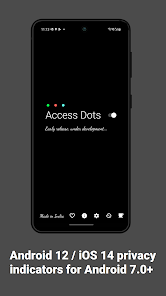
Access Dots, adds the same iOS 14 style indicators (few pixels light up as a dot) to the top right (default) corner of your screen whenever any third-party App uses your phone's camera/microphone/GPS location. Access Dots will be visible even on your lockscreen!
Configuring the App is as simple as enabling the Access Dots Accessibility Service (Toggle switch in the App > (More) Downloaded Services/Installed Services > Access Dots > Enable). By default the App is configured to show iOS 14 style colored access dots - green for camera access, orange for microphone access and blue for GPS location. The App itself does not request for camera or microphone access, however, to be able to monitor GPS access by any App, 'Access Dots' require GPS location permission.
Access Dots is in early BETA, under development, so far it has the following features:
● Display Access Dots whenever phone's camera/microphone/GPS location is engaged by a third-party App.
● Maintain an Access Log, which can be accessed from the App's main settings screen. The Access Log shows when the camera/microphone/GPS location was accessed, which App was in foreground at the time of access initiation and how long did the access last.
● Assign any color to either of the Access Dots.
● On Android 10+, Access Dots by default sticks beside your camera cutout (if your device has.) You can configure the location of Access Dots to the point of specifying X/Y coordinates.
● If your device supports 'Energy Ring - Universal Edition!' App, then you can wrap Access Dots around the punch hole camera as well.
● The size of Access Dots can be adjusted.
While it's free to change the Access Dots' color to whatever you want, consider making a donation to support the development and have access to few extra configurations like changing the 'size' of the dot or its location on the screen. :)
Note: Please make sure the App is whitelisted under any kind of optimization setting your device has, if the App is killed from background by the System, you may have to restart phone to get the Access Dots active again.
Accessibility Service Requirement
Access Dots requires to run as an Accessibility Service to display the indicator/dot on any screen whenever a third-party App uses camera/microphone/GPS. The service does NOT gather any data whatsoever.
This Service/App itself does NOT have permission to use your device’s camera or microphone.
Rang d'utilisation de Access Dots - iOS cam/mic/gps!
Le classement d'utilisation est basé sur l'algorithme de Similarweb qui calcule les installations actuelles et les utilisateurs actifs sur une période de 28 jours.
Toutes les catégories dans
Brésil--
Outils dans
Brésil--
Intérêts des utilisateurs & catégories principales
Principales catégories et applications utilisées par les utilisateurs de Access Dots - iOS cam/mic/gps!
Top des catégories
Affinité
Top des applications pour cette catégorie
23%


16%

16%


15%
Principaux concurrents & apps alternatives
Applications ayant une forte probabilité d'être utilisées par les mêmes utilisateurs, à partir du même store.

ChargeNow

YourSweep

AnyTracker - track anything!

dynamicSpot - Dynamic Island
 Access Dots - iOS cam/mic/gps! VS.
 24écembre d, 2025