

Spectrum Eye RTA のアプリ分析 10月20日

Spectrum Eye RTA
- Oleg Naumenko
- Apple App ストア
- 有料
- 音楽
A Lifetime purchase. No Subscriptions.
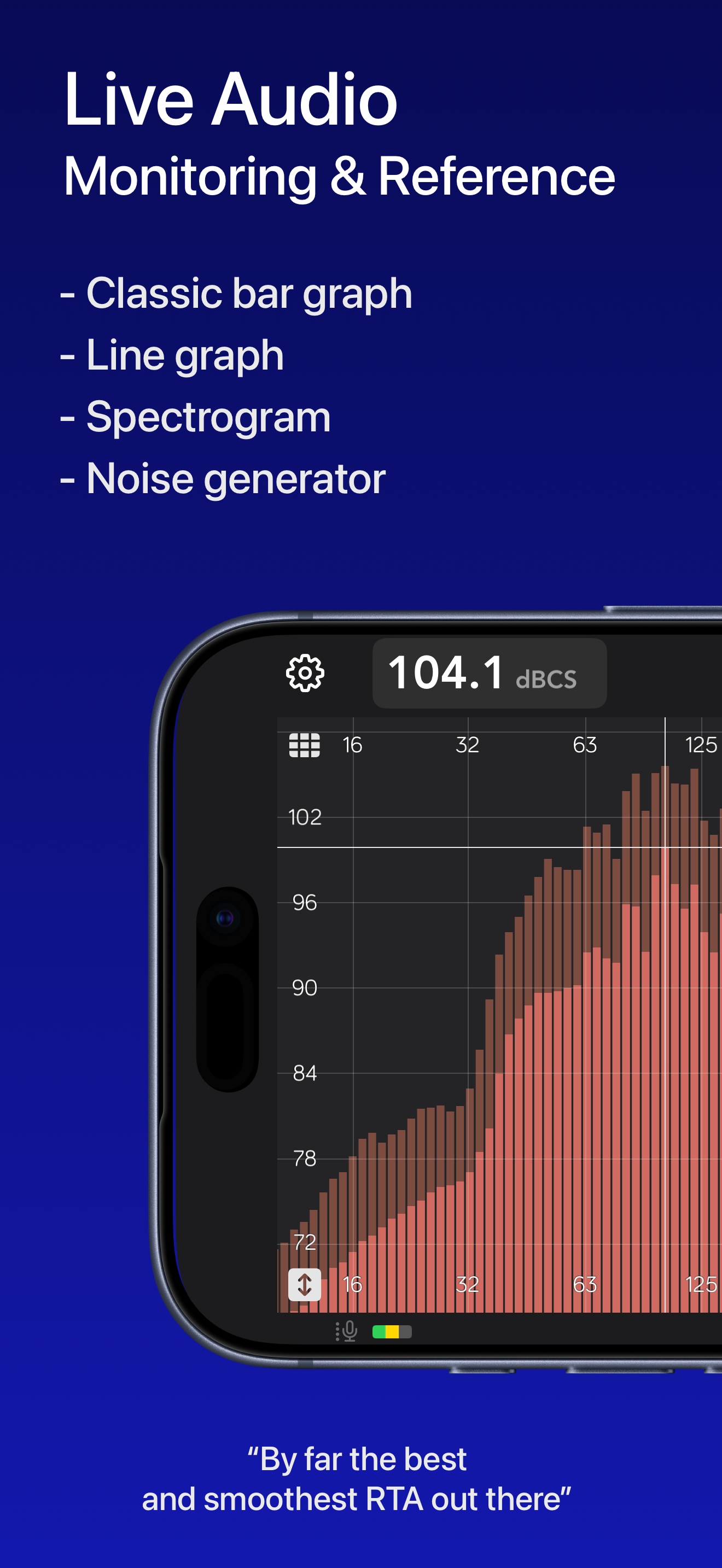
Spectrum Eye shows the frequency content of what your mic or interface is hearing - smoothly, at high FFT sizes, without freezing the UI.
Version 2 is a full rebuild: Metal plot, bars / line / spectrogram, calibrated SPL, and mic correction on the live spectrum.
For music professionals, audio engineers, sound technicians, installers, car audio, and audio students. Equally at home as a quick check or a plot you leave running.
WHAT YOU CAN DO
• Monitor sound quality at concerts and rehearsals
• Ring out feedback in stage monitors
• Find resonances in rooms, boxes, instruments and cars
• Check spectral balance of playback in the studio
• Practice frequency-aware hearing
• Measure SPL with A / C / Z weighting and Fast / Slow / Leq
PLOT
• Bars, line, and spectrogram - the configuration button is in the top right corner
• Fractional-octave resolution from 1/1 through 1/96
• Line smoothing follows the same octave map
• Peak hold with a slow release, optional fill under the line
• Find Peak (FP) tracks the loudest band in the visible range
• Classic or Overlay layout treats plot area vs scales differently; Overlay is the default
• Pan, pinch-zoom, and a live cursor in Hz and dB
• Frequency visible range presets (Full 8 Hz–22 kHz, Audio, Lows, Mids, Highs)
• Magnitude-range presets
• Spectrogram duration, Jet / Viridis / Inferno / Grayscale color palette
• Light, Dark, or System appearance, plus a custom plot color
• Spectrum update rate: 60 fps Smooth, 30 fps Efficient, or Auto (drops under heat or Low Power Mode)
SPL
• IEC-style meter: Fast, Slow, and Leq
• A, C, and Z (flat) frequency weighting
• Per-route SPL offset so you can calibrate against a reference
• Yellow / red SPL alarm thresholds per weighting, with UI tinting
• Clip indicator and a 30–140 dB level meter bar
• iPhone: Large panel in portrait device orientation; in landscape orientation, compact readout in the top bar
• iPad: switchable large and compact SPL mode
INPUT AND CALIBRATION
• Built-in mics (including iPad position / directivity where the device offers them)
• External microphones and class-compliant audio interfaces
• iOS measurement mode to bypass built-in HPF, EQ, and AGC (recommended)
• Import mic calibration files (.cal, .txt, .csv); optional phase column is ignored
• Per-route calibration curve and IEC weighting on the live spectrum
• Pink noise generator, including with the screen off (Lock Screen / Now Playing)
ANALYSIS
• FFT sizes 4K / 8K / 16K / 32K (default 16K)
• Fall-rate presets: 50 ms, 100 ms, 250 ms, 500 ms, 1 s, 5 s per 6 dB
• Nominal capture sample rate - 48 kHz, display ranges from 8 Hz to 22 kHz
Audio is processed on the device. Spectrum Eye does not record, store, or upload your audio.
Suggestions welcome - the app is in active development.
Includes In - app purchases: tips to the developer only. All the functionality is available once you download the app.
ストアランキング
ストアランキングは、GoogleとAppleが設定した複数のパラメータに基づいています。
業界別 ウェブサイトカテゴリーで
米国--
音楽で
米国--


 Spectrum Eye RTA VS.
 10月 20, 2026