

10月25日 的 CTD Live Mobile 應用程式分析

CTD Live Mobile
- Juan Pena
- Apple App Store
- 付費
- 照片與影片
CTD Live Mobile turns your iPhone or iPad into a fast, tactile remote control for OBS Studio. It connects to the OBS WebSocket server (obs-websocket 5.x, built into OBS 28 and later) and lets you run a live production from across the room — no extra screen, no clutter on your stream machine.
Built for streamers, AV operators, houses of worship, classrooms, esports, and anyone who runs a multi-camera show in OBS.
REQUIRES OBS STUDIO
CTD Live Mobile is a remote control. It does nothing on its own. You need OBS Studio (free, open source) running on a separate Mac, PC, or Linux machine, with the WebSocket server enabled under Tools → WebSocket Server Settings. Your iPhone or iPad and the OBS machine must be on the same network.
CONNECT IN SECONDS
• Scan the QR code from OBS (Tools → WebSocket Server Settings → Show Connect Info) with your camera, or
• Enter host, port, and password by hand.
• Supports obsws://, ws:// (plaintext), and wss:// (TLS) connections.
LIVE MULTIVIEW
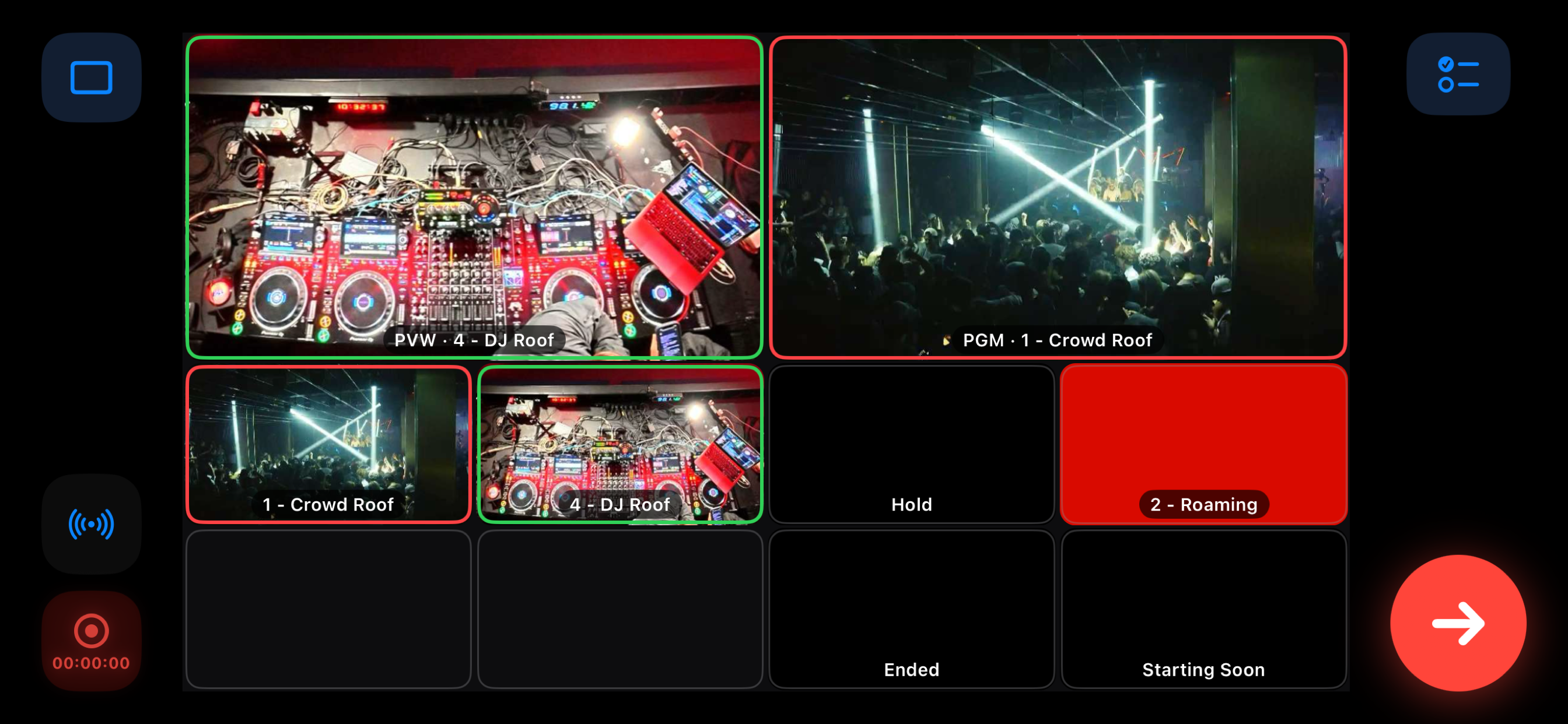
• A grid of live thumbnails for every scene, refreshed over the socket.
• Tap a scene to preview it or cut it straight to air.
STUDIO MODE, DONE RIGHT
• Full preview-to-program workflow with a dedicated TAKE button.
• Hold to quick-cut a focused angle directly to air, then release.
STREAM & RECORD CONTROL
• Start and stop streaming.
• Start and stop recording.
• Live stream and record timecode and on-air status at a glance.
AUTOMATION
• Build scene playlists and trigger rules to automate sequences.
• Map scenes, cuts, recording, and audio mute/volume to controller buttons.
FULL GAME-CONTROLLER SUPPORT
• Drive the show with an Xbox, PlayStation, or MFi controller (GameController framework).
• Steer a yellow focus ring with the d-pad or stick, then cut or preview with a button.
• Custom button bindings and an on-screen controller help map.
DESIGNED FOR THE DEVICE
• The deck measures your screen and picks a layout shaped for it — a phone upright, a tablet upright, or either of them turned on its side.
• On iPad it runs in Split View and Slide Over, so the deck can sit beside your rundown, your chat or a timer.
• Ready for folding screens: it reflows as the phone opens and closes.
PRIVATE BY DESIGN
• No account, no sign-up, no analytics, no ads, no trackers.
• Collects no personal data of any kind.
• Talks only to the OBS server you configure. Settings and OBS passwords stay on your device.
Camera access is used solely to scan the OBS connect-info QR code. Local Network access is used solely to reach your OBS server on the LAN.
Note: OBS Studio is a third-party application and is not affiliated with or endorsed by CineTech Digital.
商店排名
商店排名基於Google和Apple設定的多個參數。
所有類別 在
美國--
照片與影片 在
美國--


 CTD Live Mobile VS.
 10月 25, 2026