

7月24日的Chess Scanner - Digitizer应用程序分析

Chess Scanner - Digitizer
- Steffen Ratzke von Stoyentin
- Apple 应用商店
- 免费
- 公共事业
Scan your score sheets to digitize your chess games.
The texts gets extracted from the score sheet to generate the game. An overview presents the score sheet with the generated moves. If moves were not correctly recognized, you can easily correct them using move suggestions.
Afterward, you have the option to categorize the games into a tournament, analyze them in Lichess/Chess.com, or export them as a PGN file.
Score sheets can be captured either with the integrated scanner or selected from the gallery. The score sheet is directly extracted from the image.
The score sheets can be specified for both the White and Black players, which is particularly convenient from the tournament director's perspective. When generating the game, both versions are considered. Up to two score sheets can be specified per player.
The game can be generated directly after scanning the score sheets. Alternatively, you also have the option to manually overlay the move grid.
Supported notations:
- English: N/B/R/Q/K
- German: S/L/T/D/K
- Dutch: P/L/T/D/K
- Spanish / Italian: C/A/T/D/R
- French: C/F/T/D/R
- Portuguese: C/B/T/D/R
- Czech / Slovak: J/S/V/D/K
- Turkish: A/F/K/V/Ş
It is possible to specify other notations as well, but these are analyzed based on a model of already supported notation. Therefore, text recognition may be less accurate in such cases.
For game generation, the score sheets are sent to our servers. The time required for generation may vary depending on the legibility of the score sheet, length of the game, and internet connection. Typically, this ranges between 1 and 10 seconds.
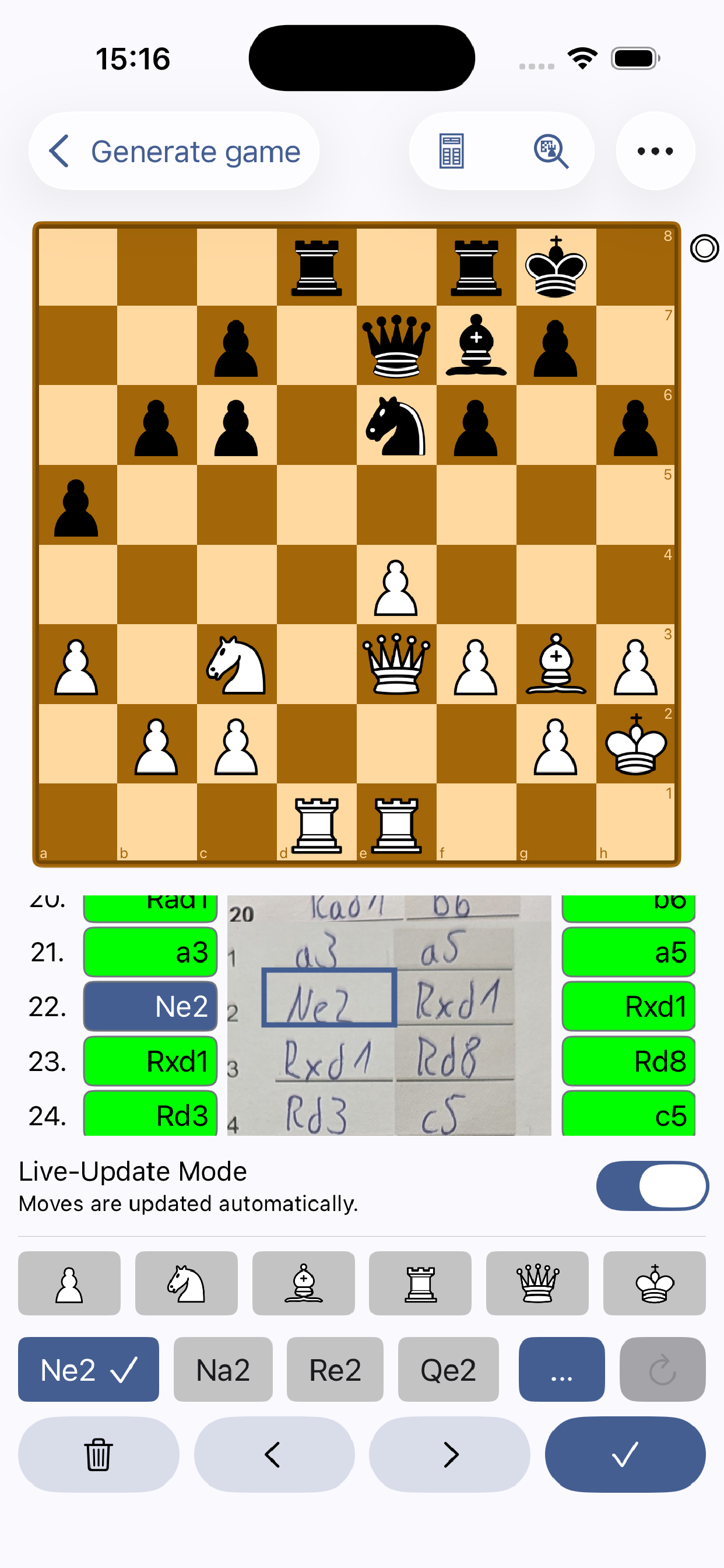
An overview displays the columns of the score sheet with the generated moves. The background color of each move indicates the likelihood of the move. Tapping on a move takes you directly to the corresponding chess position, where move alternatives are also suggested.
If moves were not correctly recognized, you can quickly and easily correct them using move suggestions. These are arranged based on probabilities and can be further narrowed down using a filter on the piece to be moved. After making a change, you can regenerate the game from the current move.
An overall overview displays all entered games. You can filter games by tournament, round, and favorites. Additionally, there is a search field allowing you to filter games by players or game descriptions.
Filtered games or individual games can be exported as a PGN file. In the settings, you can specify which data the PGN file should contain, such as tournament, round, date, etc.
Additional games can be imported into the app via PGN files.
To analyze the games, they can be opened directly in Lichess and Chess.com.
With Premium:
- Adding score sheets of the second player
- Open Games in Lichess and Chess.com
- PGN Export
- Cloud synchronisation of games
- Unlimited chessboard scans
If you would like to share any thoughts or suggestions, please feel free to send an email to:
steffen@chessscanner.com
Terms of Use (EULA): https://chessscanner.com/eula
商店排名
商店排名基于 Google 和 Apple 设置的多个参数。
所有品类在
美国--
公共事业在
美国--


 Chess Scanner - Digitizer VS.
 七月 24, 2026