






Muse app breakdown: what Meta's AI agent means for brands
by Noam Kadyshevitch5 Min.
Oct 29, 2026

Regardless of your company’s size, a free Similarweb account can be a goldmine for data and analytics. With access to advanced keyword research, comprehensive website analysis, competitor benchmarking, and more, you can gain valuable insights to enhance your digital marketing strategies.
Whether you’re just starting or an experienced marketer, Similarweb can help you make timely, data-backed decisions critical to your business’s growth.
Let’s dive in!
Summarize with ChatGPT | Google AI | Perplexity | Grok
Navigating digital analytics can be complex, but Similarweb, a recognized leader in software products, offers user-friendly options to start without a financial commitment. While it is subscription-based, creating a free account allows you to experience many of the software’s capabilities for free.
There are two main types of accounts you can create. Additionally, we offer a range of free tools that can be used without signing up for an account, which we cover in more detail below.
The 7-Day Free Trial is perfect for those looking to sample Similarweb’s offerings and explore its capabilities. During the trial period, users can test advanced tools like competitive analysis, keyword research, and business benchmarking. This trial provides a snapshot of the platform’s extensive features, helping users determine which paid subscription best aligns with their business needs. Note that you’re limited to 15 actions per day during the trial period.
To create a 7-day Free Trial account, you will need to provide your credit card details, but you will only be charged after the trial period ends.
With the Full Sign Up option, you can unlock Similarweb’s full potential. Dive deep with unlimited searches and data exploration tailored to your specific business needs. Gain insights from advanced analytics like traffic sources, engagement metrics, and competitor benchmarks. You’ll also enjoy additional benefits like country filters, access to longer historical data, and the ability to export data for further analysis. To set up a full-access account, head over to the Similarweb pricing page to find the best plan for you and your team.
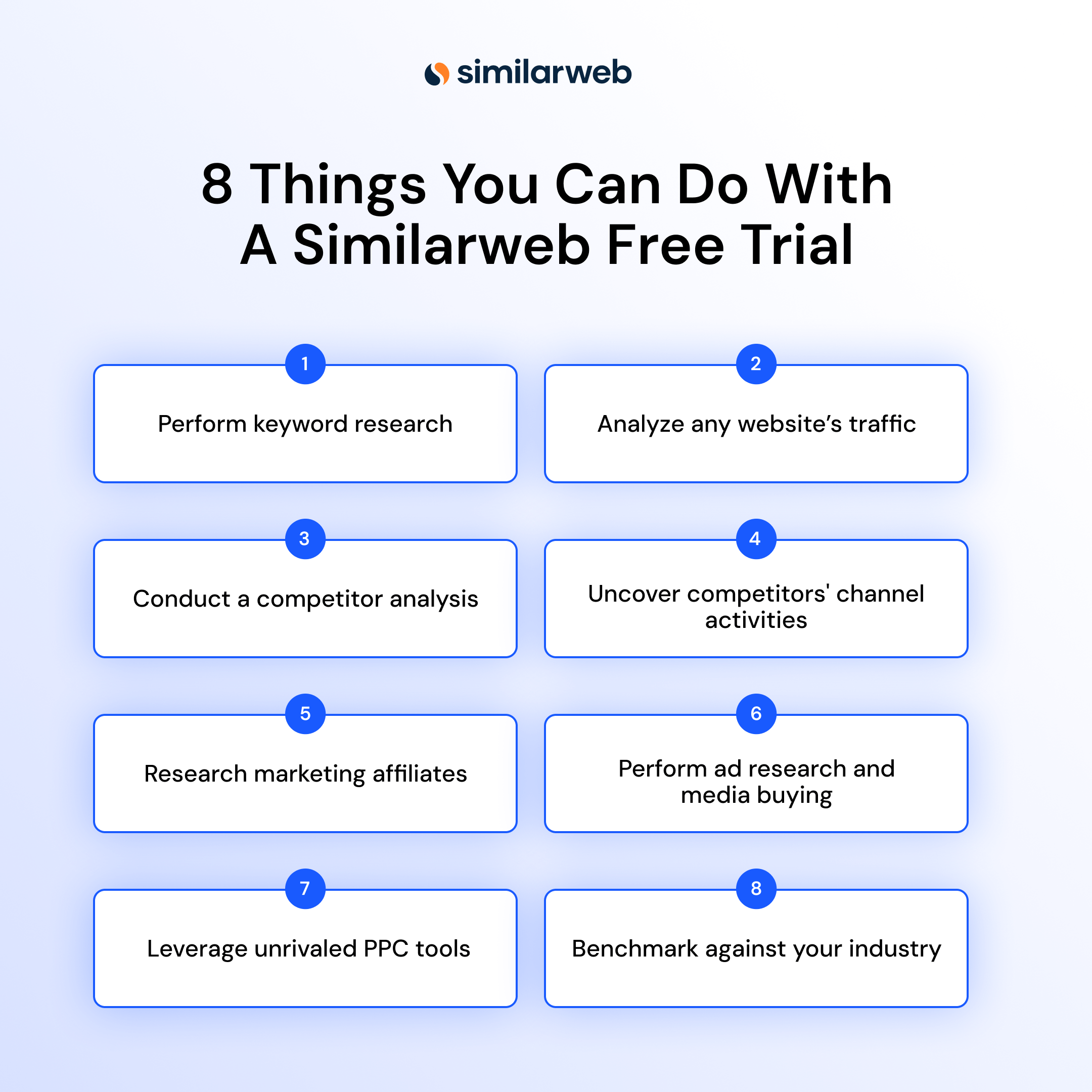
Similarweb’s free account caters to a wide range of users, providing essential tools to enhance digital marketing strategies:
In the next section, we highlight key features of the 7-Day Free Trial account. Later, we’ll explore additional free tools you can use anytime without a trial.
Keeping your keyword strategy competitive requires accurate search data and real-user insights. Similarweb unlocks both. A free Similarweb account allows you to use the Search Analysis & Keyword Research module to tap into the keywords driving traffic and engagement within your industry. Discover everything you need for a granular view of keywords across competitors, geography, devices, seasonality, and more.
Keyword Generator
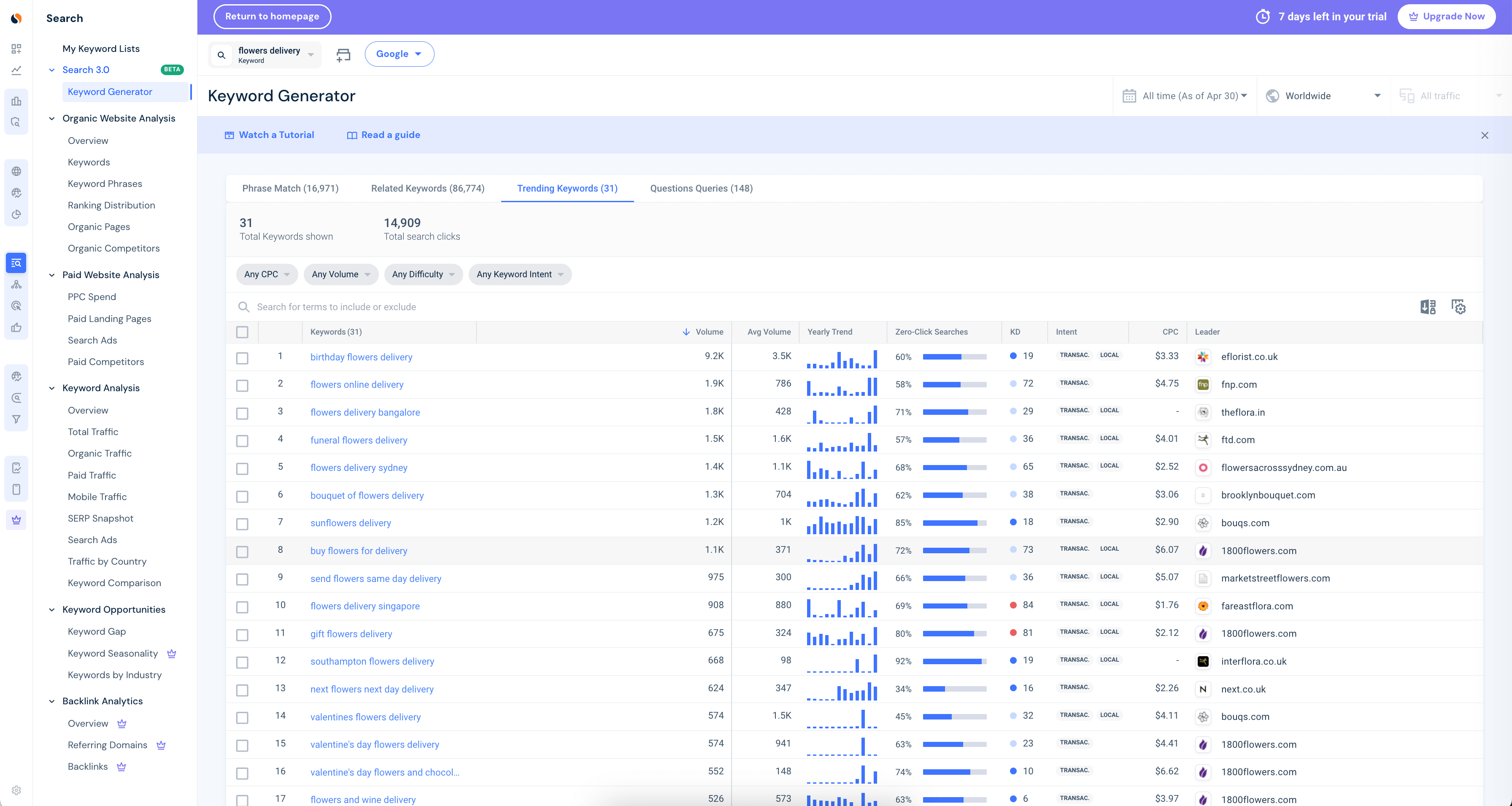
Similarweb’s Keyword Generator allows you to explore keyword ideas with access to over 5 billion keywords from three of the biggest search engines: Google, Amazon, and YouTube. This tool helps you create a unified strategy across different platforms. With a trial account, you can see a worldwide view and filter by both the last 28 days and the last 3 months.
For example, if you’re a flower delivery provider, you can see trending keywords related to the seed term ‘flowers delivery’ along with their search volume, winning website, and other key engagement metrics to build an effective SEO strategy.
Keyword Metrics
At the heart of effective keyword research is access to the right metrics, tracked across key measurement platforms and aligned with your internal reporting. Gain insights from unique metrics to make better, data-backed decisions. Learn about critical metrics like Keyword Difficulty, Search Intent, and Zero Clicks, which help you target the right keywords for your SEO strategy.
Mobile Traffic 2.0
Understand mobile search behavior with Similarweb’s new generation of mobile traffic data. Mobile Traffic 2.0 delivers fresh data and insights for millions of websites. Get a deep view of the mobile web and optimize your strategy accordingly.
Keyword Comparison
Our free keyword research tool lets you easily find new keywords by benchmarking them against each other. Get a side-by-side comparison of the most critical performance metrics in a single click to identify the best keywords for your SEO strategy.
Keywords by Industry
Find the top keywords for a specific industry. See the distributions of paid vs. organic traffic, search traffic by channel and source, and many insights on volume, leaders, and trends for the top keywords in the industry. Note that to unlock the full list of Keywords by Industry, you will need to have a paid account.
Keyword Gap
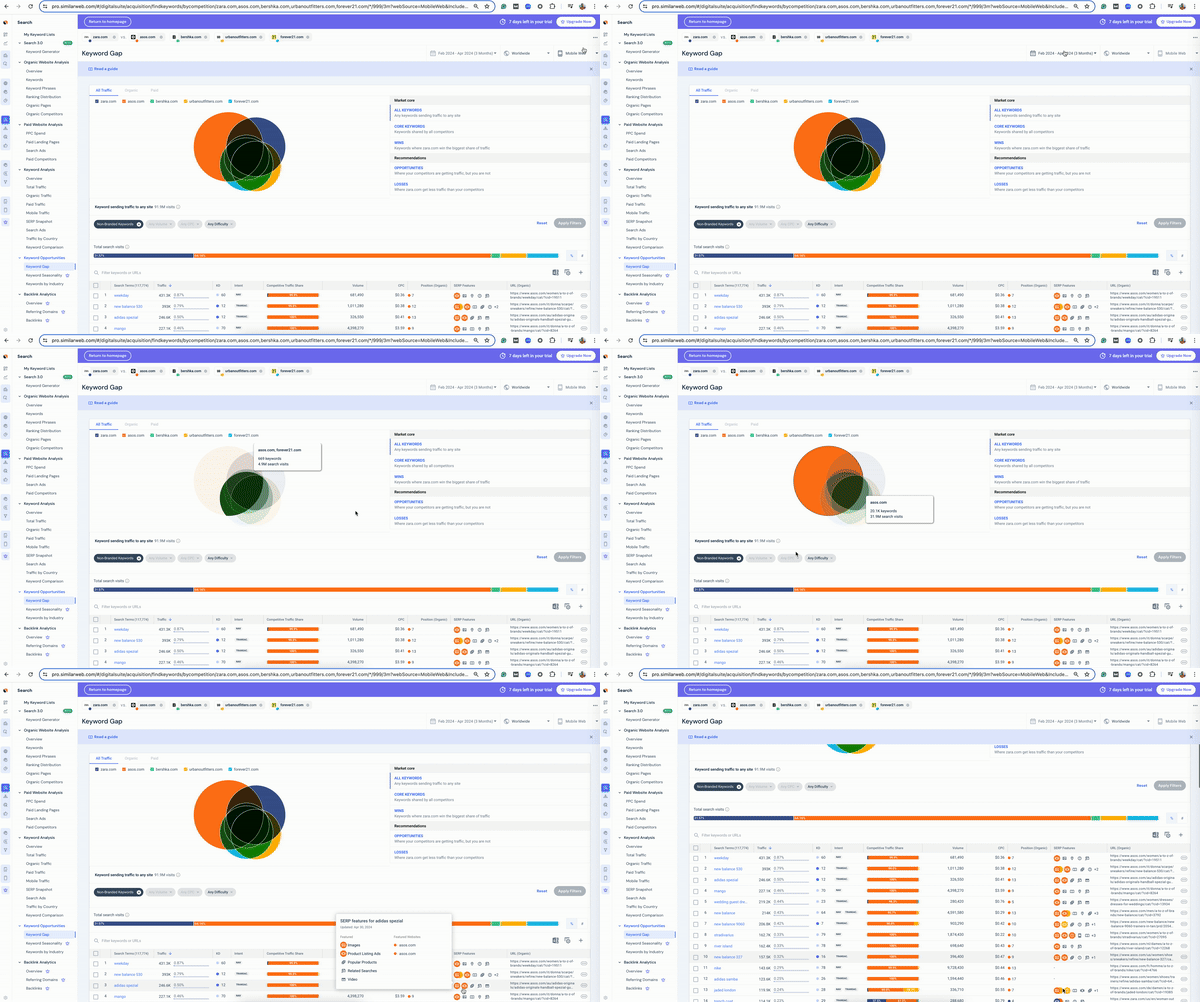
This tool helps uncover new opportunities by analyzing which keywords send you traffic vs. your competitors. The analysis you can conduct with the Keyword Gap tool helps spot new keyword optimization opportunities to drive more traffic and boost conversions. The free tool allows you to filter by Desktop vs. Mobile Web, and three different timeframes (1, 2, and 3 months).
For example, Zara can see what its competitors, Forever 21, Bershka, Urban Outfitters, and Asos, are competing for on Mobile Web, with Asos clearly winning many keywords in the competitive set.
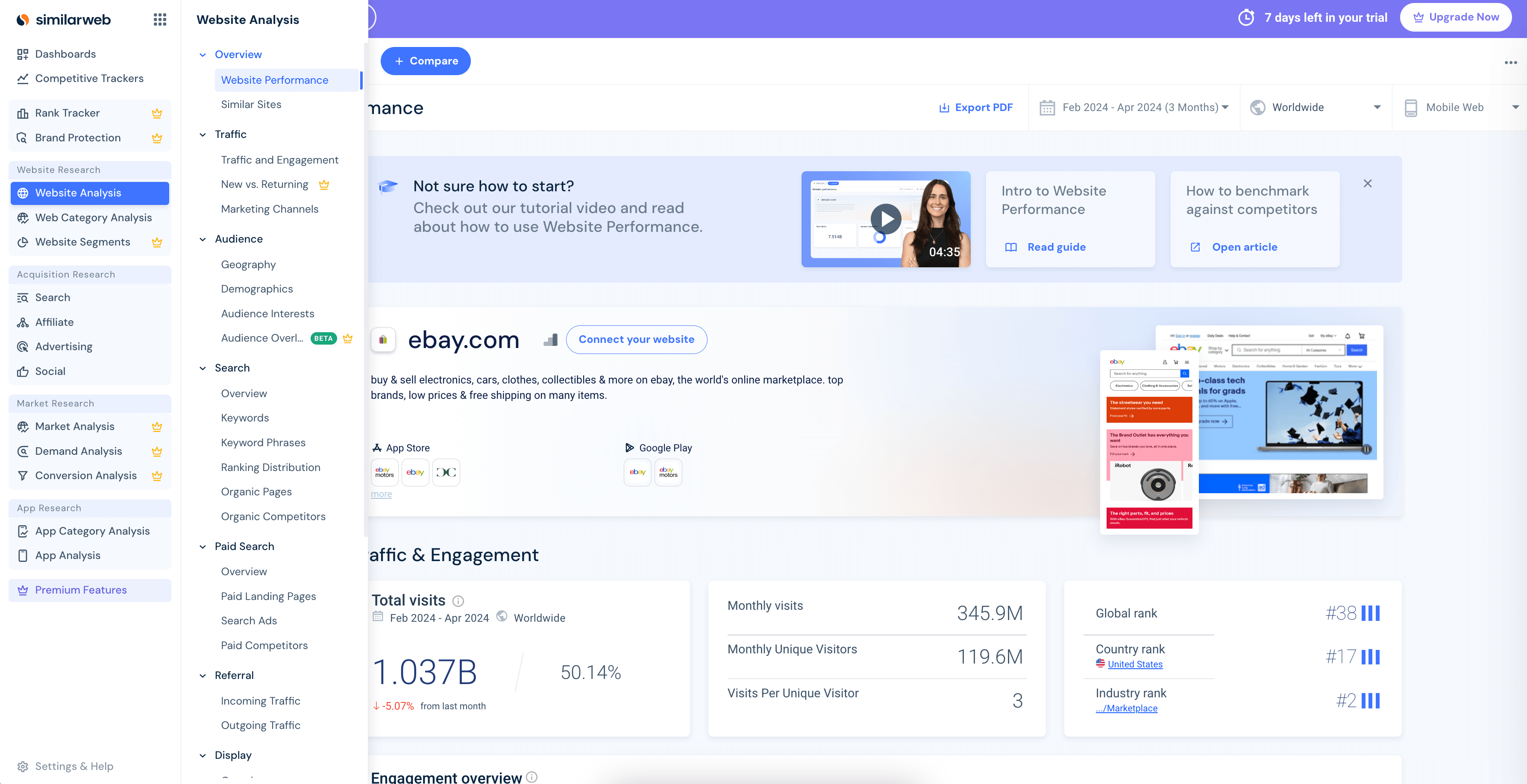
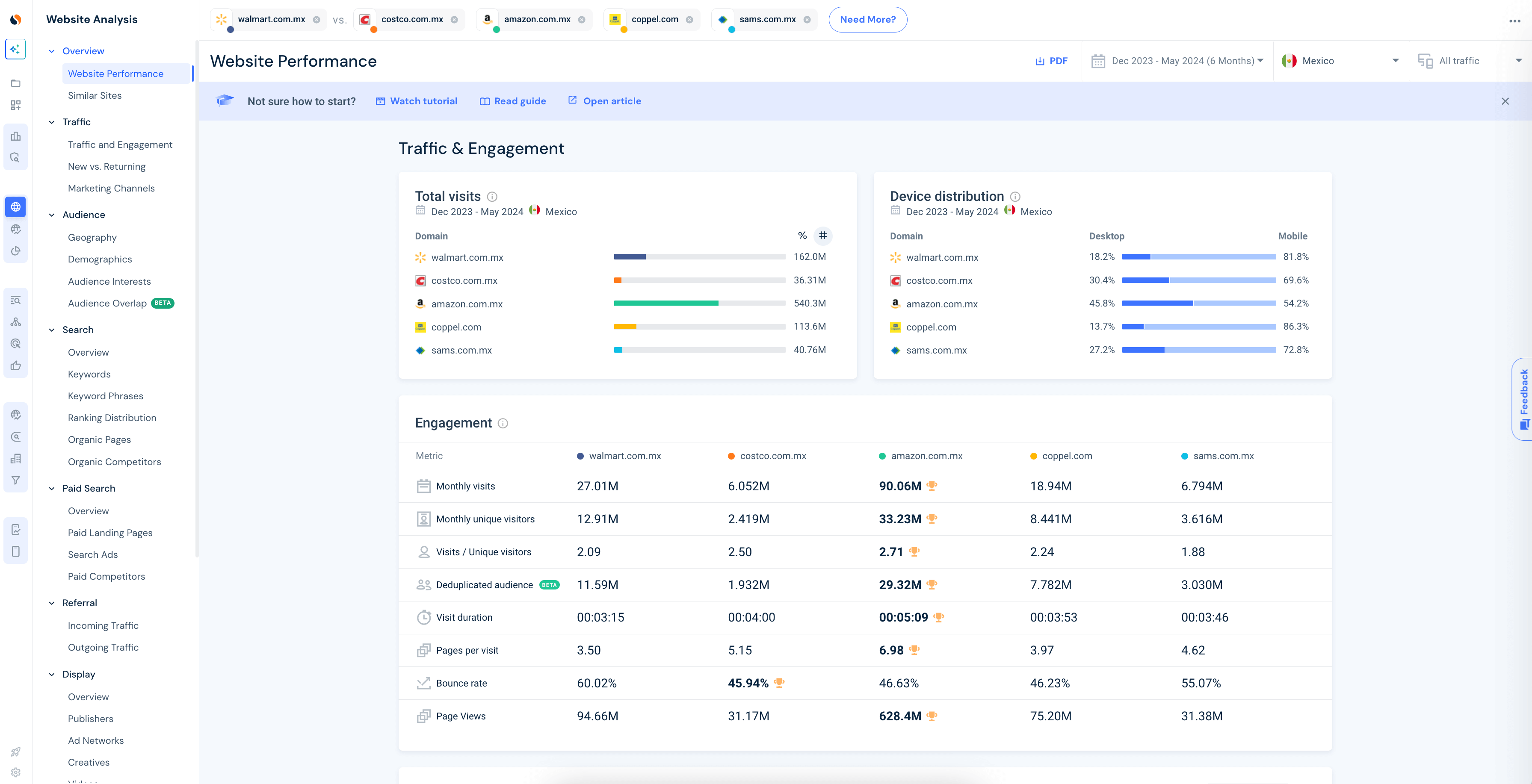
Similarweb’s Website Anaylsis tool is one of our most frequently used features. It provides detailed data on any domain, offering essential insights for competitive analysis. This tool allows you to compare website traffic and engagement metrics for up to 5 sites, identify the primary channels driving traffic to competitors, and understand their marketing strategies. Additionally, the paid version provides insights into audience overlap (between the sites), new vs. returning website visitors, and top backlinks and referring domains, allowing users to evaluate their competitors’ link equity and improve their referral traffic strategies.
You can run unlimited website queries for free using our tool (but up to 15 per day). Simply log into your account, type in the website you’re interested in, and click the ‘Analyze’ button for a list of traffic and engagement metrics.
Benchmarking your prospects’ website reach and analyzing the quality of their traffic is crucial for understanding the effectiveness of their marketing activities. This analysis allows you to identify growth potential, areas for improvement, and competitor strengths.
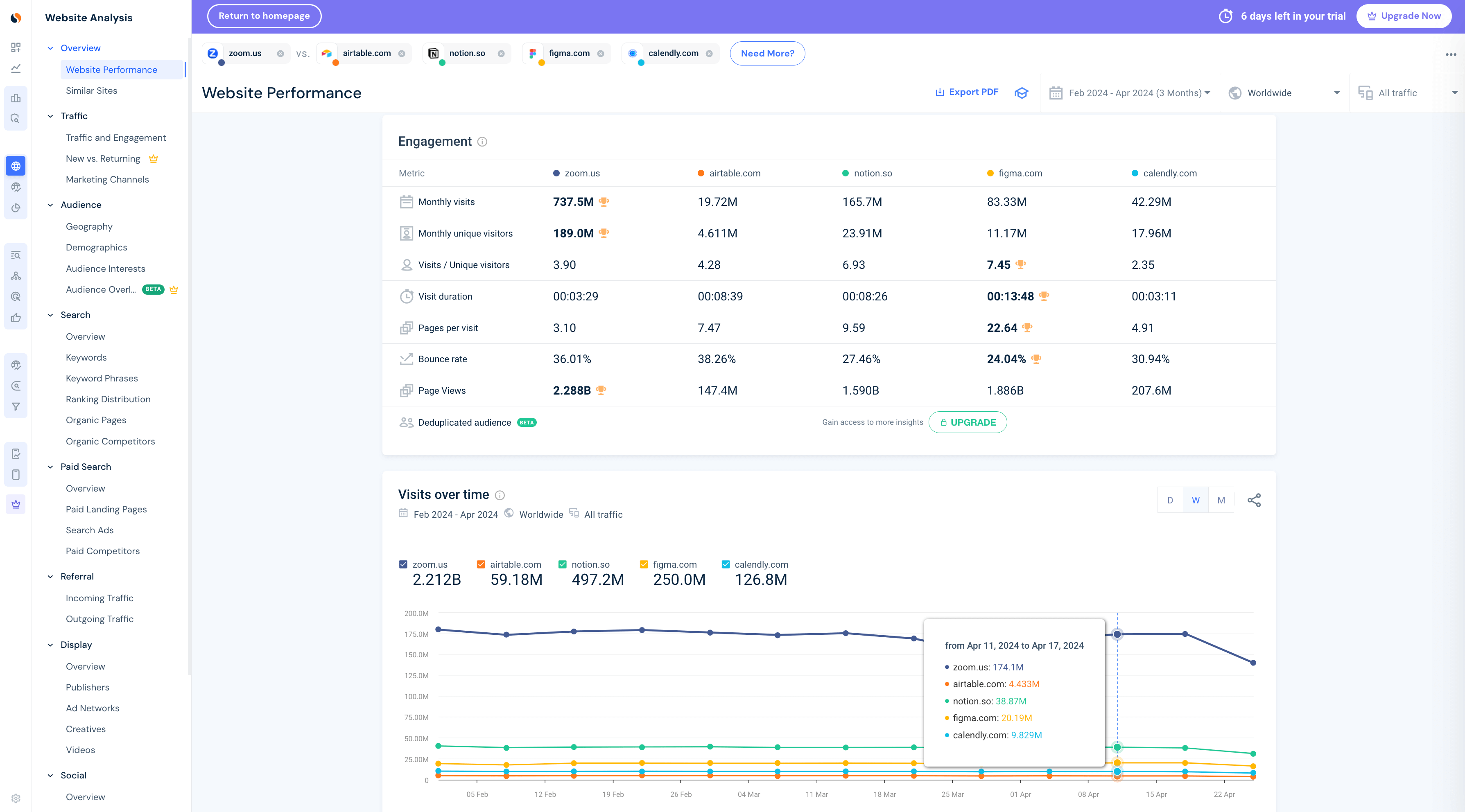
When logged in, use the ‘Compare’ button to add up to four additional domains for comparison, and choose websites that compete with your prospect. From the platform’s left menu, select the Traffic and Engagement view to understand and benchmark their reach, health, and performance. Use the following metrics to assess your prospect’s reach and generate valuable insights:
Here’s a snapshot of this tool in action:
Use our Competitor Analysis tool to dive deep into your rivals’ SEO, PPC, affiliate, and advertising strategies, all with one easy tool. Make data-driven decisions based on a complete view of your competitive landscape, set better business KPIs, and drive your campaign performance to success through access to:
This all-in-one solution for data-driven marketing planning allows you to surface insights on any brand or competitor across millions of websites, regardless of your account type.
Here’s what a typical competitor analysis looks like:
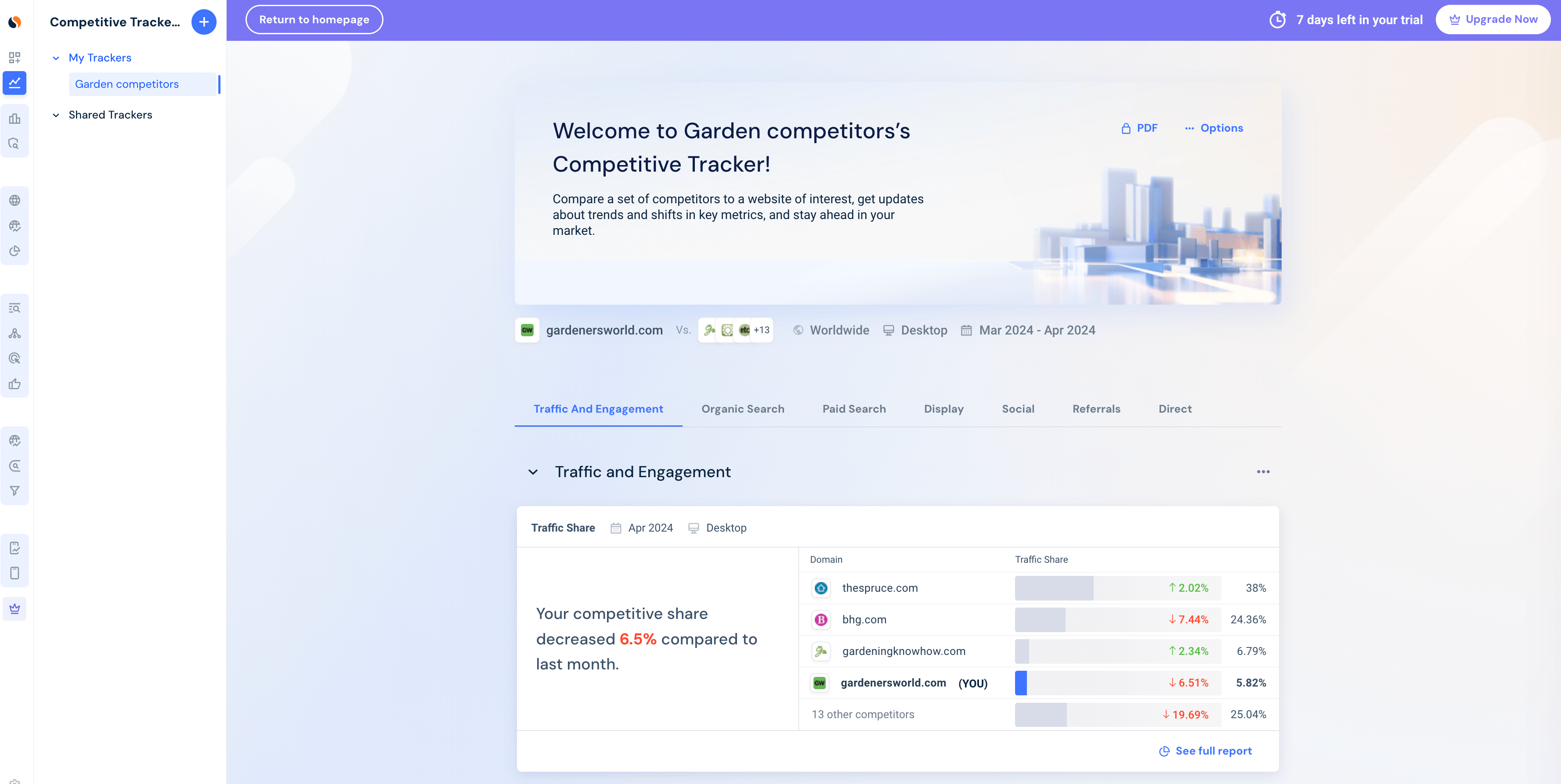
In this example, you can see how using the Competitive Tracker, gardenworld.com, a global website offering plants online, can see a breakdown of up to 24 competitor sites’ marketing channels, including Leaderboards and examples of ads and creatives others are using.
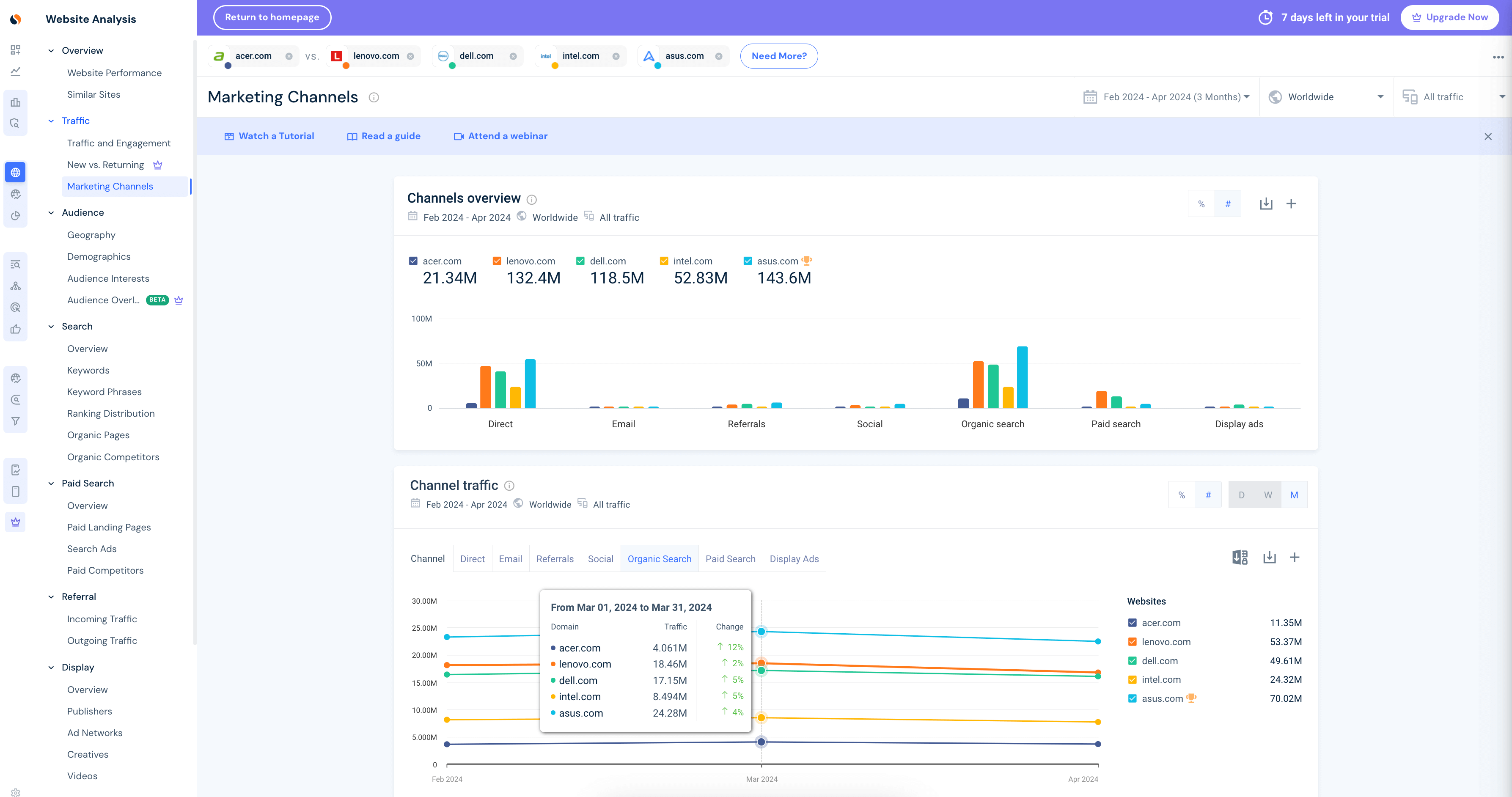
The Marketing Channels Overview: Found inside the Website Analysis module, this tool offers valuable traffic and engagement metrics for each marketing channel. Identify the channels where you are excelling and those with growth opportunities, evaluate engagement and traffic quality, and spot shifts in your competitors’ strategies over time.
Use this free tool to shape your channel strategy effectively across various channels:
To optimize your digital marketing strategy, use the organic search channel to highlight keyword opportunities where you are currently losing traffic.
To view the traffic performance of up to five websites for the last 1 month, 2 months, or 3 months, follow these steps:
Here’s an example of what the Marketing Channels Overview tool looks like in the Similarweb platform:
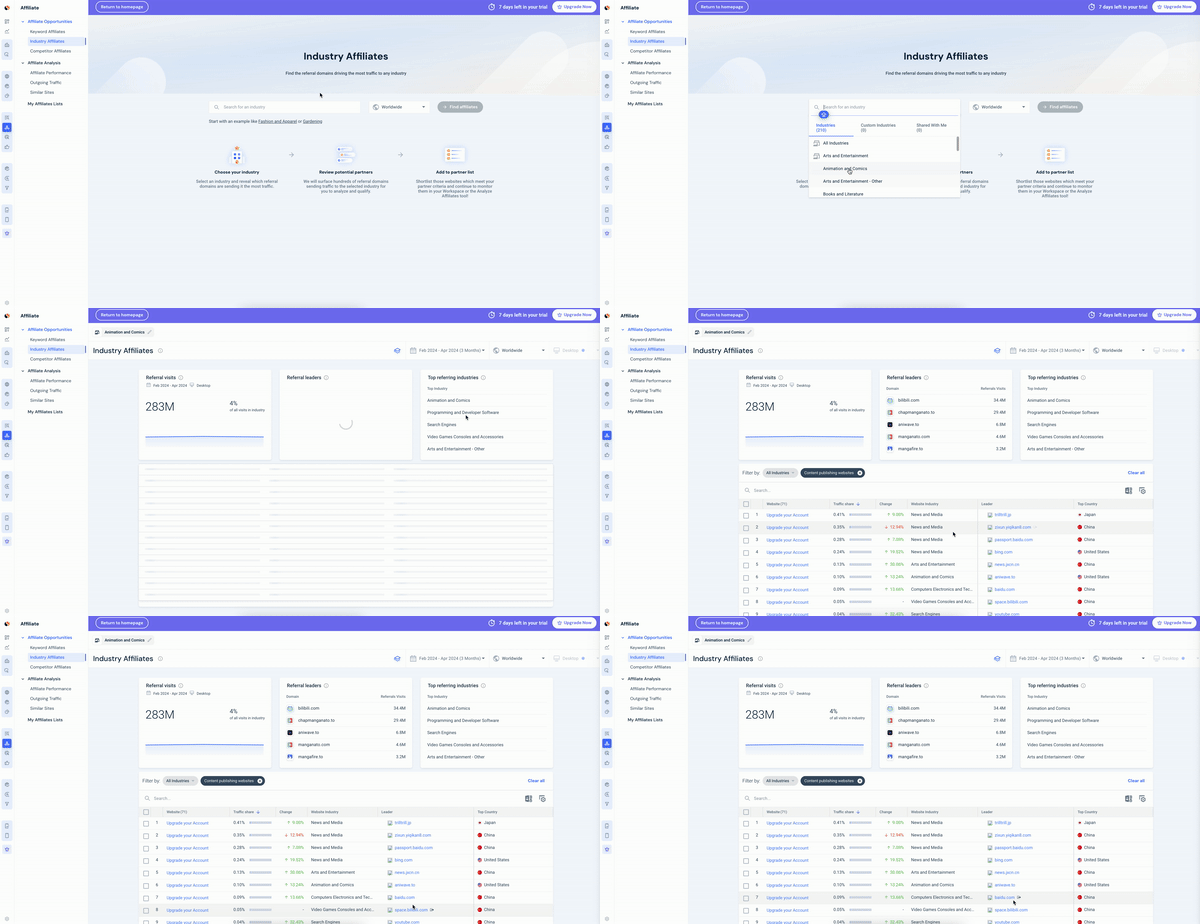
Affiliate research is crucial for optimizing partnerships and maximizing revenue from incoming traffic. With a free Similarweb account, you can use the Affiliate Research tools to perform virtually everything needed for effective affiliate research through the following screens:
1. Use the Find Affiliate Tool
Start by identifying the websites to which your target keywords are driving traffic. Similarweb returns a list of sites gaining traffic from the term and similar terms. Shortlist potential partners, then research and analyze their affiliates. Discover relevant affiliate opportunities by identifying the best referral websites in your industry and adding these affiliates to your partner lists. Additionally, find out who your competitors are partnering with for referral traffic.
2. Create Partner Lists
As you identify new affiliates, create partner lists to keep your most essential affiliates in one place. This lets you compare and monitor key metrics like month-over-month change, clicked vs. non-clicked, and more.
3. Analyze your affiliates
Use the Analyze Affiliates tool to evaluate affiliates based on traffic volume and traffic sources. This provides an in-depth understanding of the competitive landscape. From the sidebar navigation, select Analyze Affiliates, enter an affiliate website, and click +Compare to add up to four more websites. The Website Performance page offers an overview of traffic insights for the analyzed sites. High traffic and visit duration, rather than bounce rate, signify high performance.
4. Monitor potential affiliate partners
Create and monitor Affiliate Lists to stay ahead of your competition. The Monitor Partners tool allows you to view and monitor all the Affiliate Lists you have created or that have been shared with you in a centralized location. From the sidebar menu, select Monitor Affiliates and click See All Partners in a list to get a full view of traffic insights for a saved list. Explore the insights for each domain in your partner lists, analyze traffic share, change, volume, trends, and more. Simply click on an affiliate link in the table to access the Overview page for that list item.
Here’s an example:
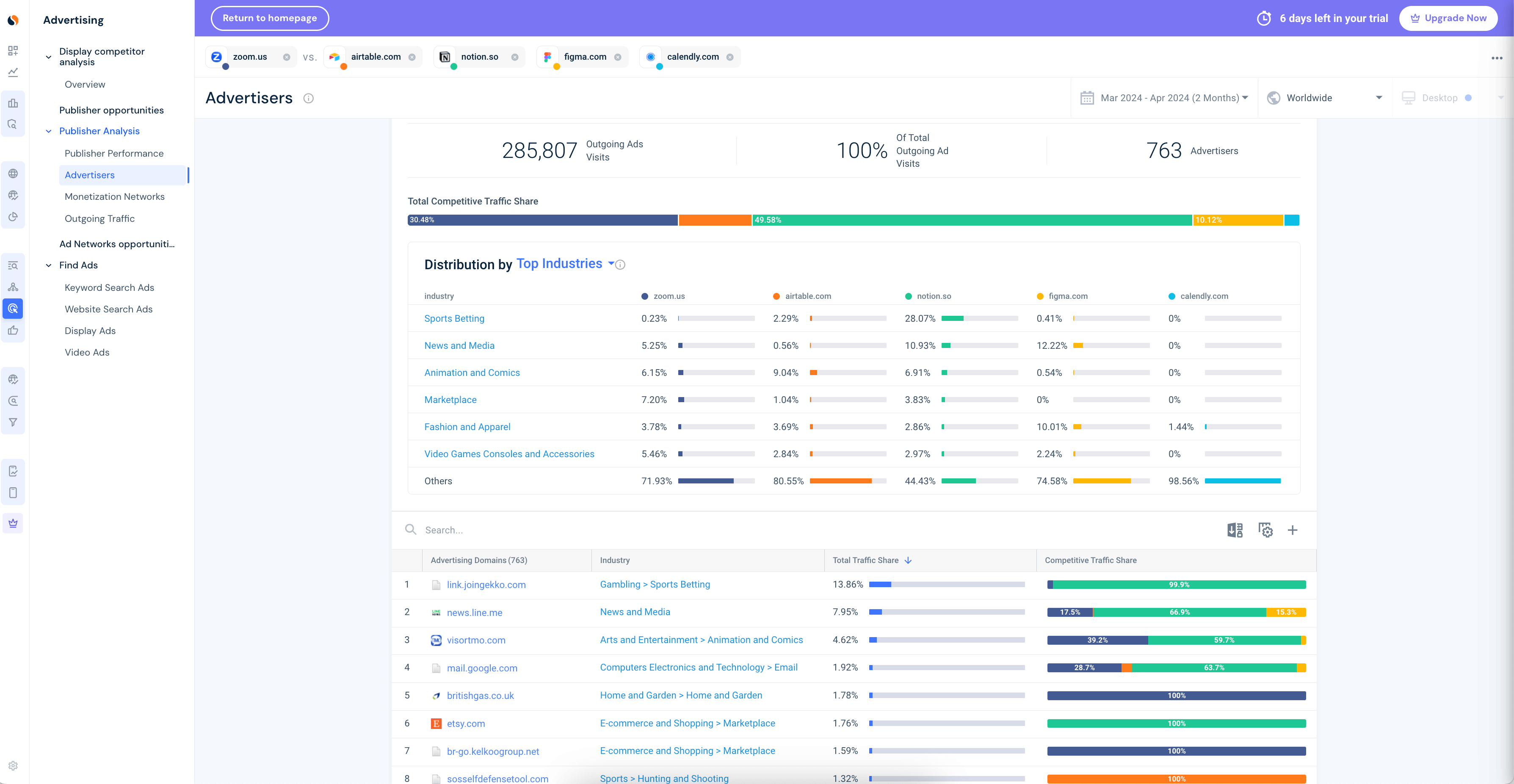
Ad intelligence is key to launching successful ad campaigns. With your Similarweb free account, you can gain valuable insights into your competitors’ advertising strategies.
The tool allows you to uncover insights to:
1. Create a winning formula
Build a successful media buying strategy by uncovering your competitors’ tactics. Access their high-performing ad copies, publisher placements, and partner networks to choose your publishers and partners wisely.
2. Uncover publisher performance
Plan for success using the most reliable data. By understanding publisher performance, deliver activations that exceed the benchmark of the best-performing campaigns in your market.
3. See Display Traffic & Engagement
Optimize paid media across channels by continuously improving campaign ROI. Adjust your tactics based on understanding competitive dynamics, consumer demand, and paid channel efficacy.
Here’s an example of what the free ad intelligence tool looks like in Similarweb:
Similarweb’s free PPC tools offer valuable insights to unravel your rivals’ paid search campaigns. With the Paid Search Overview tool, you can reveal competitors’ SEM performance by understanding the keywords and ads driving their paid search traffic. The free PPC Spend tool lets you discover estimated ad spend across multiple currencies and learn when competitors rely on paid search in their tactical marketing mix.
Analyzing Paid Landing Pages – another easy-to-use free PPC tool – helps you build attractive pages that drive high-performing campaigns by learning from those already delivering. You can also spy on competitors’ ads to improve your search ad performance by revealing their top ads, targeted paid keywords, and costs per click. Target high-performing keywords with traffic, engagement, and PPC spend insights to understand competitors’ performance across seasonal campaigns.
Additionally, you can identify opportunities to differentiate your paid search strategy and improve your performance. Gain a unique view of when and how much competitors are investing in paid search campaigns, how they perform at driving traffic, and which paid channels they are using.
To view key paid search metrics and insights for up to four competitor sites, simply:
Here’s a screenshot that illustrates what this looks like:
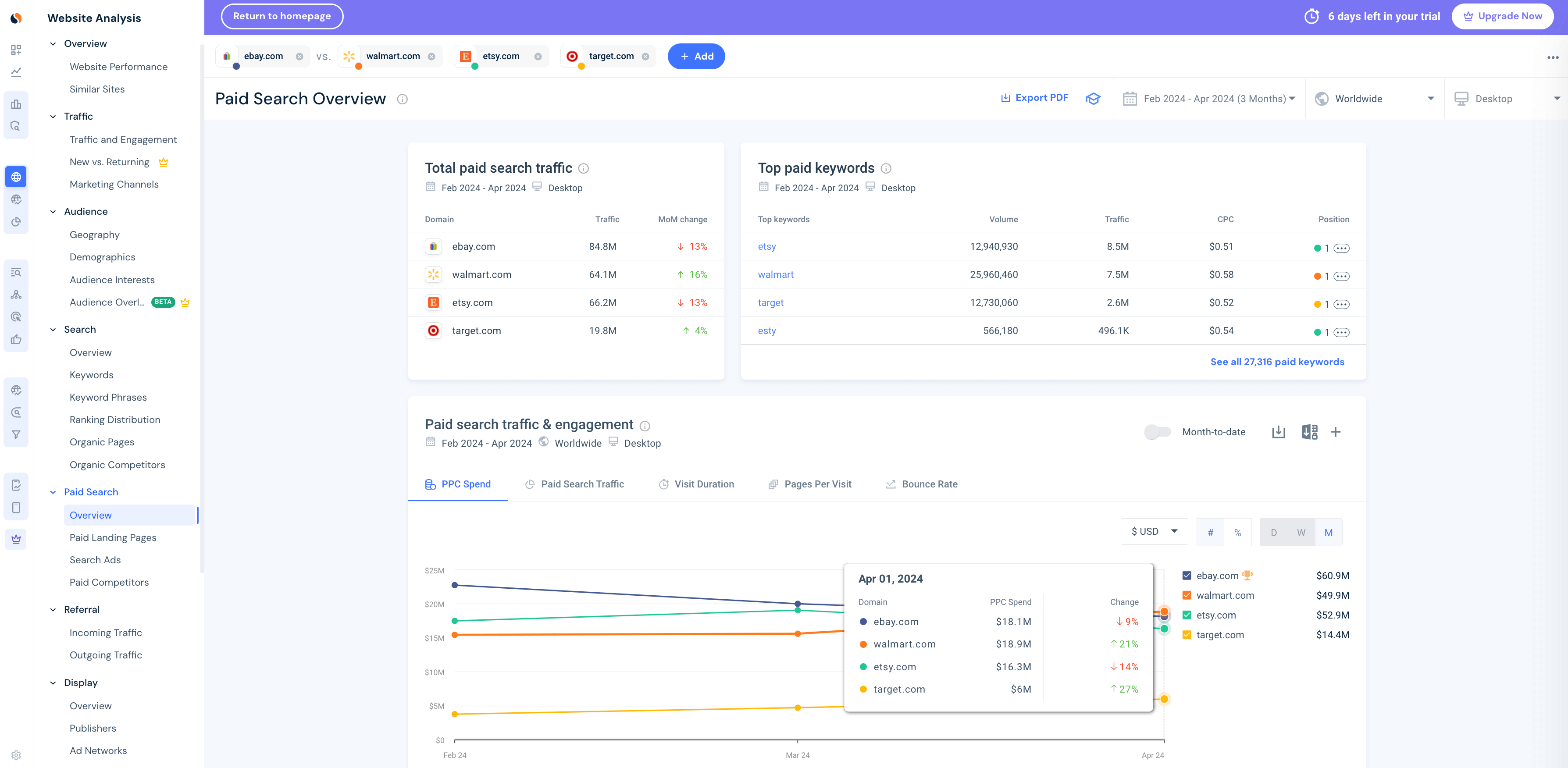
If you’re eBay, you can monitor the top paid keywords and spending trends of key competitors like Walmart, Etsy, and Target. This information helps you refine your PPC budget and evaluate the effectiveness of your own paid search campaigns.
Select or create an industry to monitor market trends, size your opportunity, and analyze and benchmark your performance. With the free trial, you can see the traffic leaders in your industry – including over 210 industries and segments within industries to choose from. This can be viewed by looking at data for all traffic, desktop, or mobile web, and can be filtered by the last month or last 3 months.
Within the available category leaders’ view, you can see a detailed Market Quadrant Analysis along with the industry average. The metrics you can compare within the quadrant include Month-over-Month traffic change, Visits Duration, Traffic Share, and Pages/Visit, which show how many pages website visitors see during a session, an indication of stickiness and good user experience.
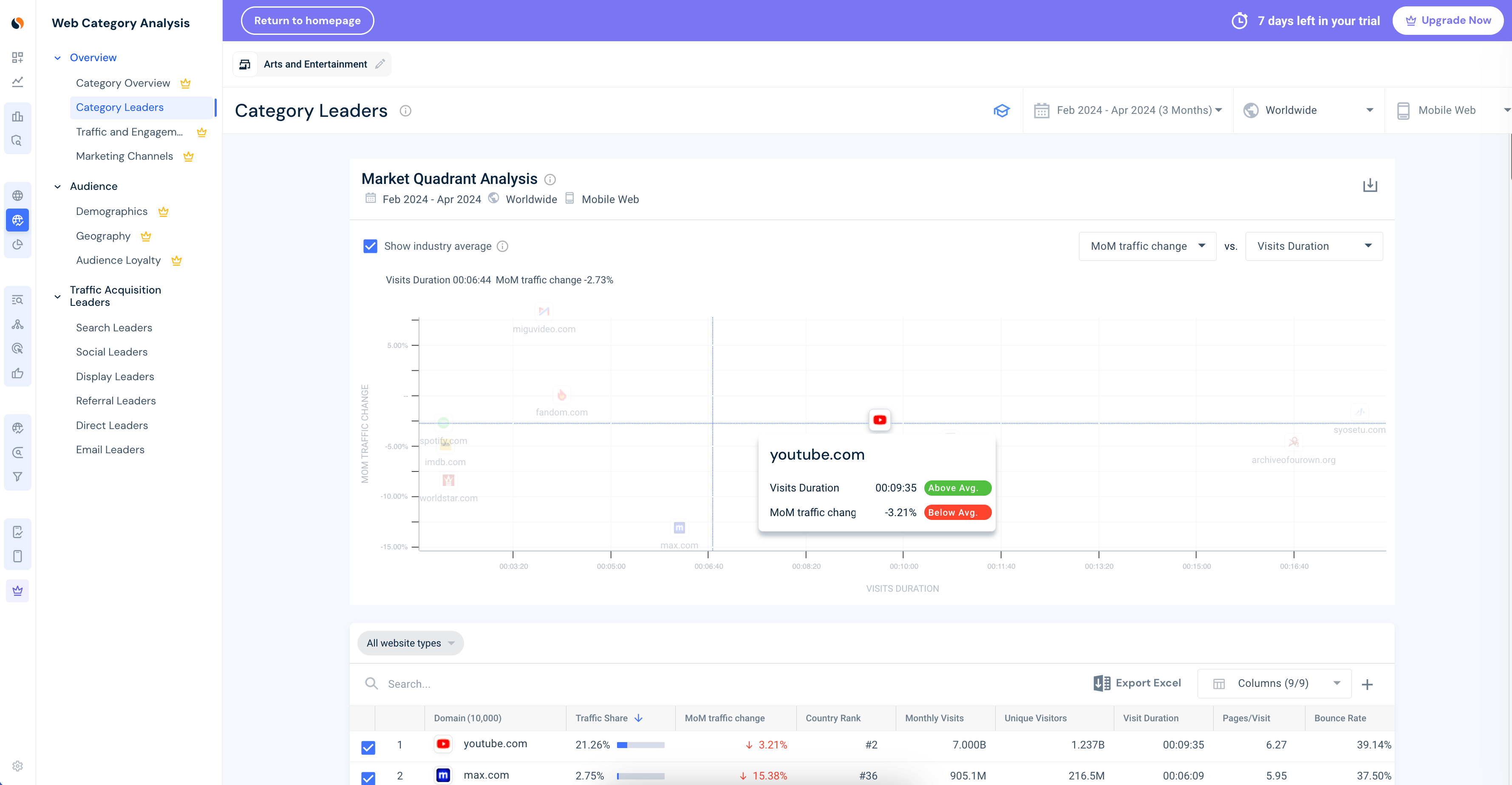
In this view, you can see a Market Quadrant Analysis for the Arts and Entertainment industry (worldwide, last 3 months). We can see that youtube.com has an above-average visit duration but below-average MoM traffic share compared to other top 10 sites that make up the category leaders.
Getting started is straightforward. Simply follow these steps:
Got any questions or need support? We’re here to help you find the right data and answers at the right time, customized to your needs.
Want to end your free trial? That’s fine:
❌ No financial implications
Canceling a Similarweb free trial is straightforward and free of direct financial repercussions, provided you cancel before the trial period ends. If you cancel after the trial period, you will be charged according to your selected package. To avoid charges, cancel before the trial expires.
✔️ Continued feature usage
After canceling, premium features will no longer be available, but the free account remains accessible, including all the free tools and the Similarweb Extension. This allows continued exploration of basic functionalities without financial commitment.
Also, if you create a paid subscription and decide to cancel your paid account with us, your account will automatically be converted to a free account.
Similarweb also offers various tools for an entry-level understanding of digital analytics and market intelligence. These tools are available to all users without any time limit, though they have limited results, which can be easily extended with a full-access account.
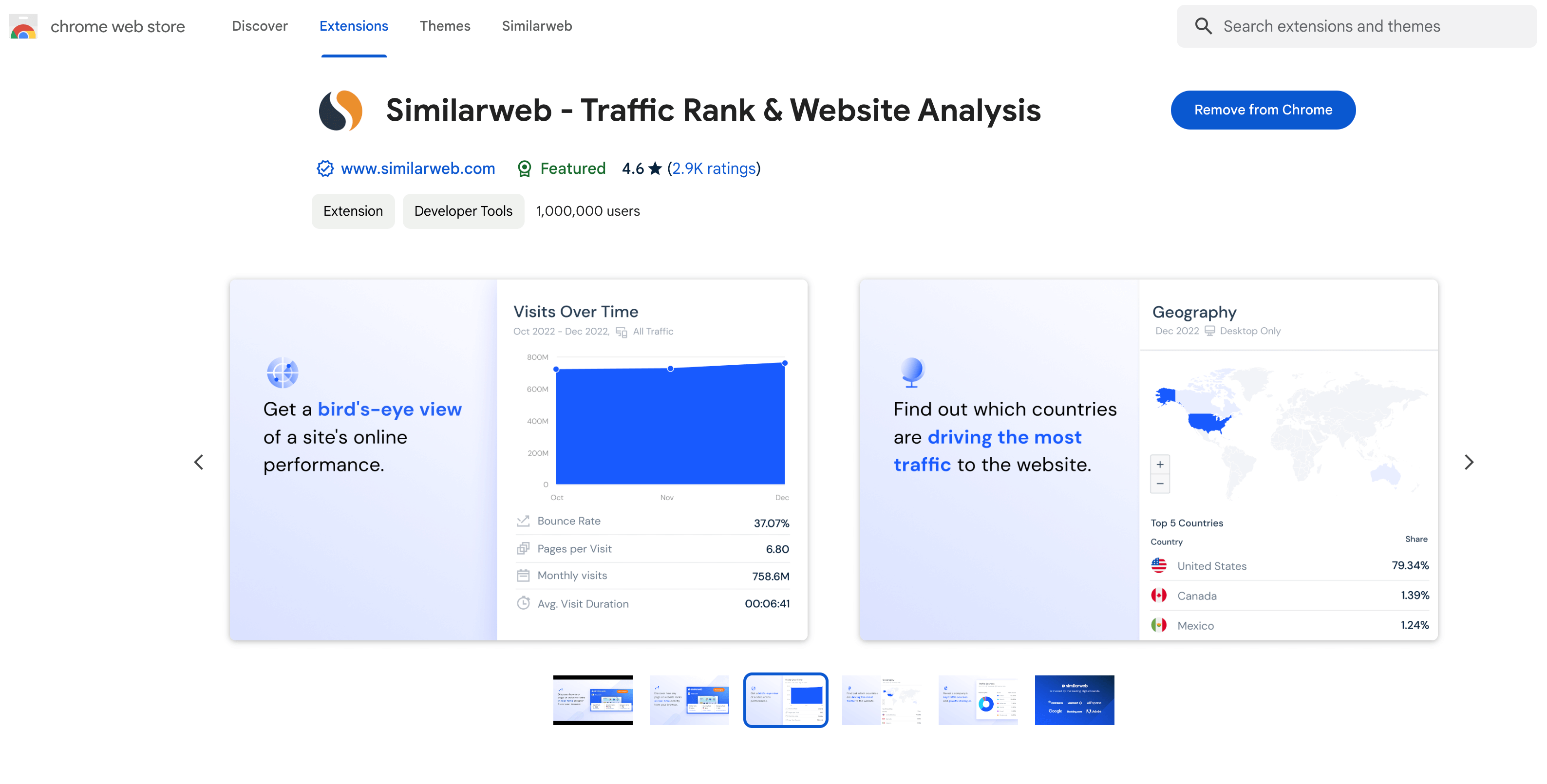
Instantly analyze any website you visit with the free Similarweb Browser Extension. Gain valuable insights like traffic ranking, how long visitors stay, bounce rate, and where traffic comes from, all without leaving your browser.
This user-friendly extension, available for popular browsers like Chrome and Firefox, simplifies your workflow. It integrates seamlessly with your browsing experience, providing all the information you need in one convenient place.
Here’s a glimpse of the insights you can unlock with Similarweb’s free Chrome extension:
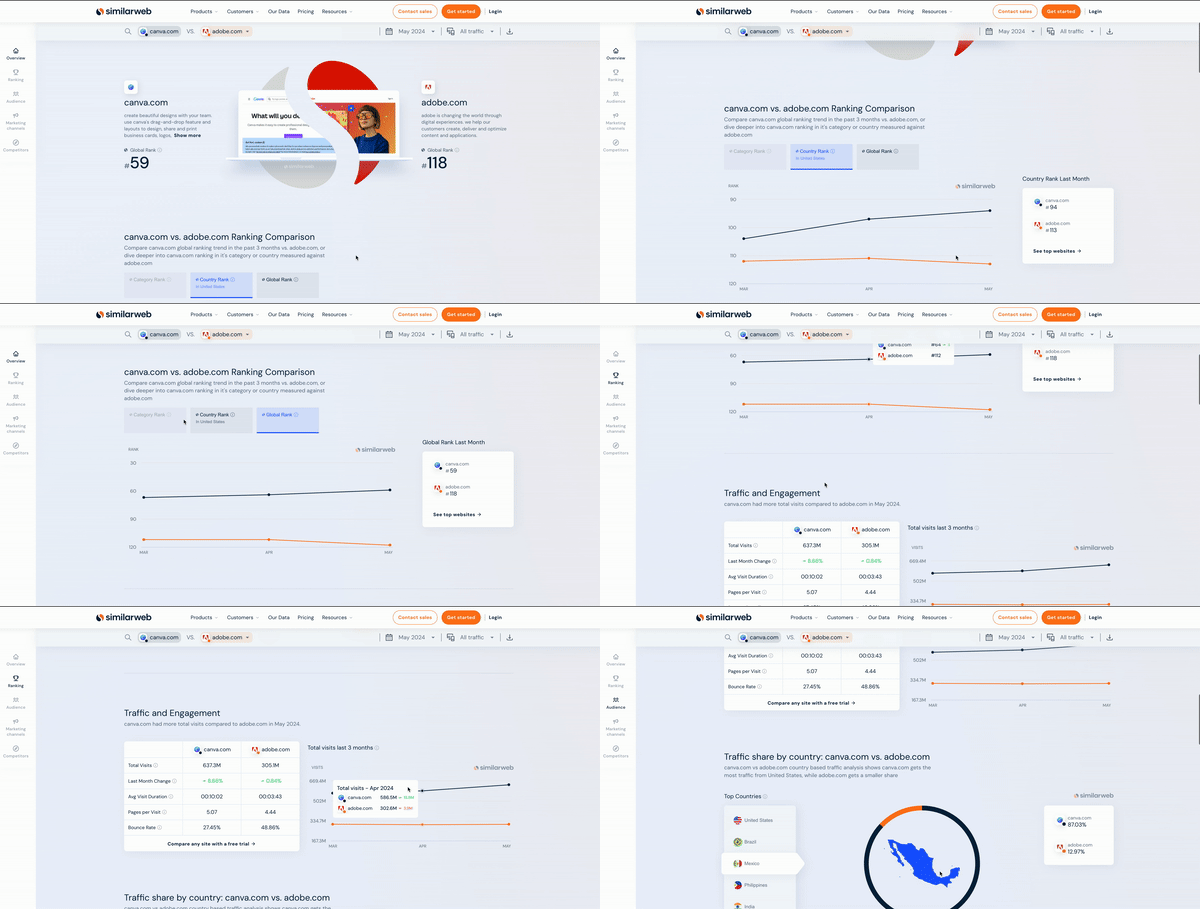
With the free Website Traffic Checker, you can reveal the most accurate, up-to-date web data to analyze your competitors’ performance and strategies and optimize your own strategy. Analyzing a website’s traffic provides valuable insights into user behavior, helping you understand how and why your audience visits your site. This information can enhance your site’s user experience, drive new traffic, contextualize your performance compared to competitors, and pinpoint areas for improvement.
Some key engagement metrics you can uncover when checking your website traffic with Similarweb include monthly visits, visit duration, page views, average pages per visit, and desktop vs. mobile device split. Monthly visits provide a foundation for traffic analysis and help you compare performance against competitors and industry trends. Engagement metrics such as session duration, pages per visit, and bounce rate reveal how visitors interact with your website, helping you identify areas for improvement.
The free tool is limited to comparing up to one other website and only shows All Traffic (without a breakdown for only Desktop or Mobile Web, which are part of the paid offering).
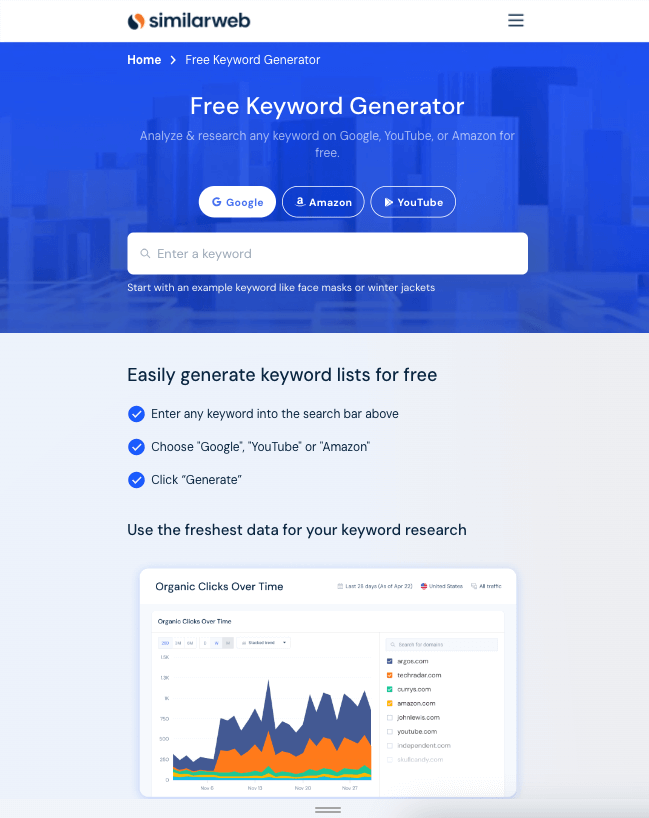
Use the freshest data for your keyword research. Similarweb lets you generate keyword lists for free from any seed keyword you want and get accurate search stats on Google, YouTube, and Amazon. You can also utilize advanced search stats and filters, deep dive into any keyword research, get keyword stats for any country, CPC, intent, and more.
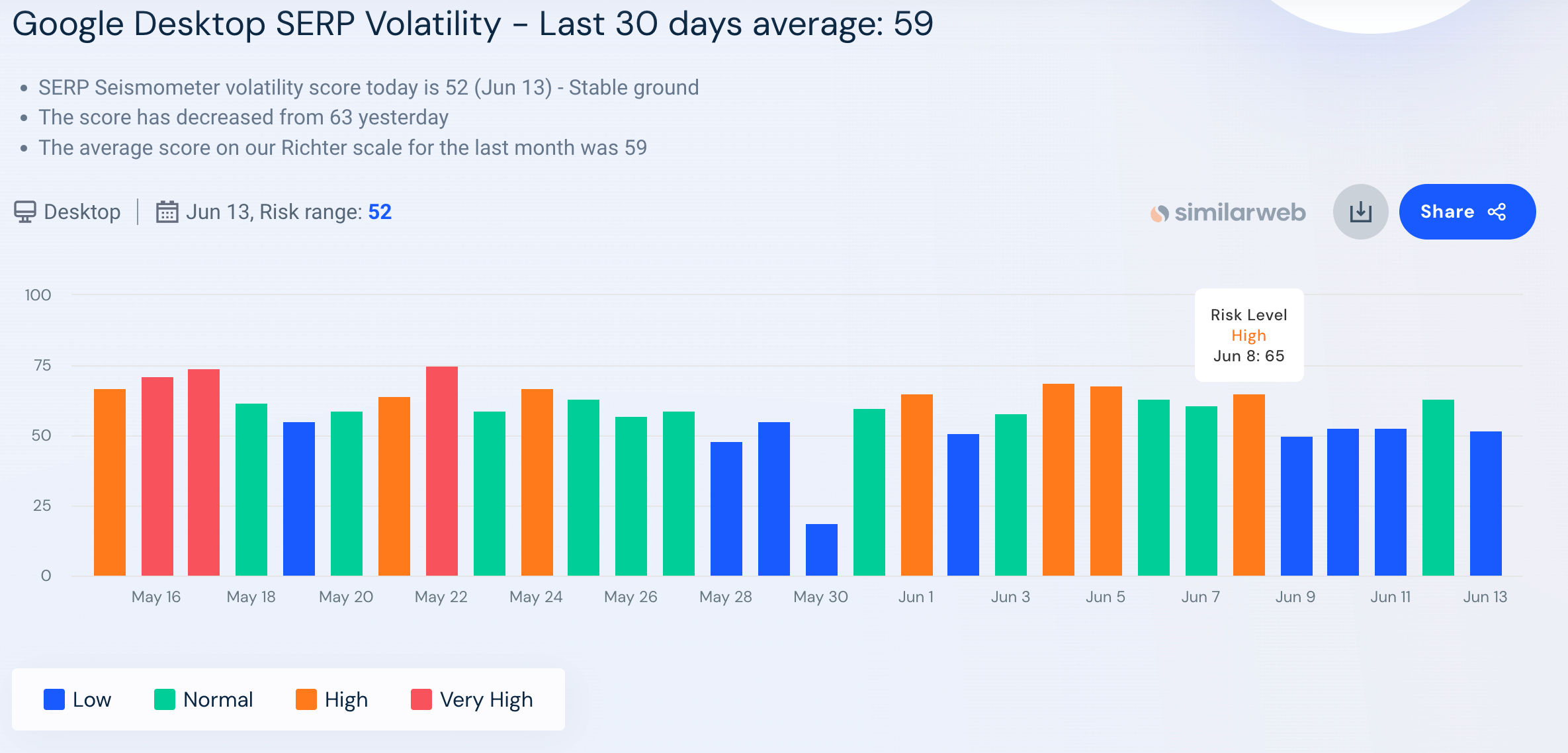
Similarweb’s SERP Seismometer is a unique tool that lets you track Search Engine Results Page (SERP) volatility in Google. It identifies and analyzes the ranking patterns of Google algorithm changes to help you avoid ranking fluctuations that can impact your site’s performance. Every year, Google launches various algorithm updates, including major ones like Broad Core Updates and Product Review Updates. However, more minor updates can also leave your rankings in a constant state of fluctuation.
The free SERP Seismometer provides comprehensive daily monitoring of ranking fluctuations and Google algorithm changes, so you don’t have to wait for the press to tell you that an update is rolling out.
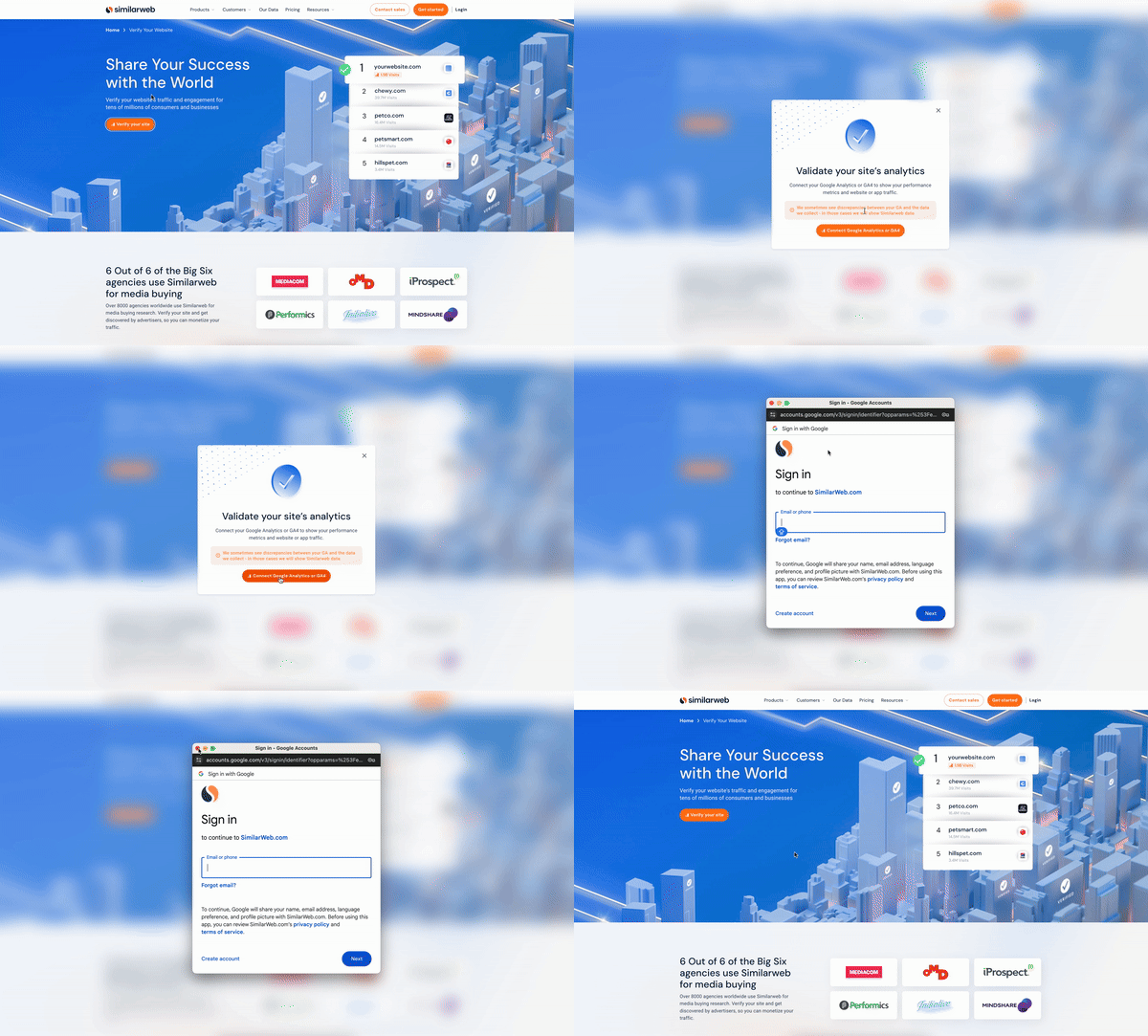
Within minutes, you can connect your first-party analytics (e.g., Google Analytics) to Similarweb to enhance your traffic analysis. This ensures higher accuracy of your competitive set and better alignment with what you see in GA. Use the free Verify Your Website tool to verify your website’s traffic and engagement for millions of consumers and businesses. This tool helps Google discover you and allows you to monetize your traffic across searches.
This was only the tip of the iceberg regarding what you can do for free with Similarweb.
A free Similarweb account offers tremendous opportunities for digital marketers and strategists. From competitor analysis and keyword research to traffic insights and SEO, the platform serves as a powerful tool even at the free level. Leverage these capabilities without an initial investment to enhance your understanding of the digital landscape and refine your strategies effectively.
Sign up for a free Similarweb account, dive into the data, and start making smarter, more informed marketing decisions today. Every digital insight offers a chance to lead in your market!

Principal Product Marketing Manager
Daniel brings 10+ years of marketing experience, specializing in both B2B and B2C audiences. He thrives at managing delivery of projects, consistently developing concepts that drive impact.
Muse app breakdown: what Meta's AI agent means for brands


What Is Retail Intelligence? How It Works and Why It's Essential to Digital Commerce
The ultimate solution to help you build the best digital strategy
