

Sie haben Ihr Suchlimit erreicht
Starten Sie Ihren kostenlosen Testzugang, um weiterhin alle Traffic- und Performance-Insights zu erkunden.
Los geht'sDuo Keyboard: Resize & Split App-Analysen für 17. November

Duo Keyboard: Resize & Split
- connectzero. inc
- Apple App Store
- Bezahlt
- Versorgungseinrichtungen
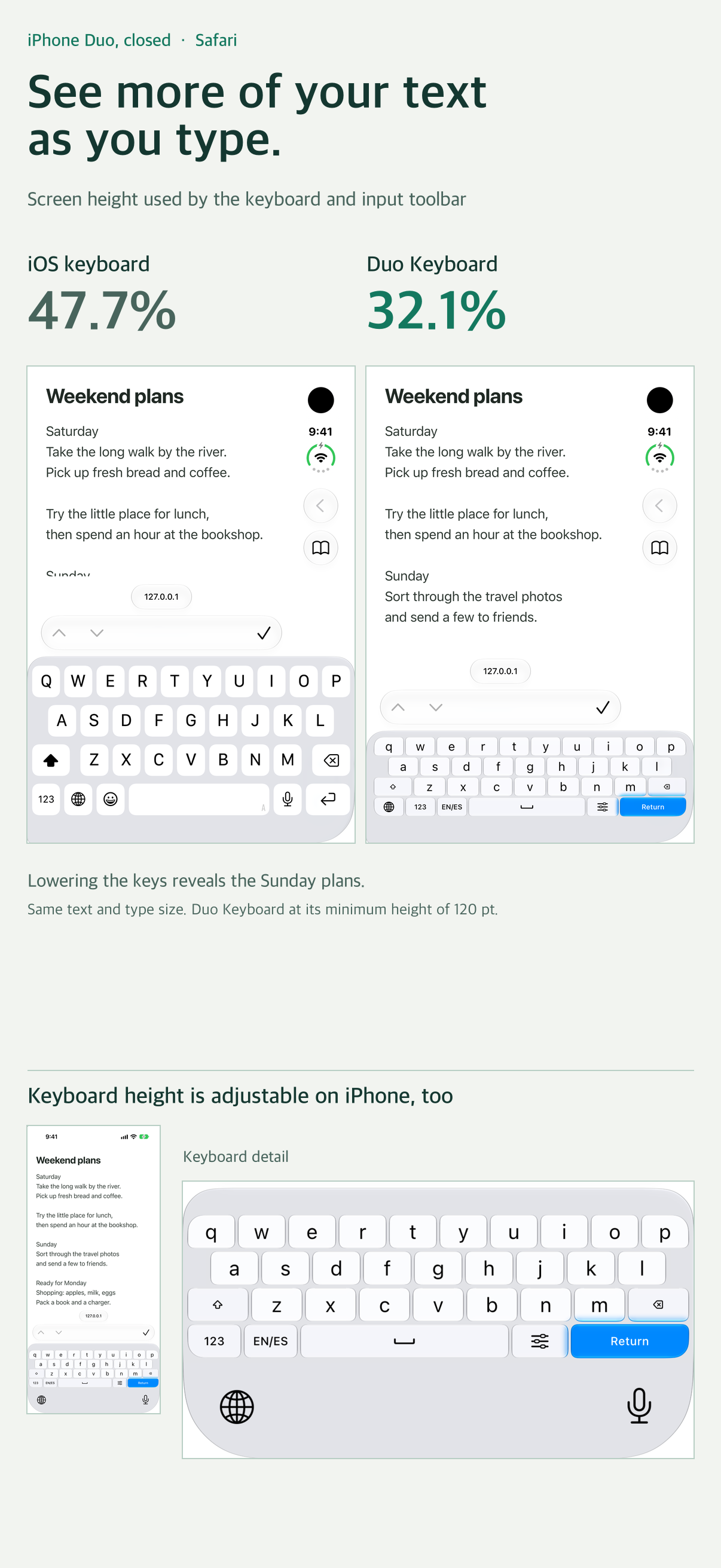
On a closed iPhone Duo, lower the keyboard to keep more of the message in view while you write your reply.
Look for Sunday’s plans in the first screenshot. With the same Safari note open, switching from the English system keyboard to Duo Keyboard at 120 pt reduced the keyboard and input toolbar from 47.7% to 32.1% of the screen height. Two more lines of the note came into view. This example was measured on a closed iPhone Duo simulator in portrait on iOS 27.1.
WHEN YOU CHANGE HANDS
Swipe the language switch key left for a left-handed keyboard or right for a right-handed keyboard. You can also swipe the empty space beside the keys to bring them over to the other side.
WHEN YOU OPEN YOUR DUO
On a wide screen, swipe down on the switch key to split the keys between your thumbs. Swipe up to bring them back together at full width. Duo Keyboard remembers your size and position separately for narrow and wide screens.
YOUR SIZE AND LANGUAGES
Hold the switch key to open settings above the keyboard. Adjust height and width while watching the keys change. In Typing, choose two inputs from 30 languages and emoji, then tap the switch key to swap between them. Try Korean and English, English and Spanish, or French and emoji. One purchase includes all layouts.
30 INPUT LANGUAGES
Korean, English, Spanish, French, German, Russian, Portuguese, Italian, Indonesian, Vietnamese, Turkish, Polish, Ukrainian, Dutch, Swedish, Malay, Filipino/Tagalog, Arabic, Hindi, Thai, Bengali, Urdu, Persian, Chinese, Japanese, Marathi, Javanese, Nigerian Pidgin, Telugu and Tamil.
Chinese supports Pinyin with Simplified and Traditional conversion; Japanese supports romaji with kana and kanji conversion; Vietnamese supports Telex. Arabic, Hindi, Thai, Bengali, Urdu, Persian, Marathi, Telugu and Tamil use paged character entry. Javanese uses Latin script. General autocorrection and next-word prediction are not provided.
FAMILIAR LAYOUTS, USEFUL CONTROLS
• English QWERTY and 12-key
• Korean QWERTY, Danmoum, Cheonjiin, Naratgeul, Cheonjiin Plus and Vega
• Three-column number and symbol pads for compact layouts
• Optional number row and settings key, switch-key placement and English auto-capitalization
• Adjustable glass opacity; Liquid Glass on iOS 26 and later, with a compatible appearance on earlier supported versions
• Swipe on Space to move the text cursor
• Return follows the input field's action; hold it for a newline
NO FULL ACCESS REQUIRED
Keyboard input is not logged or automatically transmitted. All typing, including Chinese and Japanese conversion, runs on your device. Full Access is not required. Optional bug reports are emails you review and send yourself; the report and reply address are received for support.
GET STARTED
1. Open Settings > General > Keyboard > Keyboards.
2. Tap Add New Keyboard and choose Duo Keyboard.
3. In a text field, hold the globe key and select Duo Keyboard.
4. Hold the actual keyboard's switch key to set size, placement and inputs.
BEFORE YOU BUY
• iOS controls the available width and bottom system area. Margins may remain on some devices or in some apps. Split mode requires a wide enough input area.
• Empty areas around or between the keys remain part of the keyboard. They do not reveal the document underneath. There is no free-floating keyboard or system mouse pointer.
• iOS may use its own keyboard in password or certain phone fields, and in apps that disallow third-party keyboards. Some fields do not accept newlines.
• In-app practice settings are separate from the actual keyboard's saved settings.
• On a wide screen, after moving the keys and reopening the keyboard, the previous position may briefly appear before the saved position is displayed.
Rang speichern
Der Store-Rang basiert auf mehreren Parametern, die von Google und Apple festgelegt wurden.
Alle Kategorien in
Vereinigte Staaten--
Versorgungseinrichtungen in
Vereinigte Staaten#99
Top-Wettbewerber und alternative Apps
Apps mit hoher Wahrscheinlichkeit, von denselben Benutzer:innen aus demselben Store verwendet zu werden.

NiceClock Analog Pro

EmpireClock

Dúo Calculator

Duo Keyboard
 Duo Keyboard: Resize & Split VS.
November 17, 2026