

You’ve hit your search limit
Start your free trial to keep exploring full traffic and performance insights.
Get StartedAnálisis de la app WOV : creative textures para 2 de noviembre

WOV : creative textures
- K-Devices
- App Store de Apple
- Pagado
- Música
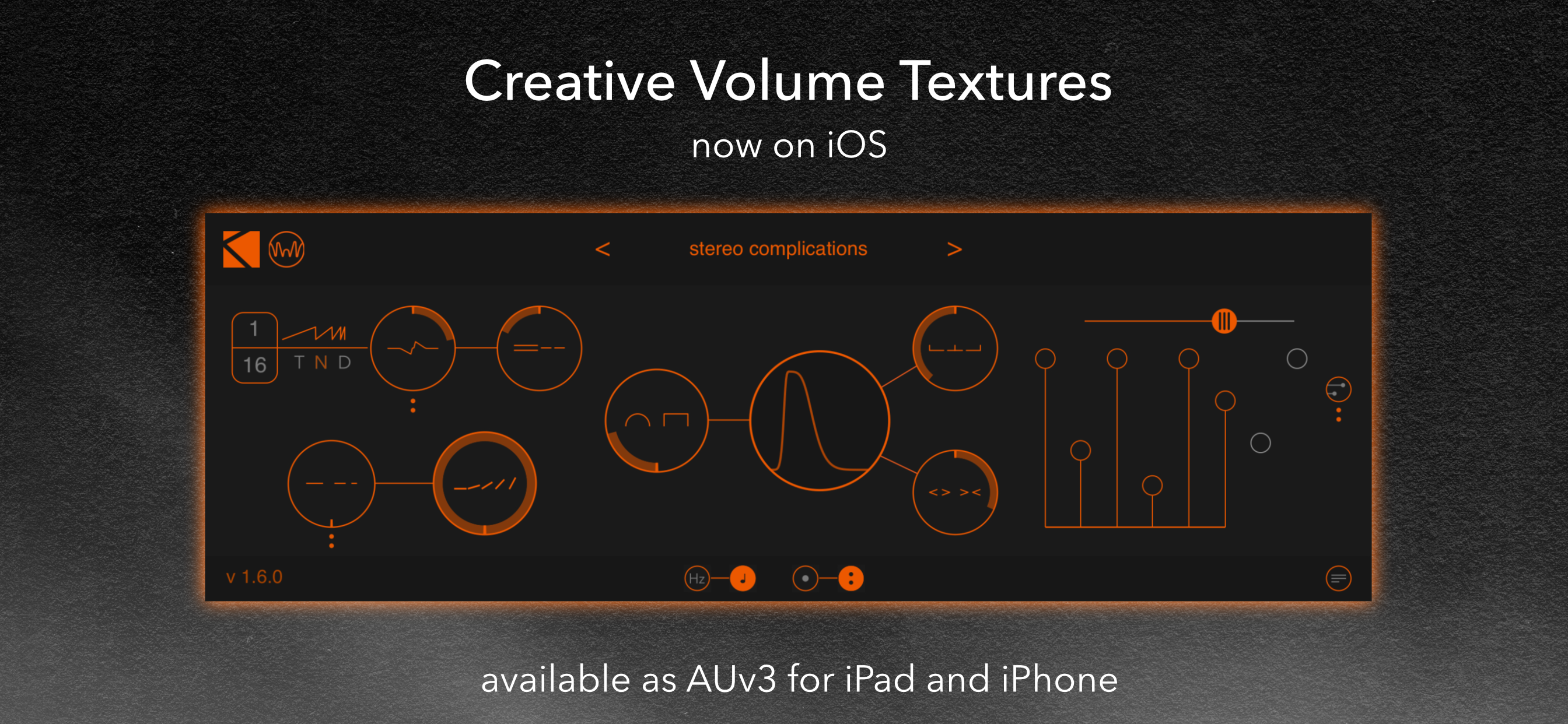
WOV for iOS is an AUv3 effect for making a wide range of textures out of your sounds – from familiar tremolo waves to glitchy stutters and everything in between.
WOV lands on iOS with an injection of inspiring presets by Richard Devine and Stèv!
*** Please note: WOV is an Audio Unit extension (AUv3) – it only works in an AUv3 host app like Garageband, AUM, Cubasis, Modstep, Beatmaker 3, etc... ***
HOW IT WORKS / DESCRIPTION
The Rate Section
This section determines the rate or speed at which WOV operates. Rate can either be assigned in Hz, or in fractions of a beat in sync with a hosting app – to switch between Hz and sync modes, use the switches at the bottom center of WOV.
It’s easy to set up a static rate for WOV and leave things at that – but WOV has much more to offer! To the right of the Rate control, the bipolar Response knob sets the sensitivity with which WOV’s rate will either slow down or speed up depending on the volume of the incoming signal. The bipolar Variation control further introduces randomized amounts of variation to the rate – at its extremes going as far half the rate (knob to the far left) or twice the rate (knob to the far right).
The Depth Section
Depth sets the amount of modulation over the dry signal – to the left and it’s more subtle, all the way to the right and WOV will act as a repeating gate. Silence introduces more randomness to the plugin, increasing the likelihood that the amplitude will be zero for some cycles.
The Waveform Section
The waveform of a tremolo effect is essentially its repeating envelope. Classic tremolo effects offer stock waves – WOV, being a K-Devices product, is much more customizable!
The Wave knob morphs between a quasi-sine shape (far left) and a slightly rounded-off square shape (far right). Peak acts as a kind of attack control for the waveform – far left for a sharp attack, or far right to reach the peak more gradually. Finally, the Warp knob allows you to either squeeze or expand the waveform, affecting the length of each sound. When the Wave control is set to a full square, Warp acts as a duty cycle/pulsewidth control.
The Accents Multislider
The eight-step sequencer uses a multislider to set the relative accent value for each beat of the rate. The slider adjusts between two and eight steps in length, and a button offsets the accents going to the right channel one step over from the left (note that this requires Stereo to be enabled).
—
Get Wide
WOV can either preserve the stereo placement of its input signal, or it can add stereo offset to the output signal. Enabling the Stereo switch directly affects the Response, Silence, and Sequencer for a wider sound.
Go By Feel
As part of encouraging more musical and creative applications of WOV, in addition to using symbols for controls, the controls in WOV do not have individual readouts. We encourage you to let your ears determine the right knob positions whenever you can! If you’d like a precise readout, however, you can see/edit it by clicking on any parameter and looking in the upper-right corner of WOV.
Icons
By default, all labels are graphical – for text labels, click the symbols/text label switch in the lower-right had corner.
Clasificación de tiendas
El Store Rank se basa en múltiples parámetros establecidos por Google y Apple.
Todas las categorías en
Estados Unidos--
Música en
Estados Unidos--
Principales competidores & aplicaciones alternativas
Aplicaciones con una alta probabilidad de ser utilizadas por los mismos usuarios, desde la misma tienda.

BLEASS Dragonfly

TB BitJuggler

Things - Bubbles

Speakers - Mics & Loudspeakers
 WOV : creative textures VS.
noviembre 2, 2026