

You’ve hit your search limit
Start your free trial to keep exploring full traffic and performance insights.
Get StartedAnálisis de la app NeoServer: SSH Client|Terminal para 13 de julio

NeoServer: SSH Client|Terminal
- Space-Time Transformation Technology Co., Ltd.
- App Store de Apple
- Gratis
- Herramientas para desarrolladores
NeoServer is a powerful SSH terminal and server management app for developers, sysadmins, and self-hosting users.
Connect to Linux servers, VPS machines, cloud hosts, NAS devices, Raspberry Pi boards, and AI compute nodes. Use a fast mobile terminal, manage Docker and Podman containers, browse files with SFTP, monitor server metrics, run shell scripts, keep tmux and zellij sessions alive, and handle common remote server tasks from your iPhone or iPad.
◉ Terminal and Remote Access
• SSH connections to Linux, macOS, and BSD servers
• Password and private key authentication
• Jump server and SOCKS5 proxy support
• Run shell initialization scripts after connecting
• Built-in special keyboard, copy, paste, and quick actions
• Command completion hints, with double-tap TAB support
• Deep tmux and zellij support for fast session recovery
• Built for Codex and Claude Code workflows, with direct paste or upload of images, videos, and files
• Custom terminal themes, fonts, and programming ligature fonts
◉ File Management (SFTP)
• Browse server files and directories
• Upload, download, delete, and rename files
• View file size, permissions, and modification time
• Edit files online
• Syntax highlighting for common programming languages
• Preview images, logs, configuration files, and more
◉ Batch Script Execution
• Run scripts on one or multiple servers
• Organize servers into groups
• View script execution history
• Execute maintenance tasks in batches
• Suitable for batch updates, deployments, and inspections
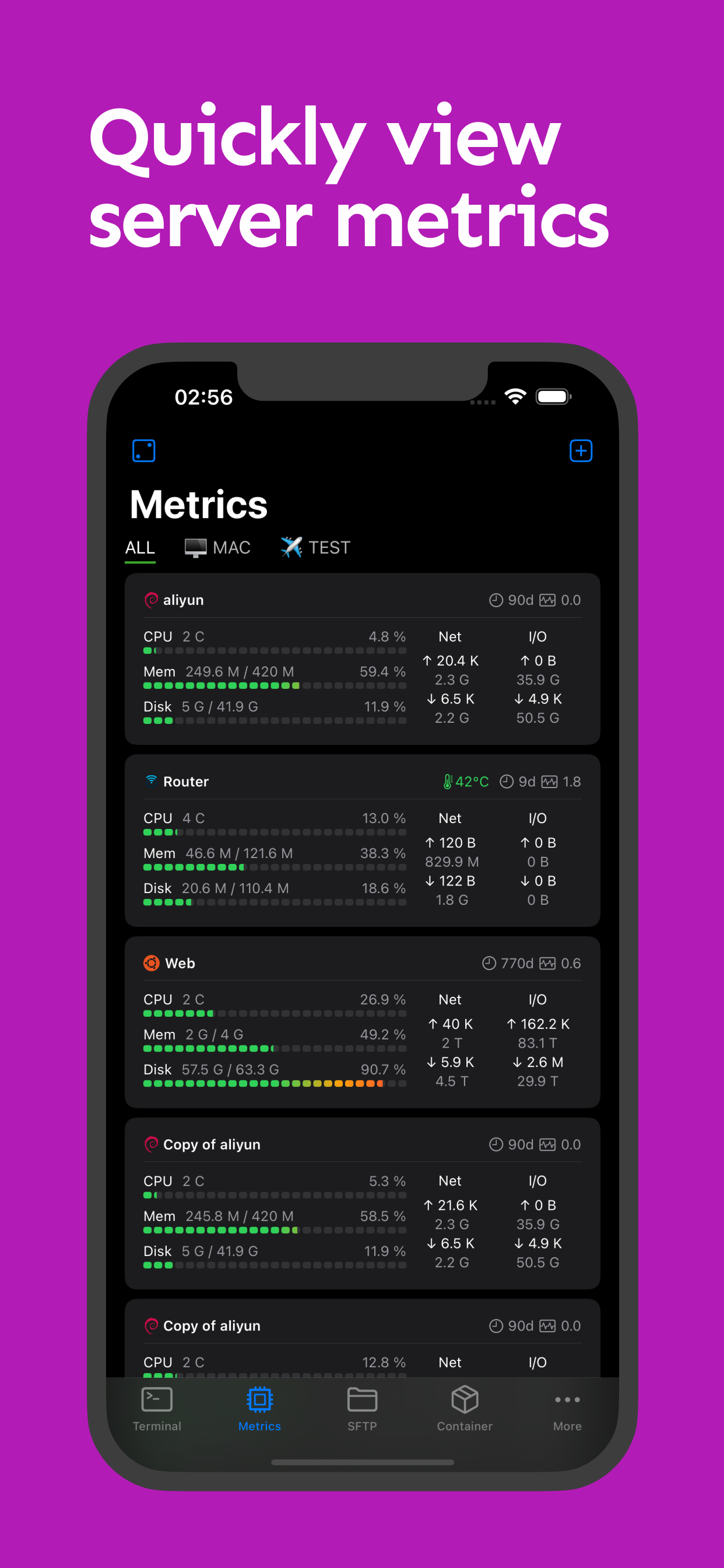
◉ Server Monitoring
View server status in real time:
• Uptime
• 1 / 5 / 15 minute system load
• CPU model, temperature, and usage
• Memory usage
• GPU usage and GPU task information
• Disk capacity, IOPS, and I/O Wait
• Disk read/write speed and total read/write volume
• Network upload and download speed
• Total traffic statistics
• Network interface details, IP addresses, and UP/DOWN status
Key metrics can also be shown directly in iOS widgets.
◉ Process Management
• View the system process list
• Show PID, user, CPU, memory usage, and more
• Sort by columns
• Send signals to terminate processes
◉ Docker and Podman Management
• View container status
• View container logs
• View inspect information
• Create, start, stop, and restart containers
• Pause and delete containers
• Manage images and container resources
◉ Remote Wake and Automation
• Wake-on-LAN (WOL) remote startup
• Wake LAN devices with one tap
• Remote shutdown and daily operations support
• Great for NAS and home server users
◉ Security and Data Sync
• Face ID / Touch ID app protection
• Sync data with your private iCloud storage
◉ Who NeoServer Is For
• Home server users
• NAS users (Synology, QNAP, TrueNAS, and more)
• Website administrators and operations engineers
• Developers and programmers
• AI model researchers
• Cloud server administrators
◉ Feedback and issues: h2eros.z@gmail.com
◉ Data Privacy:
◦ All data is stored on your device. NeoServer does not transmit data to any server other than the servers you configure. It also has no third-party analytics or advertising network connections.
◦ Privacy Policy: https://www.joyk.com/en/doc/neoserver-privacy.html
◦ Terms of Use: https://www.apple.com/legal/internet-services/itunes/dev/stdeula/
Clasificación de tiendas
El Store Rank se basa en múltiples parámetros establecidos por Google y Apple.
Todas las categorías en
Estados Unidos--
Herramientas para desarrolladores en
Estados Unidos#148
Principales competidores & aplicaciones alternativas
Aplicaciones con una alta probabilidad de ser utilizadas por los mismos usuarios, desde la misma tienda.

ServerCat - SSH Terminal

Docker Server Admin

SSH Client - Secure ShellFish

Docker Manager GUI - WhaleDeck
 NeoServer: SSH Client|Terminal VS.
 julio 13, 2026