

Chroma - Icon Pack のアプリ分析 5月3日

Chroma - Icon Pack
- Nate Wren Design
- Google Play ストア
- 有料
- パーソナライズ
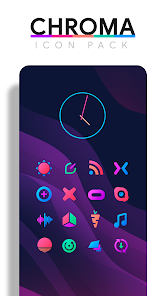
Chroma is a colorful icon pack featuring simple minimalist icons using 5 hand-picked shades to provide an pleasing and consistent color palette. Color up your display with some simple, clean Icons. Included with the hand-crafted icons are matching wallpapers, and widgets for clocks, battery & weather. Widgets offer color, size, and font customization and over 200 custom made and hand-picked wallpapers included.
QUICK TIPS
You can manually edit icons in most launchers by long-pressing the icon you'd like to edit.
Widgets: If your widget stops updating, check your system or battery settings to make sure the app is exempt from battery optimization. More info at https://dontkillmyapp.com/
DISCLAIMER
You may need a 3rd party launcher to apply the icon pack.
HOW-TO GUIDE
http://natewren.com/apply
FEATURES
• 4,500+ hand crafted flat, clean & simple colorful flat HD icons with many variations of default icons such as phone, contacts, camera, etc.
• 300+ Customized wallpapers. Wallpapers include abstract designs & illustrations, 3D renders inspired by the theme, and landscape photos. All wallpapers shown are included!
• XXXHDPI high definition colorful icons included for super large HD screens. All Icons are 288x288
• Some parts of the flat icons are transparent letting each show the provided sky/landscape backgrounds or to your own backgrounds
• Wallpaper chooser comes installed
• Request icons via "Request" tab
• Clean icons go with any background but work best with minimalist dark/light backgrounds.
• Muzei support for rotating wallpapers
• New icons added regularly
WIDGETS
System widgets as well as editable KWGT widgets are included.
• Battery widgets
• Digital clock widgets
• Analog clock widget
• Weather widgets
COLOR HEX CODES
Red: #eb3488
Purple: #8751a1
Orange: #f48075
Green: #24b89d
Blue: #4186c6
HOW TO APPLY ICONS VIA ICON PACK
1. Open the app after installing
2. Navigate to "Apply" tab
3. Select your Launcher
HOW TO APPLY ICONS VIA LAUNCHER
1. Open Launcher settings by tapping + holding on an empty area of home screen
2. Select personalization options
3. Select icon pack
FOLLOW ME
Twitter: https://twitter.com/natewren
QUESTIONS/COMMENTS
natewren@gmail.com
http://www.natewren.com
Chroma - Icon Pack使用ランク
使用ランクは、28日間の現在のインストール数とアクティブユーザー数を計算するSimilarwebのアルゴリズムに基づいています。
業界別 ウェブサイトカテゴリーで
米国--
パーソナライズで
米国--


 Chroma - Icon Pack VS.
 5月 3, 2026