

BoardNotes: Notes, PDF, Docs 앱 분석 (10월 21일)

BoardNotes: Notes, PDF, Docs
- Chongqing Ouluowa Technology Co., Ltd.
- Apple App Store
- 무료
- 생산성
Feature Introduction:
BoardNotes is a versatile handwriting note-taking app that integrates five major functions—whiteboard, notebook, PDF, mind map, and flashcards—covering most note-taking scenarios. It serves as your All-In-One App.
Handwriting Pen:
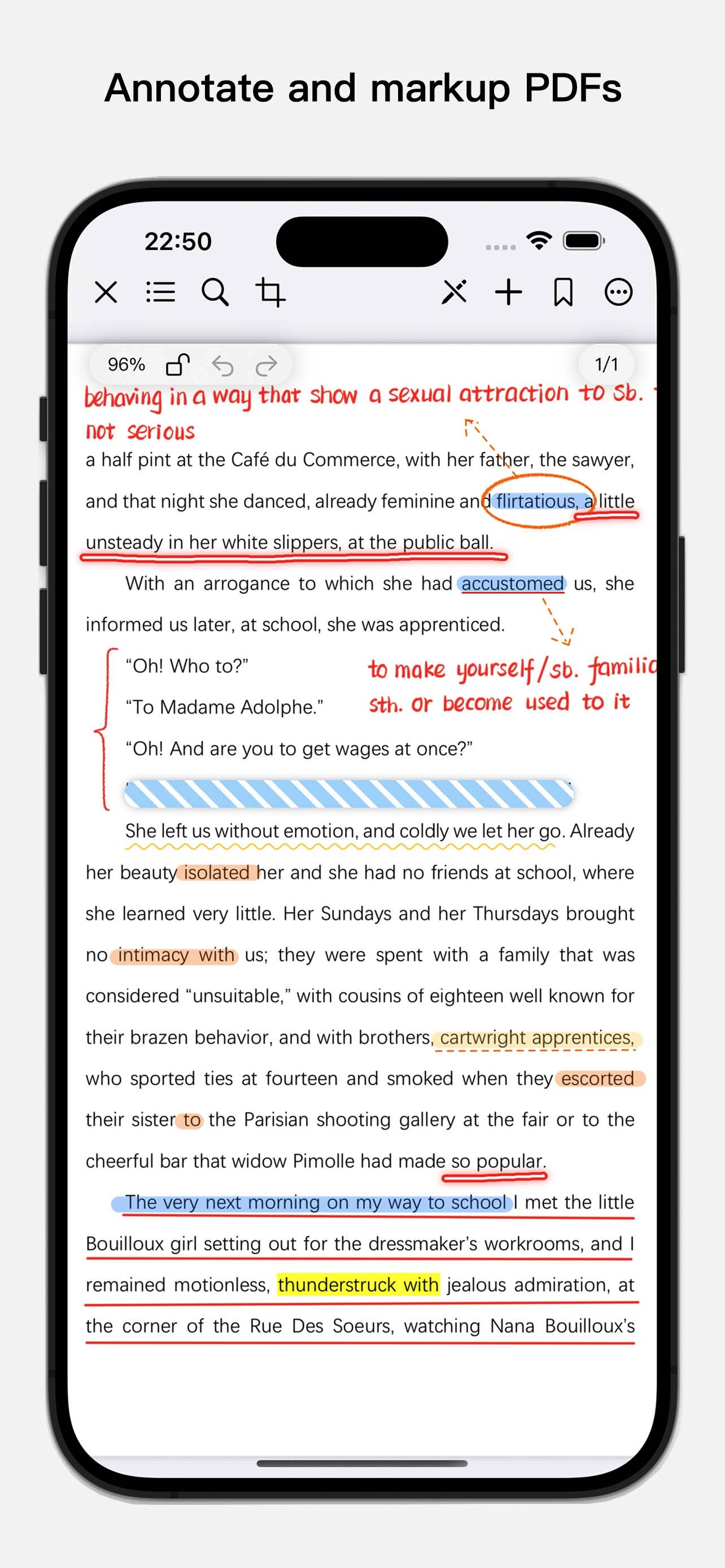
1. BoardNotes utilizes Apple's native pen technology and has developed additional pens tailored for Chinese writing, including a fountain pen, a laser pointer for presentations, and a tape pen for masking notes.
2. Choose from a variety of brushes (laser pen, tape pen, ballpoint pen, straight-line pen, wavy-line pen, custom fountain pen, quill pen, pencil, marker, watercolor pen, fill pen, single-line pen, crayon, freehand pen) to unleash your creativity.
3. Lasso tool (extremely powerful).
4. Eraser (pixel eraser and object eraser).
Whiteboard:
1. The whiteboard is ideal for organizing fragmented knowledge, brainstorming, and boosting creativity.
2. Write and draw freely without worrying about boundaries.
3. Customize background colors and grid templates.
4. Add various card types (text, image, video, audio, webpage, file, handwriting).
5. Multiple auxiliary tools: background board, pins, link navigation (supports bidirectional links), connectors, timer (countdown supported), calculator.
6. Quickly locate notes using the search function.
Notebook & PDF:
1. Create notebooks and PDFs with multiple paper templates and cover options. Import images from Photos or PDFs from the Files app as pages or covers.
2. Add text, images, stickers, videos, webpage snapshots, audio recordings, links (bidirectional links supported), timers, calculators, and floating PDF windows.
3. Layer functionality—show or hide layers as needed.
4. Insert new pages via blank sheets, images, scanned documents, or files.
5. Cut, copy, and paste pages into other notebooks or PDFs.
6. Duplicate, rotate, or delete pages.
7. Reorder pages via long-press and drag in thumbnail view.
8. Create outlines and add bookmarks.
9. Search (text, handwritten notes, etc.).
10. Import e-books (epub, mobi, azw, etc.).
Mind Map:
1. Mind mapping is a key feature within the whiteboard.
2. Nodes support multiple formats (text, image, handwriting, video, audio, webpage snapshot, file).
3. Offers 3 structures and 18 color schemes.
4. Add summaries (brackets).
5. Handwritten mind maps (using handwritten cards).
6. Long-press and drag selected cards into the mind map.
7. Reorder nodes or adjust hierarchy via long-press and drag.
Flashcard:
1. Flashcards use the SuperMemo algorithm to automatically schedule optimal review intervals, reminding you before forgetting to maximize memory efficiency.
2. Flashcards support text, images, and handwriting.
3. Quickly create cards from notes in whiteboards, notebooks, or PDFs using the rectangular lasso tool.
Download BoardNotes for free on iPad, iPhone, and Mac.
For suggestions, please contact us via the in-app feedback feature.
스토어 순위
스토어 순위는 Google과 Apple이 설정한 여러 매개변수를 기반으로 합니다.
모든 카테고리 ·
미국--
생산성 ·
미국--


 BoardNotes: Notes, PDF, Docs VS.
 10월 21, 2026