

Read.md 앱 분석 (10월 21일)

Read.md
- Pavel Abin
- Apple App Store
- 무료
- 유틸리티
Open any .md file and read it beautifully — on your iPhone, iPad, or Mac.
Read.md is a markdown reader. Not an editor, not a note-taking app, not a vault system. A reader. Tap a .md file, it opens, it looks great, you read it.
PERFECT RENDERING
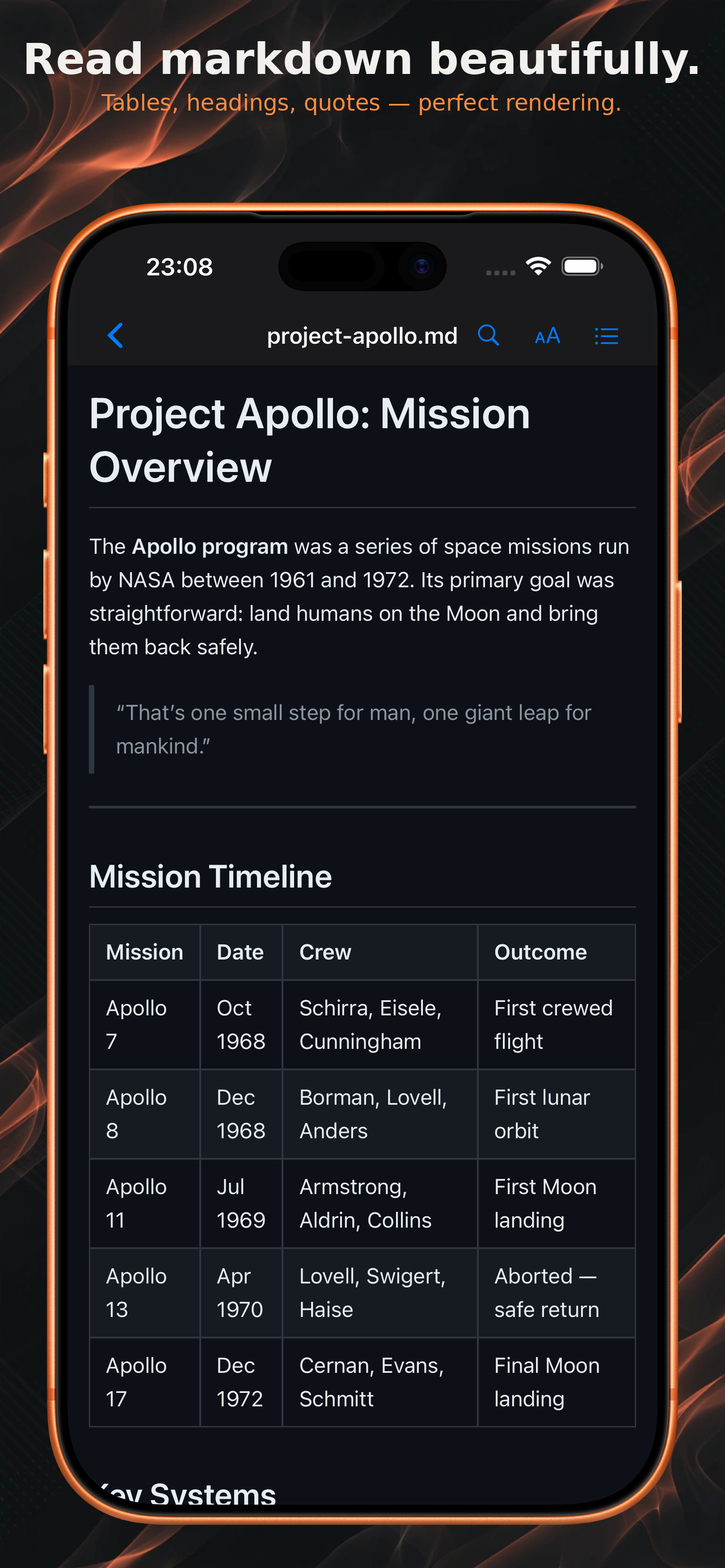
Tables, code blocks, nested lists, task lists, blockquotes, images, links — everything renders correctly. Syntax highlighting for 180+ programming languages. GitHub Flavored Markdown fully supported.
MERMAID DIAGRAMS
Flowcharts, sequence diagrams, Gantt charts, class diagrams, and more render natively. Tap to zoom into any diagram for a detailed view.
EXPORT TO WORD, PDF & HTML
Turn any document into a real Word (.docx) file with proper headings, tables, lists and code blocks, a clean, paginated, print-quality PDF, or a self-contained HTML file — diagrams and images intact. Share it, print it, archive it. Or export the original Markdown source. (Word, PDF and HTML export are Read.md Pro; Markdown export is free.)
OPEN FROM GITHUB
Read documentation straight from the source. Browse any GitHub repository — public or private — navigate its file tree, and open any .md file with the same beautiful rendering.
Sign in with a personal access token; your token stays on your device. (Read.md Pro)
SMART DIAGRAM FIXER
ASCII art and box-drawing diagrams that look broken in other apps? Read.md detects and corrects misaligned characters automatically so your diagrams look the way they were intended.
NAVIGATE LONG DOCUMENTS
Auto-generated table of contents from your headings. Search within any document with match highlighting and next/prev navigation. Your scroll position is remembered when you come back to a file.
ZERO FRICTION
No account needed to read. No workspace. No vault. No setup. Works as your default .md file handler — open markdown and plain-text files from Files, Finder, email attachments, AirDrop, the share sheet, or drag and drop.
ADAPTS TO YOUR DEVICE
iPhone: stacked navigation with a frosted-glass nav bar and bottom sheets.
iPad: landscape split-view, portrait slide-over panels, trackpad and keyboard support.
Mac: split-view with sidebar, reader, and table-of-contents panel, keyboard shortcuts, and translucent panels.
Everything adapts automatically when you resize windows or rotate your device.
DARK AND LIGHT MODES
Switch between dark and light themes, or follow your system setting. Adjust font size to your preference. Everything updates live.
PRIVATE BY DESIGN
Opens instantly, even large files. Your markdown is rendered entirely on your device — file contents are never uploaded, and reading works fully offline. No ads. No account required to read. The only feature that touches the network is GitHub browsing, and only when you choose to use it. We use anonymous, aggregate analytics to improve the app.
READ.MD PRO
A one-time purchase — or a yearly subscription with a free trial — unlocks Word/PDF/HTML export and GitHub browsing. Everything else stays free, forever.
WHAT PEOPLE USE IT FOR
Reading AI-generated markdown exports. Turning markdown into Word documents for colleagues. Reading GitHub README files on mobile. Viewing documentation and project specs on the go. Reviewing technical docs from colleagues. Browsing personal notes written in markdown.
Terms of Use (EULA): https://www.apple.com/legal/internet-services/itunes/dev/stdeula/
스토어 순위
스토어 순위는 Google과 Apple이 설정한 여러 매개변수를 기반으로 합니다.
모든 카테고리 ·
미국--
유틸리티 ·
미국--


 Read.md VS.
 10월 21, 2026