

File Explorer Professional 앱 분석 (10월 8일)
File Explorer Professional
- Certchip
- Apple App Store
- 유료
- 유틸리티
File Explorer is a wonderful local and cloud file manager that enables you to manage files on your mobil device.
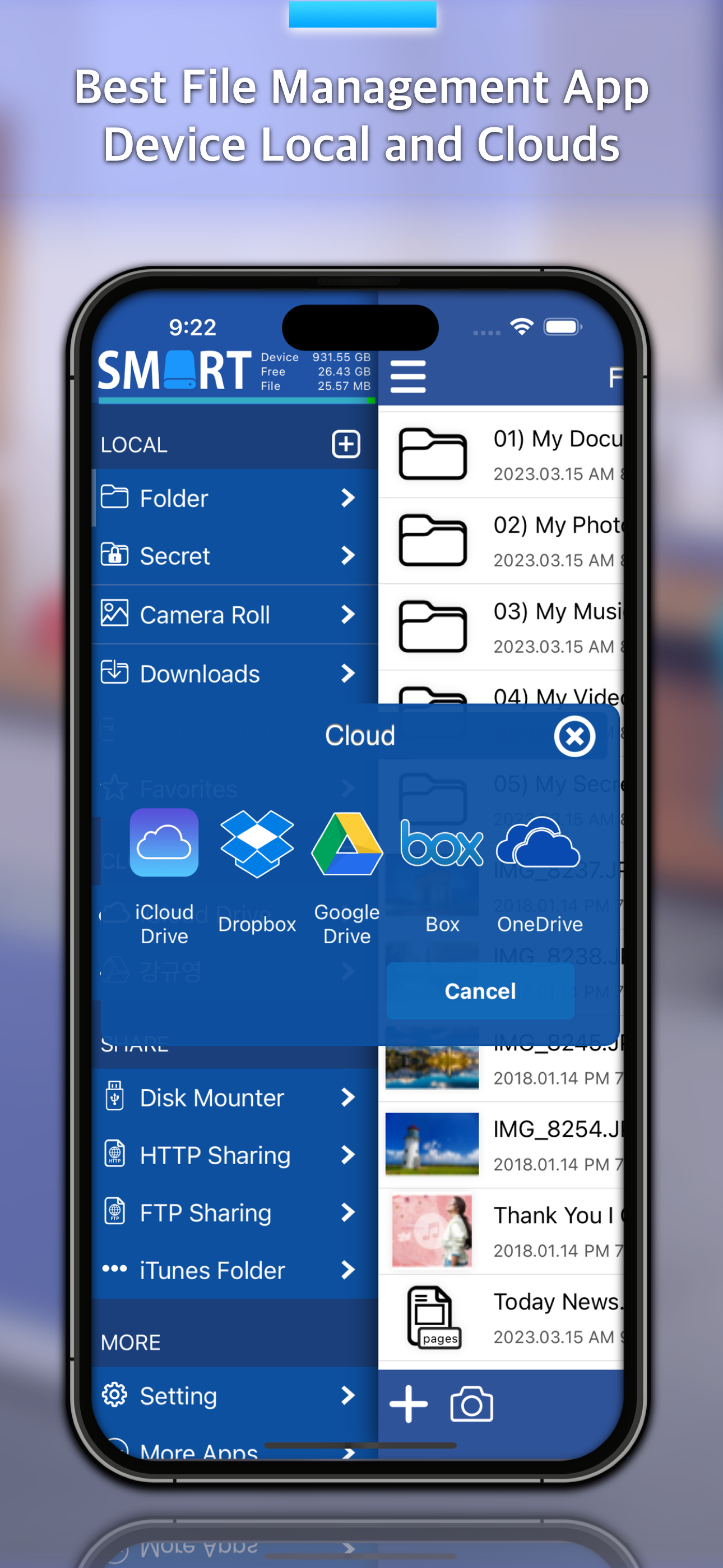
You can management your device files and cloud files. Supported iCloud Drive, Dropbox, Google Drive, Box, OneDrive.
You can send cloud file shared link to your friend.
You can play the music, video files and read documents files, manage them and export them to your computer.
You can take new photo, video and voice files.
You can use video convert and audio convert.
- Video file to MP3 file. (ex; mp4, mov, m4v -> mp3)
- Video file to MP4 file. (ex; mov, m4v -> mp4)
You can to do file sharing from your device with web sharing and ftp sharing via wifi network.
# Multi Account Cloud Drive Service Support
- iCloud Drive
- Dropbox
- Google Drive
- Box
- OneDrive
# File sharing
- Disk Mounter
- HTTP Web Sharing
- FTP Sharing.
# MP3 Convert
Audio and Video files (WAV, M4A, MP4, MOV, M4V, etc) can be converted to MP3 files extracted just audio.
# MP4 Convert
Various video files (MOV, M4V, etc) can be converted to MP4 video files.
# Photo and Video Edit
All photos and video can be rotated and flipped.
# Music Album Artwork
Picture of music album can be changed and chosen from photo album of the smart phone.
# Secret Folder
Any important data can be saved and kept safely in "Secret Folder".
"Secret Folder" provides safe locking system, which consists of password and Touch ID.
# Music Player
You can play all of music files saved in your smart phone. Especially the streaming is maintaining at sleep mode or using other apps.
# Camera
You can take photos during video record and the screen is wider than original iPhone camera.
It is involving various functions like resolution, flash and autofocus.
# Voice Recorder
You can record voice anytime and anywhere you want. Especially recording is maintaining at sleep mode or using other apps.
# Text Editor
You can simply create text file and make your important notes.
# Folder
Most basic data will be saved in the section “Folder”, as well as the functions of camera, voice record and media player are also used in Folder.
# Album
Section “Album" manages all photos and videos. You can also take and save photos in Album as well as the saved files can be copied in other sections.
# Download
If you input internet address, it opens the web page with built in Safari web browser. You can download any files linked from web sites.
# Favorites
You can set often used files or folders with star shaped button, and you can find and use the data easily in this section.
# iCloud Drive
All apple devices and Window system that have iCloud Drive can synchronize all datas through Explorer App.
# Disk Mounter
You can mount the saved files in your smart phone to Mac or Window PC conveniently.
You can install disk mounter program on your Mac / PC from http://www.smartdisk.org for free.
# HTTP Sharing
You can share and manage the files in your smart phone on the web browser through HTTP server.
# FTP Sharing
You can share and manage the files in your smart phone on the web browser through FTP server.
# iTunes Folder
You can manage the files in the app through iTunes program.
# File Zipping and Unzipping
You can zip and unzip the files or folders.
# File Export
Smart Disk Explorer supports exporting functions such as printing, mailing, opening other apps, and saving image files as photos in album.
# App Lock Passcode
The locking system will be automatically activated to protect your important data when you close the app. It supports Touch ID for convenience and safe.
스토어 순위
스토어 순위는 Google과 Apple이 설정한 여러 매개변수를 기반으로 합니다.
모든 카테고리 ·
미국--
유틸리티 ·
미국--


 File Explorer Professional VS.
 10월 8, 2026