






Muse app breakdown: what Meta's AI agent means for brands
by Noam Kadyshevitch5 Min.
Oct 29, 2026

For most bloggers, the biggest battle isn’t just creating content, it’s getting noticed in a sea of endless information. With millions of posts published daily, simply pushing out updates isn’t enough.
The solution? SEO tactics that actually move the needle. Ranking higher in search results drives organic traffic, brings in targeted readers, and gives you an edge that paid ads simply can’t match.
But here’s the catch: great content alone won’t cut it. Success comes from a powerful combination of high-quality content and strategic SEO. That’s where blog SEO steps in so your posts don’t just exist but get seen by the right audience and build lasting trust in your niche.
And with search algorithms constantly evolving, staying ahead means more than just writing. It requires smart optimization, data-backed decisions, and a deep understanding of user behavior.
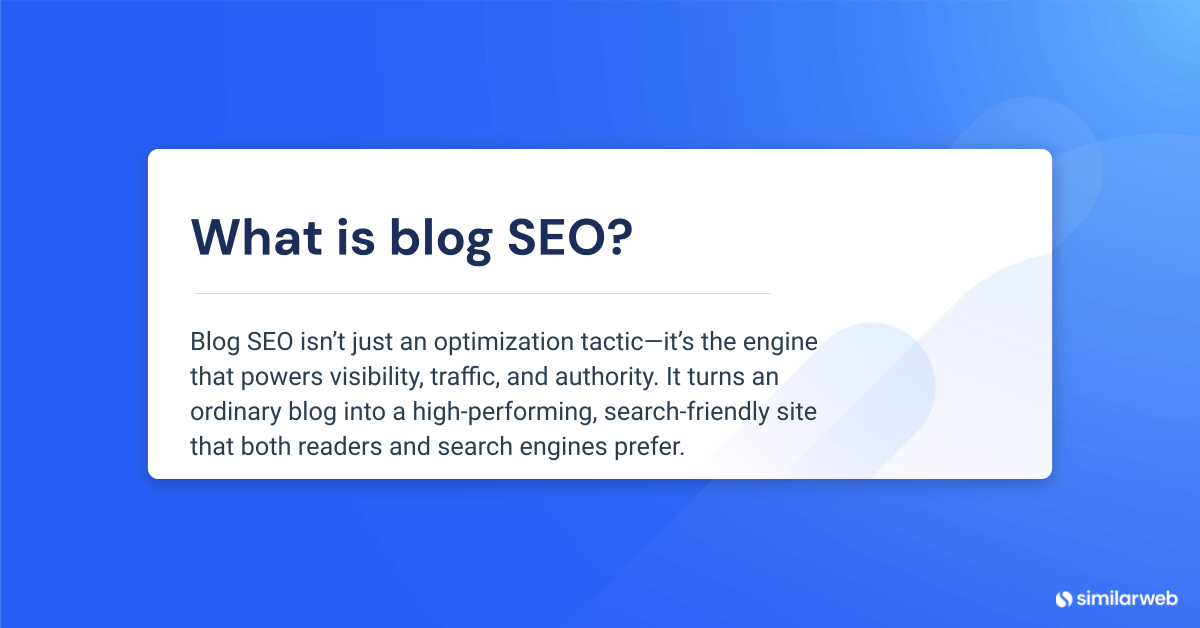
Blog SEO isn’t just an optimization tactic, it’s the engine that powers visibility, traffic, and authority. It turns an ordinary blog into a high-performing, search-friendly site that both readers and search engines prefer.
But getting there takes more than just good writing. Blog SEO is a mix of:
When done right, these strategies don’t just increase organic traffic, they make your blog more discoverable, interesting, and valuable.
There are many ways in which a well-thought-out SEO strategy can help you in terms of growth:
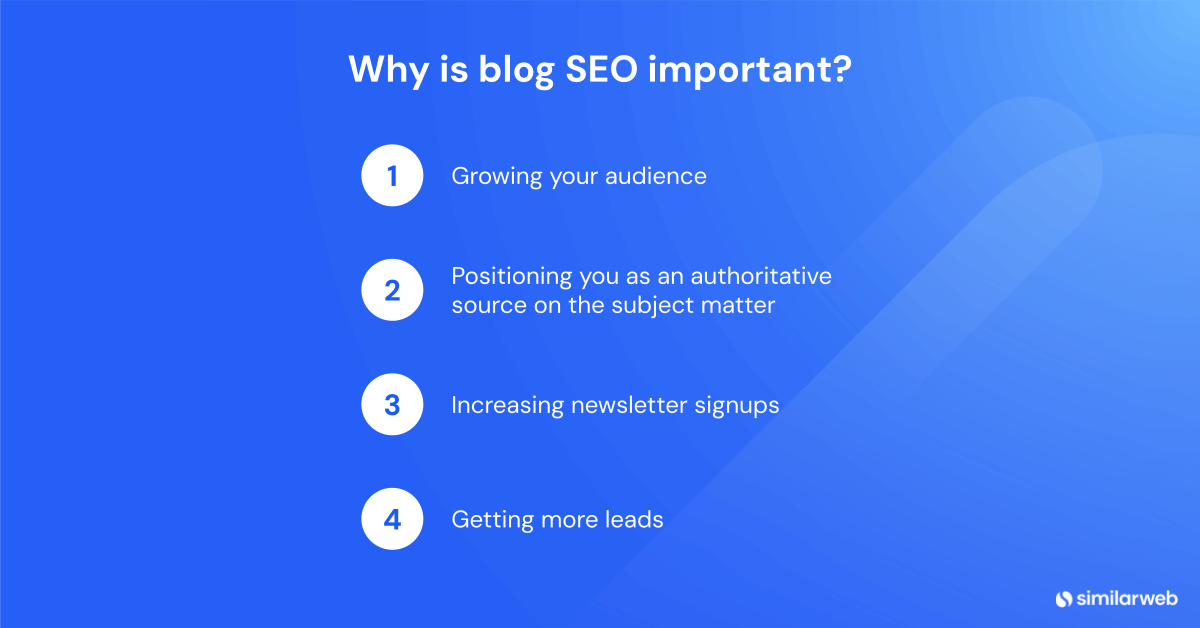
It opens opportunities to wider audiences. Well-planned SEO techniques make bloggers industry experts, bringing their profile to a new level by attracting more visitors. This tends to equate to more frequent engagement, which in turn builds reader relationships.
Blog SEO is a very important factor in driving traffic to your blog. By drawing on search engines, optimized content will reach many people beyond the audience the blog might have ideally reached first. It is not only to make the blog more widely read but also to establish the blogger as an authority on a particular subject. As the competition rises on the internet, positioning yourself as an authority on certain issues can become the blueprint that others use.
Another immediate side-effect of good blog SEO would be an increase in newsletter signups. As long as readers find something interesting and worthwhile, they’re more inclined to want to receive regular posts in their email. This builds an unstoppable loop of interaction, keeping the blog active and relevant subscribers for ongoing interaction and expansion.
Leads are the breath of life for any business seeking to scale. Blogs that are SEO-friendly can act as marketing assets to get new leads because they’re easily found on the web. If customers are able to access a solution or insight from a blog post, they are more likely to advance through the sales funnel and turn their interest into conversions with a business.
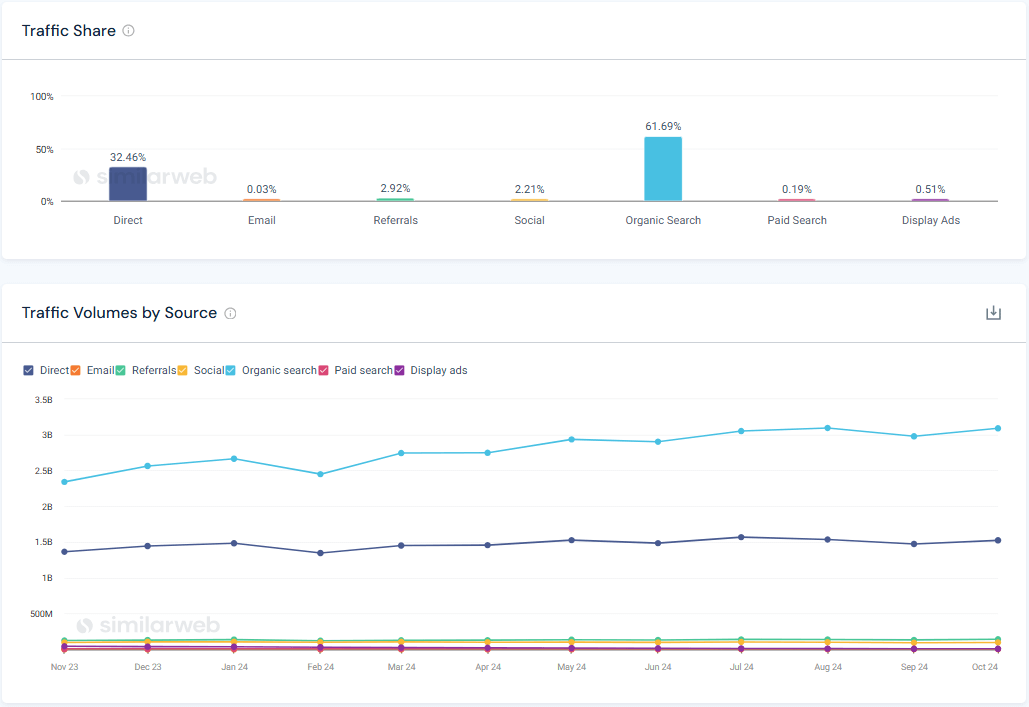
Our insights reveal that organic traffic is more important, and 62% of blog visits come from organic traffic, surpassing direct traffic by an impressive margin.
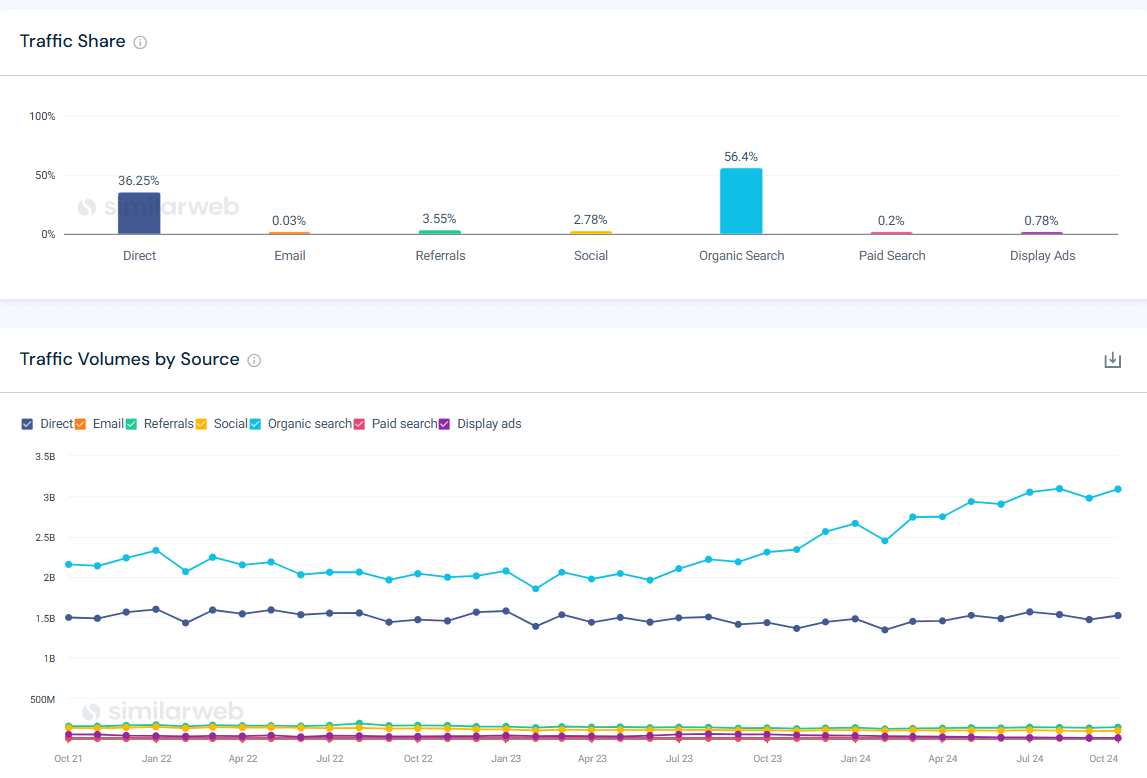
Organic traffic shares have risen 43% in three years, showing that optimizing blogs to get new readers is more important than ever.
A well-optimized blog isn’t just about great content and stuffing in the right keywords. That’s only half the battle. If you want search engines to find, crawl, and actually rank your content, you need to get the technical side right too.
We’re talking about technical SEO best practices, the tweaks that improve discoverability, keep your site running smoothly, and stop search engines from wandering into places they shouldn’t.
Here’s how to get it done:
Think of your robots.txt file as the bouncer at the door of your site. It tells search engines exactly where they can and can’t go, which pages to crawl, and which to ignore.
Before anything else, check that your site is open to crawlers. The basic directive looks like this:
User-agent: *
That wildcard (*) tells all search engines they’re welcome to crawl. But, there’s a catch.
Not every part of your site needs to be indexed. In fact, some areas should stay off-limits.
Why? Because search engines have limited crawl resources (aka your crawl budget). If they waste time indexing low-value pages, they’ll spend less time on your important content.
A great example of what you should block? WordPress automatically blocks the /wp-admin/ directory by default because, obviously, search engines have zero reason to crawl your backend dashboard.
Other directories you might want to disallow include:
Fine-tuning your robots.txt file checks that search engines focus on the right pages including your actual content while keeping sensitive areas off-limits.
Let’s be clear. Running a blog without HTTPS in 2025 is like leaving your front door wide open in a high-crime neighborhood. You’re practically inviting trouble.
HTTPS (Hypertext Transfer Protocol Secure) isn’t just a nice-to-have anymore—it’s a must. It encrypts the connection between your blog and its visitors, shielding sensitive data from prying eyes.
But here’s the kicker: it’s not just about security. HTTPS also gives you an SEO edge and makes visitors trust your site more.
If you’re serious about your blog’s performance, this is one technical upgrade you can’t afford to ignore, and here are the primary reasons why:
Even if your blog doesn’t collect personal information, an unsecured connection leaves the door open for interception. And trust us, you don’t want cybercriminals messing with your traffic.
With HTTPS in place, your blog stays intact, untampered, and free from malicious alterations. No sneaky attackers injecting malware. No phishing scams hijacking your visitors’ trust. Just a clean, secure experience for everyone.
That’s exactly what your readers will do if your blog isn’t secured with HTTPS.
A secure site displays a padlock icon in the browser bar, a universal sign that tells visitors, ‘This site is safe.’ And when people feel safe, they’re more likely to stick around, read your content, and even subscribe to your newsletter or make a purchase.
Google has made it crystal clear: HTTPS is a ranking factor. If two sites are equal in all other aspects, the one with HTTPS will rank higher.
Translation? Switching to HTTPS equals better search visibility, more traffic, and higher user interaction.
Not to mention, modern browsers prefer secure sites, and some features (like progressive web apps) require HTTPS to function properly.
Think Google can find all your blog posts on its own? Maybe. But why leave it to chance?
A sitemap is like a cheat sheet for search engines. It gives Google a neatly structured list of every important page on your blog, so that nothing gets buried, especially new posts, hidden gems, or deeply nested pages.
Sure, Google can crawl your site naturally. But a sitemap makes its job way easier. And when Google’s job is easier, your blog ranks better.
Here are the top reasons why your blog needs a sitemap:
A sitemap acts like a map, which takes search engines straight to your most valuable pages. If you’re running a blog with hundreds, or even thousands, of posts, this checks every article gets its shot at ranking.
Without strong internal links, these pages risk being forgotten. A sitemap makes sure they don’t get lost in the shuffle.
Ever tried browsing a site on your phone, only to be met with microscopic text, buttons you can’t tap, and pages that take forever to load? Certainly not fun.
Here’s the deal: Google’s mobile-first indexing means your site’s mobile experience isn’t just important, it’s everything. If your blog isn’t designed for mobile users, you’re losing rankings, interaction, and traffic.
To check if your website is mobile-indexable, run Similarweb’s Site Audit tool. Once the audit wraps up, head to the Indexability section and click on ‘Mobile indexability.’ That’s where you’ll see how your pages perform on mobile and whether search engines are giving them the green light.
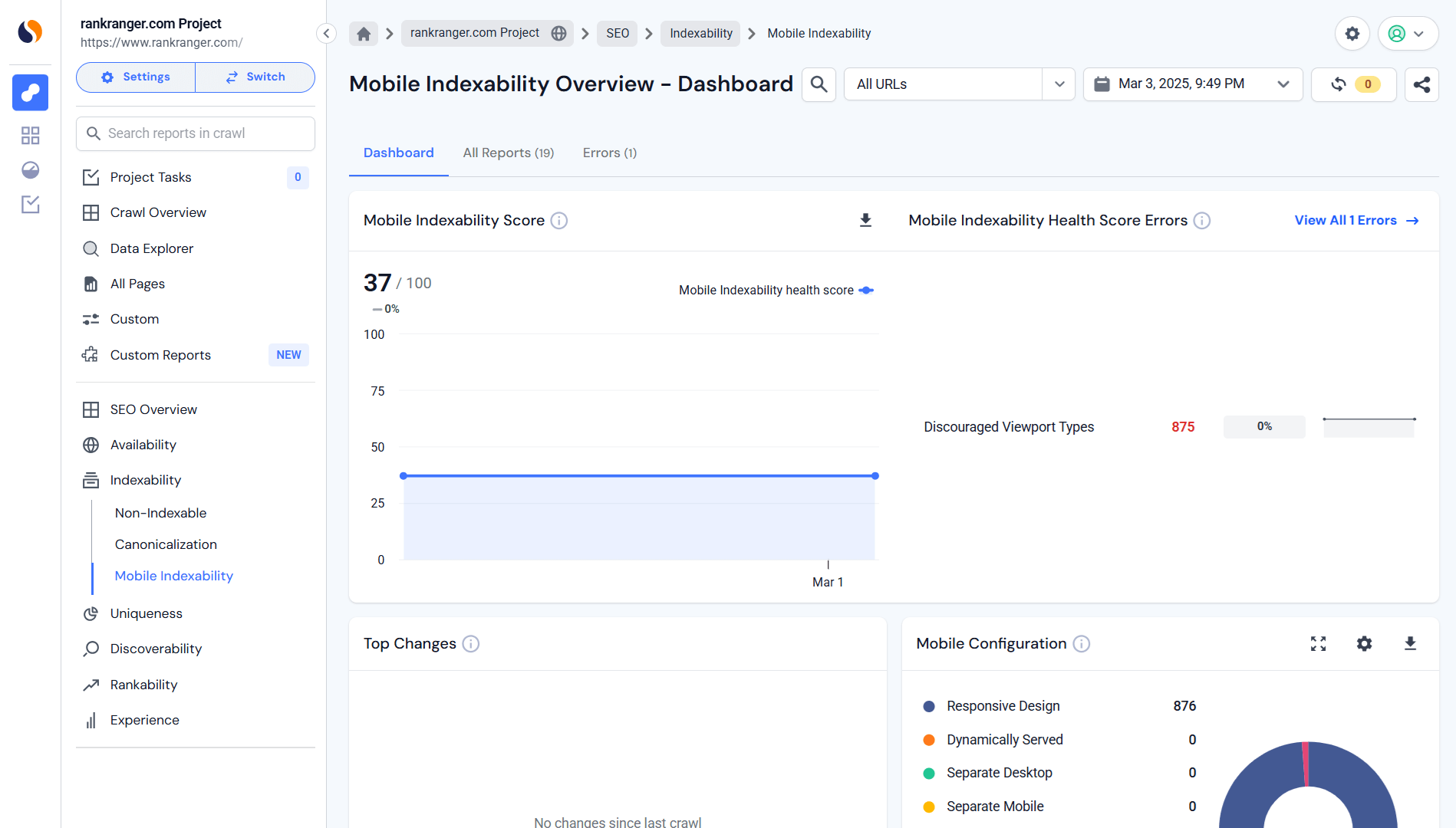
Google ranks the mobile version of your site first. If your blog isn’t mobile-optimized, guess what? You’re getting outranked.
A mobile-first strategy improves search visibility, user experience, and engagement, which means more traffic and better rankings.
If your blog isn’t mobile-friendly yet, now is the time to fix it. No excuses. No waiting. Just a better experience for every visitor.
Here are some of the recommended mobile-first optimization strategies:
Simplify layouts to remove distractions and unnecessary elements that slow things down. Make the text easy to read without the need for them to do any pinching and zooming. Your mobile visitors aren’t here to hunt for information. Give them what they need, fast.
Here’s how to optimize navigation for mobile:
A frictionless experience = higher user interaction. Make it easy, and they’ll stick around.
Speed matters. A slow site kills rankings, conversions, and patience.
How to fix it?
Because no one wants to wait for a page to load. Ever.
Use headers and subheaders to break up text for quick scanning. You might also need to increase your font size. The text should be readable at a glance.
You should also make use of white space and images to give your content room to breathe. Make it clean, structured, and effortless to read. Because if your visitors can’t skim your content in seconds, they’ll move on.
To test your site on actual mobile devices, not just emulators. Check across multiple screen sizes to spot display issues and make sure all interactive elements work flawlessly.
Real-world testing gives a real mobile-friendly experience.
Nothing kills a visitor’s interest faster than a slow-loading site. You wait. And wait. And—nope, they’re gone.
Site speed isn’t just about user experience, it’s a major SEO factor. A slow blog frustrates readers, lowers user interaction, and tanks conversions. And since Google uses page speed as a ranking signal, a sluggish site can push you straight off the front page.
To check how fast your website is loading, head over to the Similarweb Site Audit tool, go to the Experience section, and click on Page Speed. That’s where you’ll get the full details.
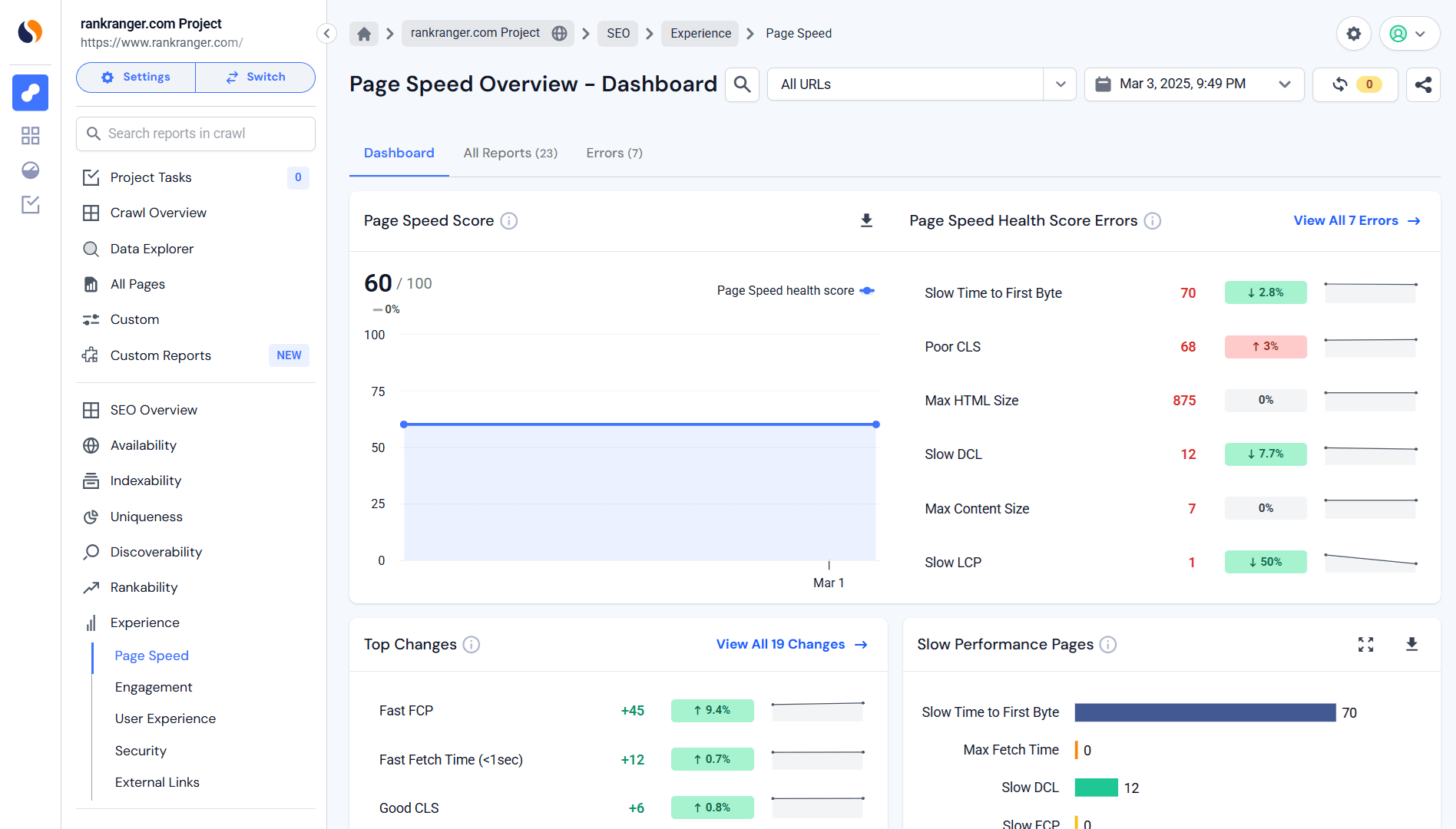
Attention spans are short. Make users wait, and they’ll leave.
Google’s Core Web Vitals measure how fast, stable, and responsive your blog is. Here’s what you need to get right:
With fast hosting, you get faster pages and that would lead to happier users and better rankings.
Smaller images, faster loads, better experience. Simple.
With a CDN, your blog loads lightning-fast, no matter where visitors are.
Speed isn’t a “one-and-done” deal. Check it, tweak it, optimize it.
Ever seen a messy URL and had no idea where you were on a website? Not great, right? A clear, logical URL structure isn’t just good practice. It’s important for SEO and user experience.
Google relies on URLs to understand your site’s hierarchy. A well-structured blog makes it easier for search engines and users to navigate. So, if your URLs are a chaotic mess, time to clean them up.
Head to the Website Analysis tool and click on Website Structure.
This section gives you a further look at everything behind the scenes, including subdomains, top-performing pages, and traffic-driving folders. Think of it as your site’s blueprint, with all the moving parts mapped out in one place.
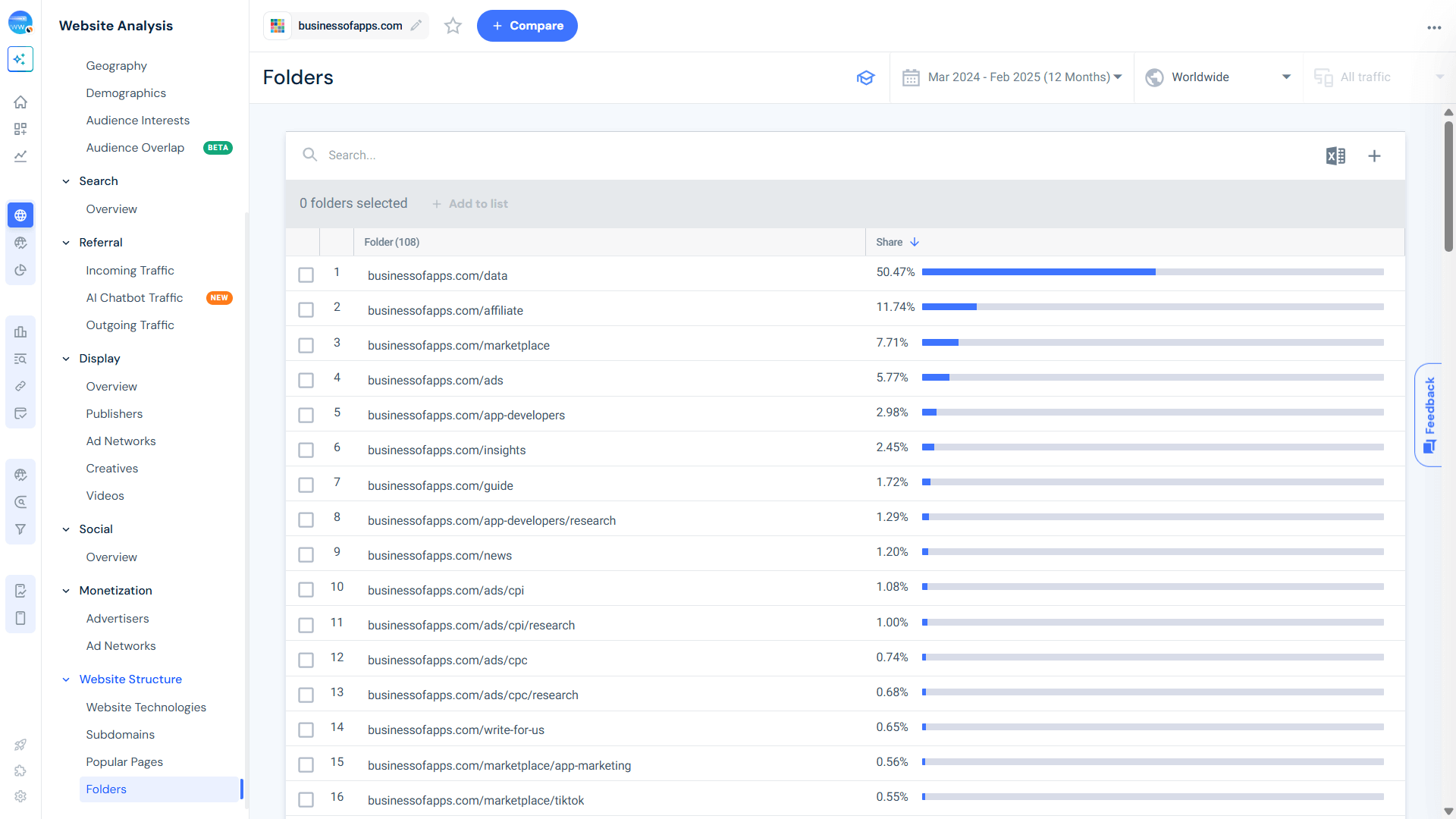
Here’s the deal: Google treats subdomains and subfolders differently. Use a subfolder if you want your blog to be recognized as part of your main site.
Here’s what a good subfolder looks like:
example.com/blog/
example.com/articles/
example.com/resources/
Now here’s an example of something that’s not great:
blog.example.com (Google might treat it as a separate site!)
Moral of the story? Keep your blog within your main domain to consolidate authority and avoid SEO dilution.
Got a large blog with multiple categories? Your URLs should reflect that hierarchy. This isn’t just for SEO. It helps with organization and tracking, too.
Here’s a flat structure (bad example):
example.com/blog-post-title/
And here’s a hierarchical structure (good example):
example.com/blog/marketing/content-marketing/blog-post-title/
See the difference? Google does, too. This format tells search engines:
That context matters for rankings.
Tag pages: SEO goldmine or ranking killer? That depends.
When used correctly, tag pages can increase search rankings, and improve internal linking and user experience as well. But when mismanaged, think thin content, duplicate pages, or orphaned tags, they can do more harm than good.
Google treats tag pages like category pages, meaning they can be indexed and ranked. The catch? They need to provide real value.
For your tag pages to help (rather than hurt) your SEO, they should:
Bottom line? If a tag doesn’t improve navigation or strengthen your content structure, it shouldn’t exist.
Not every page deserves a spot in Google’s index. Some pages add zero value for search users. Others clog up search results with duplicate content, diluting your SEO efforts.
The fix? Use the noindex tag. This tells search engines to skip low-value pages and focus on what really matters. Your best content.
When tag pages and category pages look almost identical, they compete against each other for rankings.
Instead of letting Google index both and create redundant search results, noindex tag pages that don’t offer unique value.
Rule of thumb: If a tag page is basically a duplicate of a category page, noindex it.
Some pages just don’t belong in search results. Noindex them to keep Google focused on what matters.
Adding a noindex tag is simple. Just insert this line in the page’s HTML:
<meta name=”robots” content=”noindex”>
For non-HTML resources, use the X-Robots-Tag HTTP header instead:
<x-robots-tag: noindex>
This guarantees that Google won’t waste crawl budget on pages that shouldn’t be indexed.
An SEO plugin is your best friend. Sure, platforms like WordPress, Wix, Squarespace, and Shopify come with basic SEO features. But if you want real control over your search visibility, structure, and metadata, an SEO plugin is a must.
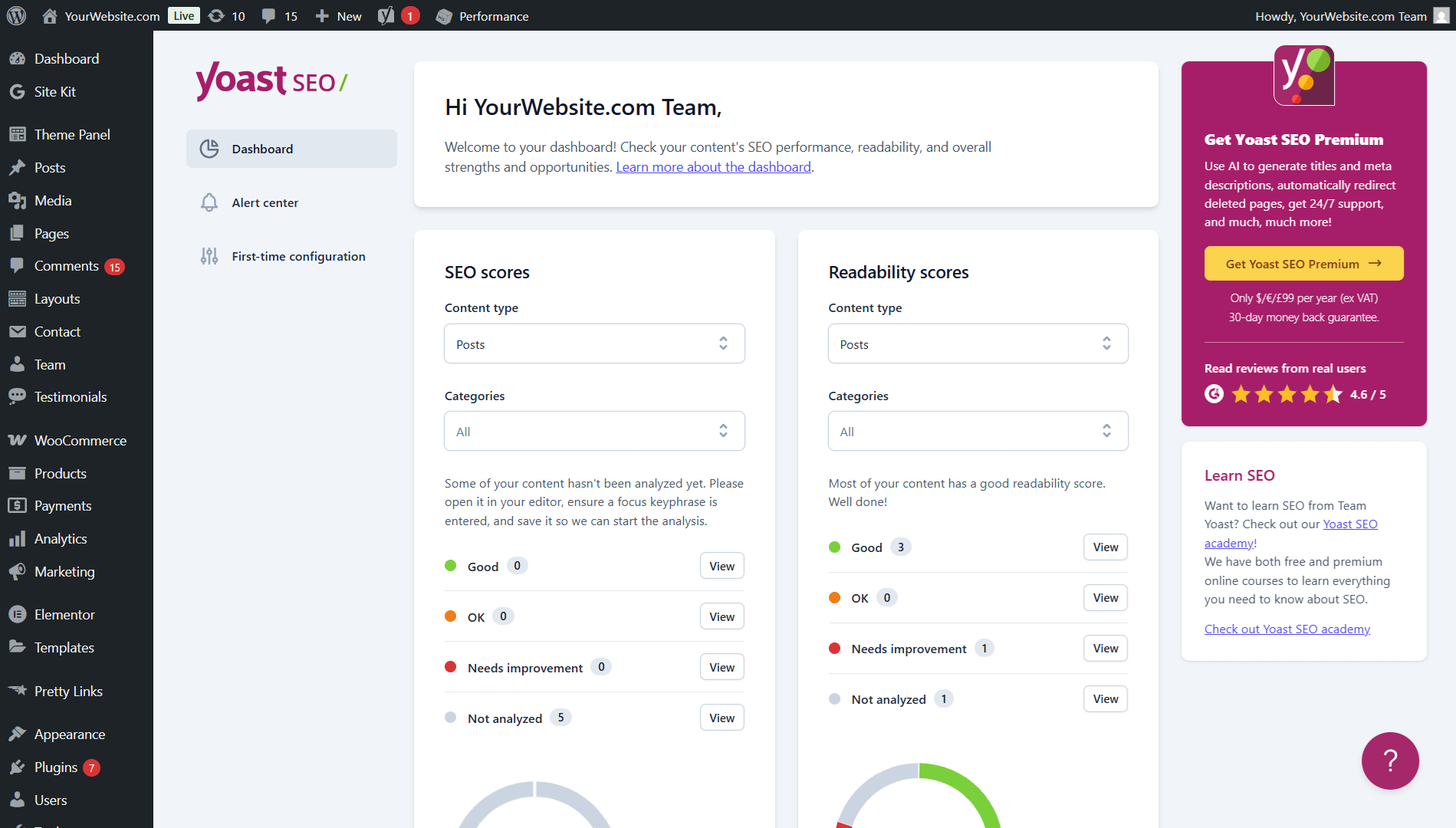
Here’s why:
SEO plugins do the heavy lifting when it comes to making your site search-friendly:
If search engines can’t find your content, they can’t rank it. An SEO plugin makes sure they do.
Need better meta titles, descriptions, and content structure? An SEO plugin has you covered.
Keyword analysis helps optimize your content for search intent, while readability checks make sure posts are skimmable and interesting. You can also get internal linking suggestions to strengthen page connections for SEO value.
But don’t follow every recommendation blindly. SEO plugins guide you, but rankings depend on real value, not just ticking optimization boxes.
Some SEO plugins auto-generate archive pages that sort blog posts by date (month/year). But the bad news is that these pages often add no real value, clutter your site, and create low-quality duplicate content.
In order to fix it, make sure your SEO plugin isn’t creating unnecessary archive pages (unless your blog actually benefits from them.)
A messy, bloated URL speeds up SEO disaster. But a short, clean, and descriptive URL? That’s an SEO win.
Your URL structure matters, both for user experience and search rankings. A clear, keyword-rich URL tells searchers exactly what your post is about, making them more likely to click through. The bonus? Google loves it, too.
Here’s an example of a bad URL:
domain.com/blog/article12345 (It’s confusing, vague, and useless for SEO.)
And here’s what a good URL should look like:
domain.com/blog/weight-loss-tips (This one is clear, relevant, and easy to understand.)
See the difference? One gives search engines and users clarity, the other? A meaningless string of numbers and words.
Your meta title and description are your first impression in search results. And first impressions matter. A strong, well-crafted snippet grabs attention, improves click-through rates (CTR), and gets more eyeballs on your content.
While Google doesn’t use meta descriptions as a ranking factor, a compelling one can be the difference between someone clicking your post or your competitor’s.
If you’re not planning to write a meta description, then Google will do it for you and the results could be a hit or a miss.
The best-case scenario is that Google pulls something decent from your content. And the worst-case scenario? You end up with a random, out-of-context snippet that doesn’t sell your post.
A handwritten meta description gives you control and a higher chance of getting the click.
Unlike titles, Google doesn’t use meta descriptions for rankings. That means you can forget keyword stuffing and focus on persuasion.
Your goal? Make people want to click. That’s it.
Alt texts are a tiny SEO detail with a big impact. Google can’t ‘see’ images. It relies on alt text to understand what’s in them. Properly optimized alt tags contain keywords you’re promoting and the image description.
You can easily spot images missing alt tags using the Similarweb Site Audit tool.
Here’s how:
Head to the Discoverability section. Under the Discoverability Health Score Errors, look for the issue labeled ‘Links with Images Missing Alt tags.’
That’s your target. This quick check gives you a clear list of images that need attention.
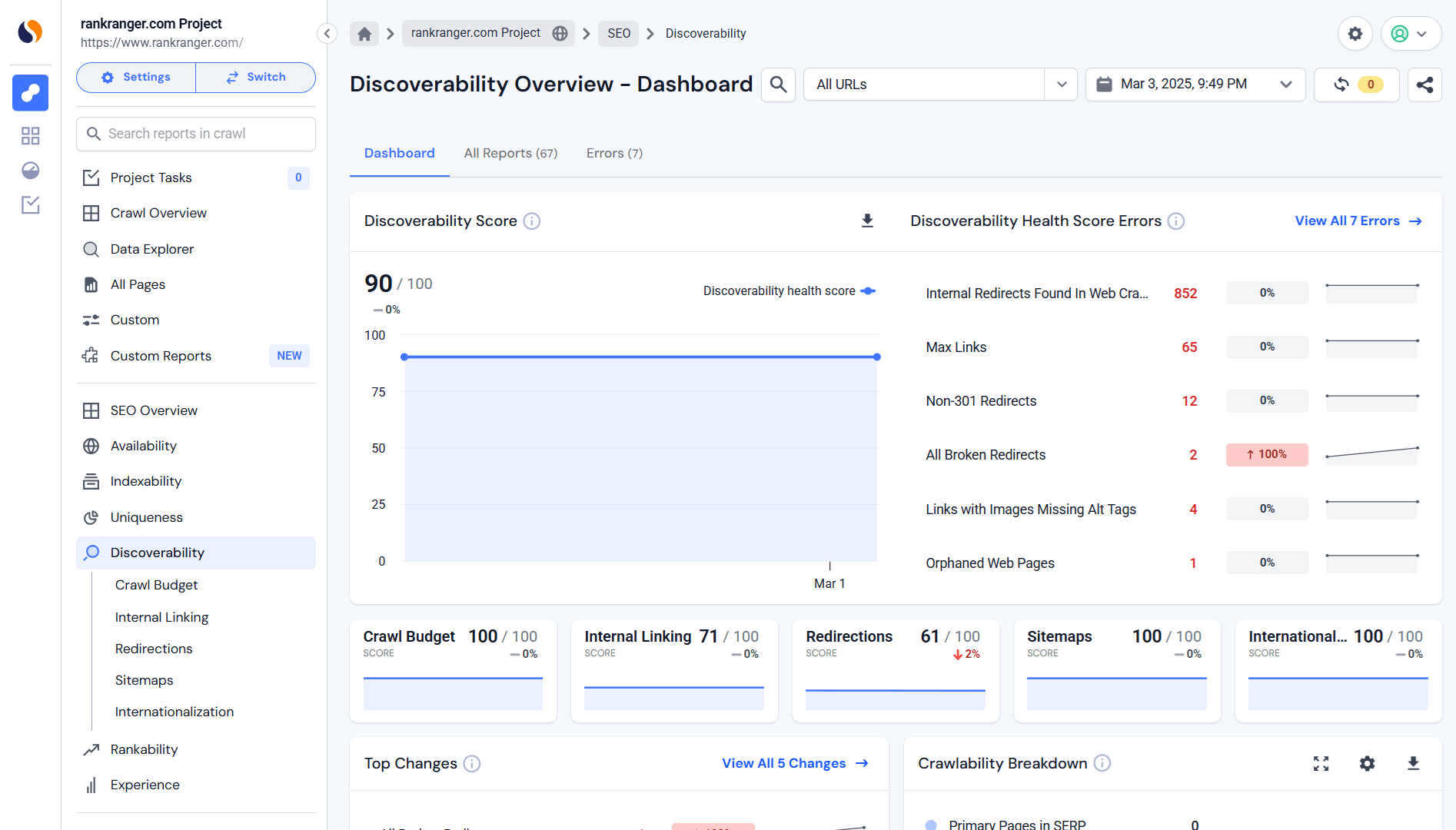
You need to be clear and descriptive. The alt text should explain the image in a natural way. And while using relevant keywords is okay, don’t attempt keyword stuffing. Make it flow.
You also need to be specific with your alt texts. Instead of ‘image of a dog’, say ‘Golden retriever playing in the park’.
Great content won’t rank if your site’s technical SEO is a mess. Google cares about indexing, site structure, and page performance. And if your blog isn’t technically sound, your rankings will suffer.
That’s why regularly monitoring technical SEO issues is a must. Here’s how to stay on top of it:
If you’re not using Google Search Console (GSC), you’re flying blind. This free tool from Google gives you a direct line of insight into how search engines crawl, index, and rank your blog.
Here are some of the important reports you need to check:
But there’s one limitation: Google Search Console won’t manually crawl pages on request. It only reports on URLs Google has already discovered. If Google hasn’t crawled a page yet, it won’t show up in the reports.
Google Search Console tells you what’s wrong, but it doesn’t crawl your site proactively.
That’s where Similarweb Site Audit comes in. This tool actively scans your blog for SEO issues before they tank your rankings.
Here’s what to check with the Site Audit tool:
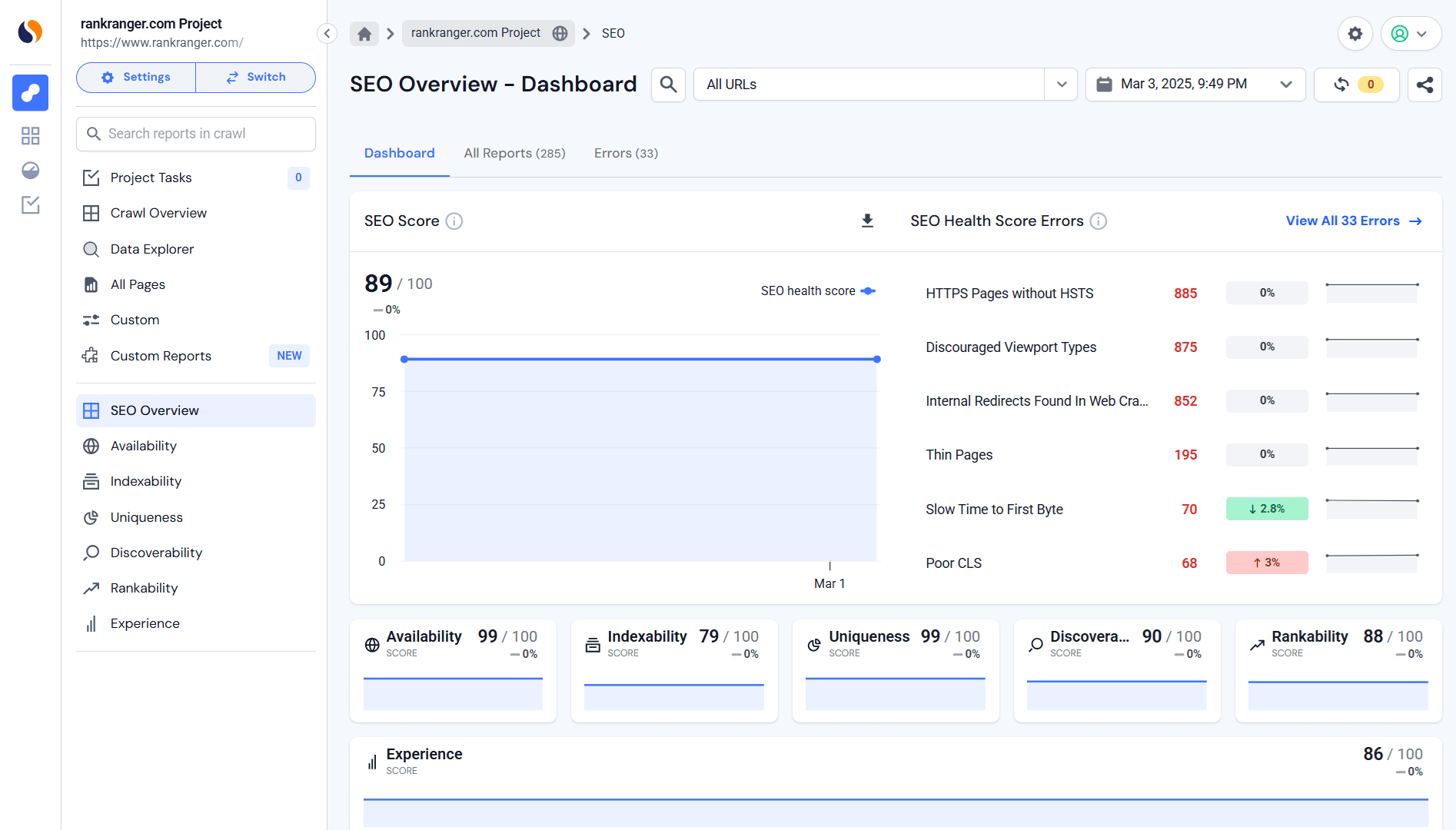
Creating a blog post isn’t just about typing out a few paragraphs and hitting publish. If you want real results, higher rankings, more traffic, and more involved readers, you need to optimize.
This guide walks you through 12 strategies on how to write a high-quality SEO blog to increase its visibility and get more eyes on your site:
SEO starts with solid keyword research. If you’re not targeting the right terms, you’re basically throwing content into the void.
Keyword mapping is like GPS for your content strategy. It checks each post is laser-focused on the right search terms without competing against your own content (aka keyword cannibalization).
Use Similarweb’s Keyword Research tool to pinpoint high-impact keywords, analyze search volume, and find low-competition opportunities.
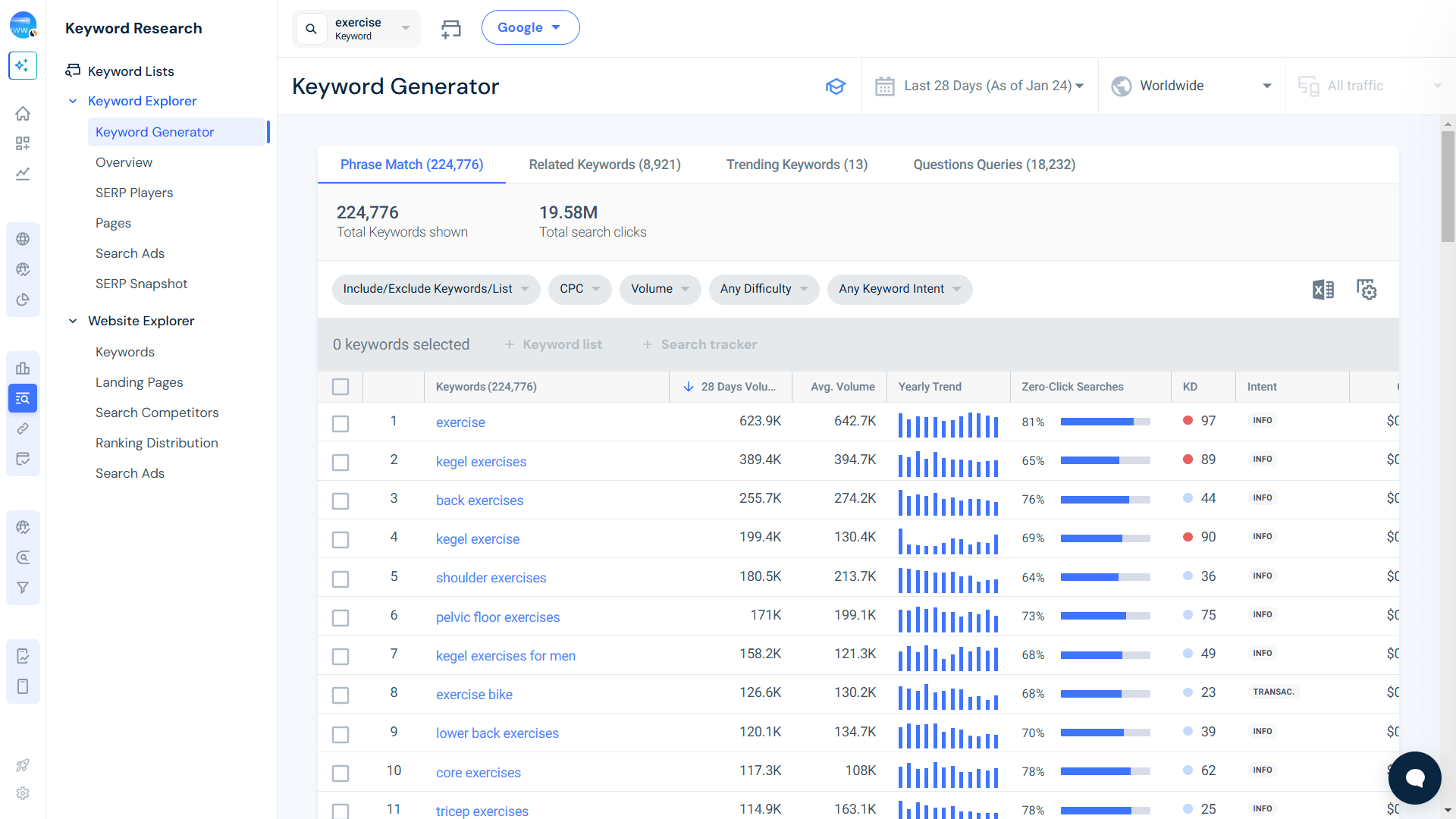
But why stop there? Take things a step further by analyzing competitor keywords. Look at what terms your competitors rank for that you don’t and pinpoint content gaps where you can create better, more in-depth content. The goal is simple: get ahead by finding what others missed.
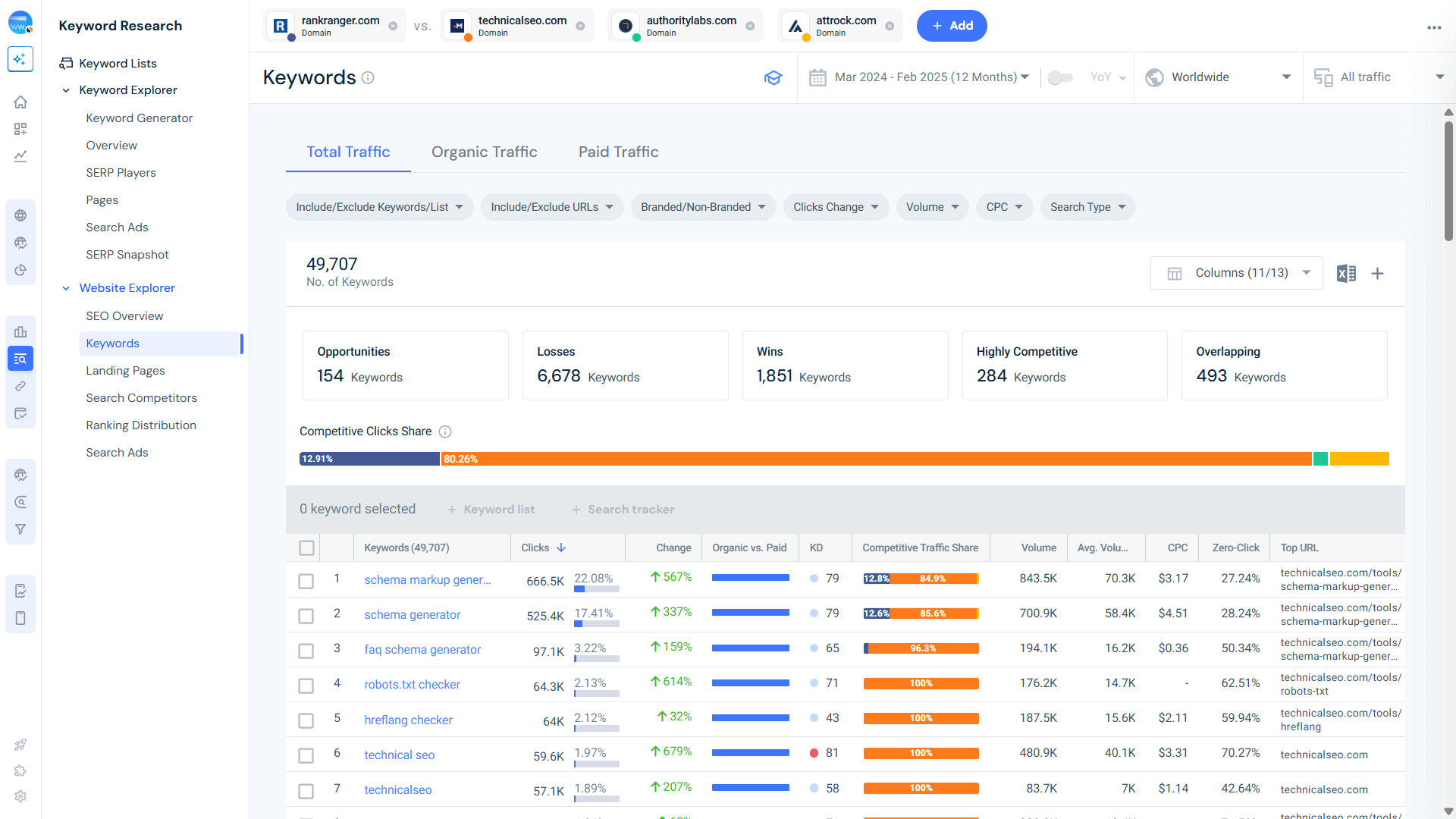
Via the Keyword Research tool, head straight to Website Explorer and then click on Keywords. Now type in your domain along with a few of your top competitors.
What happens next?
You’ll get a list of keywords you’re already getting traffic for, and more importantly, the ones you’re not. These are the missed opportunities. The gaps.
To catch them, look at the Competitive Traffic Share column and see what competitor keywords are gaining traffic and you’re not.
If your blog post doesn’t match what users expect when they search, you won’t show up in results. That’s why search intent is an important ranking factor.
There are four main types:
To figure out the search intent behind a keyword, head into the Keyword Research Tool. Under Keyword Explorer, click on Overview.
Now enter your keyword or a group of related termsm and scroll down. Look for the section labeled Intent.
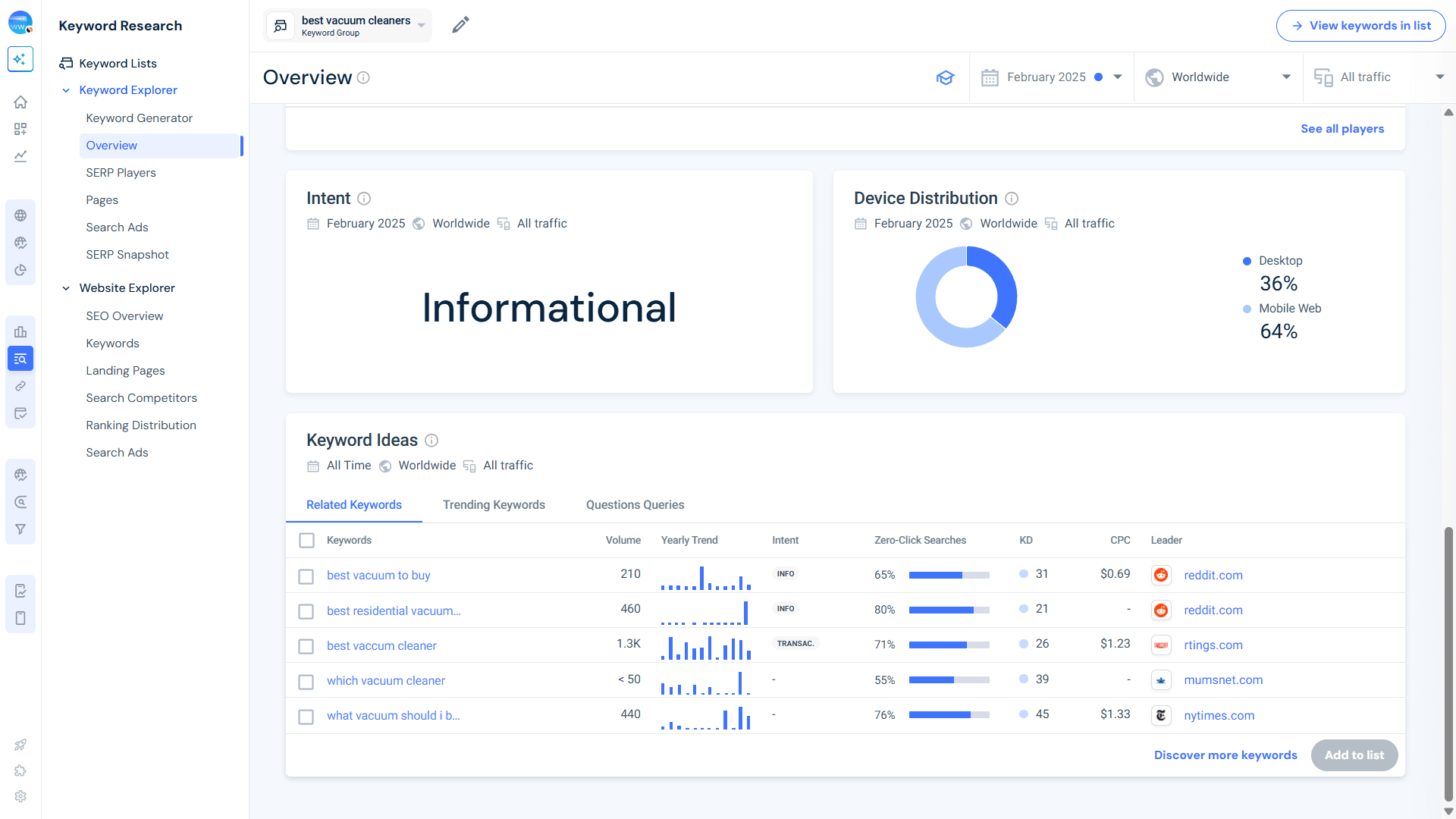
This is where you’ll find an estimate of what people are actually trying to do when they search for that keyword.
Before writing, check the top-ranking pages for your target keyword. If they’re mostly how-to guides or listicles, don’t try ranking with an opinion piece. It won’t work. Match the format that Google already favors while making your content even better.
Half-baked content won’t cut it. If your blog post is shallow, expect it to rank low (if at all). To create authoritative, high-ranking content, you need to research beyond the basics.
Start by checking Google’s ‘People Also Ask’ section to find related questions your audience is actively searching for.
Look into top-ranking pages to identify common subtopics they cover, then go deeper than they did. Make sure to reference primary sources like research papers, expert interviews, and case studies to add credibility.
The more valuable and in-depth your content, the stronger your SEO advantage.
Google rewards unique content that brings new insights, not recycled ideas. Content spinning, just rewording existing content, won’t get you anywhere. Instead, focus on originality.
If you’re covering a topic that’s been written about a hundred times, what’s your fresh take? Consider adding your own findings, real-world experiences, or expert interviews.
If possible, conduct small experiments, surveys, or case studies to provide exclusive data. That’s how you make your blog post stand out in a sea of sameness.
Using keywords is an art. Overdo it, and Google will penalize you for stuffing. Underuse them, and your post might not rank at all.
The trick? Place them where they matter most. The title tag, H1, subheadings, first 100 words, image alt text. These are the areas where search engines expect to see relevance.
Keep it natural. No need to force your keyword into every other sentence. When in doubt, write for humans first, and refine for search second.
Your H1 tag is like your headline. It needs to be clear, concise, and keyword-optimized. Make sure your primary keyword appears in it, but don’t force it. A well-crafted H1 is compelling yet natural, guiding both users and search engines on what the post is about.
Remember that there should only be one H1 per page, followed by properly structured H2s, H3s, and H4s to keep your content readable and organized.
Headings do more than just break up text. They help Google understand your content’s hierarchy. Use H2s for main sections, H3s for subtopics, and H4s for supporting details.
This makes your content scannable and could improve both SEO and user experience. When your post is structured well, readers stay longer, bounce rates drop, and rankings go up.
Even the best SEO strategy won’t save poor readability. If your content is hard to read, people leave, and Google notices. Keep paragraphs short (2-3 sentences max), use simple language, and stick to active voice. Break up text with bullet points, numbered lists, and bold takeaways.
Tools like Hemingway or Grammarly can help refine readability. The easier your content is to consume, the longer people stick around.
Google doesn’t just want good content. It wants trustworthy content. That’s where E-E-A-T comes in:
To improve your blog’s credibility, link to authoritative sources like .gov, .edu, and well-known industry sites. Cite data, research studies, and expert quotes to back up claims. And if you have a recognized author, highlight their credentials.
Internal links are SEO gold. They keep visitors involved, help search engines crawl your site, and distribute ranking power across your content.
Always link to 2-3 relevant posts within your blog. This not only improves navigation but also improves page authority.
Walls of text? No thanks. Adding images, videos, and infographics can double user participation. Google also prioritizes multimedia-rich content.
Make sure that your visuals are optimized by adding descriptive alt text and compressing files for fast loading. Embedded videos? Even better. They increase time on page, a major ranking factor.
Want more featured snippets? A simple FAQ section can help you rank for long-tail keywords and AI-generated search results. A table of contents makes navigation easier, improves user experience, and can even appear in Google’s rich results.
Think you’re done after crafting the perfect blog post? Think again.
SEO isn’t a one-and-done deal. Hitting ‘publish’ is just the beginning.
To climb the rankings and outrank competitors, you need to build authority, and that means backlinks.
A strong SEO strategy doesn’t exist in isolation. It’s a combination of smart link-building, content refinement, and industry connections.
As your site’s authority grows, so do opportunities for partnerships, collaborations, and recognition in your niche.
Keep optimizing. Keep building. SEO is a long game so play it well.
Does updating a blog post’s content make a difference in SEO?
Absolutely. Search engines love fresh, relevant content. Updating old posts with new insights, refined keywords, and current data keeps them ranking higher. Think of it as giving your blog a second wind. Refresh it, and Google takes notice.
Do backlinks influence your blog’s SEO?
Without a doubt. Backlinks act as online endorsements, which signal to search engines that your content is worth ranking. But here’s the kicker. Quality beats quantity. A handful of authoritative links will do far more for your blog than a flood of low-value ones.
How often should keyword research be done?
At least once a quarter. Search trends change, user intent shifts, and Google’s algorithm keeps moving. If you’re still using keywords from last year, you’re already falling behind. Stay ahead by tracking what your audience is searching for right now.

Senior SEO Specialist at Similarweb
Maayan is a senior SEO specialist with 7+ years of experience in SEO. She loves complex research projects, creating SEO strategies and performing technical audits.
Muse app breakdown: what Meta's AI agent means for brands


What Is Retail Intelligence? How It Works and Why It's Essential to Digital Commerce
Give it a try or talk to our marketing team - it’s free!
